
Serialization converts a Java object into a sequence of bytes that you can write to a file, send over the network, or store in a cache. Deserialization turns these bytes back into an object – with the same field values and with all the objects it references.
Since version 1.1, Java has had its own mechanism for this: the Serializable interface and the classes ObjectOutputStream and ObjectInputStream. In this article, I call the bytes that ObjectOutputStream writes and ObjectInputStream reads an object stream – to distinguish them from the streams of the Stream API, which have nothing to do with them.
This is how you write an order to a file and read it back:
Customer customer = new Customer("Ada Lovelace", "ada@example.com");
Order order = new Order(1001, customer);
order.addItem(new OrderItem("Notebook", 2, new BigDecimal("4.99")));
order.addItem(new OrderItem("Fountain pen", 1, new BigDecimal("39.90")));

Path file = Path.of("order.ser");

try (var out = new ObjectOutputStream(
    new BufferedOutputStream(Files.newOutputStream(file)))) {
  out.writeObject(order);
}

try (var fileIn = new BufferedInputStream(Files.newInputStream(file));
    var in = new ObjectInputStream(fileIn)) {
  Order copy = (Order) in.readObject();
  System.out.println(copy);
  System.out.println("Equal: " + copy.equals(order));
  System.out.println("Same object: " + (copy == order));
}
Order[id=1001, customer=Customer[name=Ada Lovelace, email=ada@example.com],
items=[OrderItem[product=Notebook, quantity=2, price=4.99],
OrderItem[product=Fountain pen, quantity=1, price=39.90]]]
Equal: true
Same object: falseThe copy is equal but not identical: equals() returns true, == returns false. readObject() has created a new object, with the same field values, the same customer, and both order items.
For this to work, Order, Customer, and OrderItem only have to implement the Serializable interface. It doesn’t have a single method. The JVM does the rest: It reads the fields of the object, writes them to the object stream together with the class name, and assembles a new object from them when reading.
Getting started is simple, but the mechanism has many pitfalls: fields that are null after reading, object streams that can no longer be read after a harmless class change, and object streams that execute potentially malicious code when read.
In this article, you will find out
- how to write objects with
ObjectOutputStreamand read them withObjectInputStream, - which objects end up in the object stream and why an object written twice arrives outdated,
- what the
transientkeyword is for and why a transient field isnullafter reading, - what the
serialVersionUIDis and which class changes make old object streams unreadable, - what happens with a non-serializable superclass,
- how to customize serialization with
readObject(),writeObject(),readResolve(), andwriteReplace(), - how records, enums, lambdas, inner classes, and collections behave,
- how a deserialization attack works and how to protect yourself with filters,
- when you should choose a different format instead of Java serialization.
What Is Serialization Used For?
Wherever an object needs to leave the JVM and reappear as an object later or in another JVM, Java serialization is an option. Examples are:
- Remote Method Invocation (RMI): The arguments and return values of a remote method call are transferred in serialized form.
- Messaging: An
ObjectMessagefrom the Jakarta Messaging API (formerly JMS) carries a serialized object. - HTTP sessions: Servlet containers store the attributes of a session in serialized form when they swap sessions out to disk or copy them between the nodes of a cluster.
- Caches that write objects to disk or distribute them to other nodes.
- Files in which an application stores its state.
Formats such as JSON or Protocol Buffers do the same, are language-independent, and don’t write Java class names into their data. The sections Deserialization Attacks and Filters and When Not to Use Java Serialization show why that is an advantage.
If you work with RMI, sessions, or a framework that requires Java serialization, however, there is no way around it.
The Examples in This Article
The examples use a small order model: a customer, an order item, and an order with any number of items.
The customer is a class whose constructor validates the email address:
public class Customer implements Serializable {

  @Serial private static final long serialVersionUID = 1L;

  private final String name;
  private final String email;

  public Customer(String name, String email) {
    if (!email.contains("@")) {
      throw new IllegalArgumentException("Invalid email: " + email);
    }
    this.name = name;
    this.email = email;
  }

  public String name() { return name; }
  public String email() { return email; }

  @Override
  public boolean equals(Object o) {
    return o instanceof Customer other
        && name.equals(other.name)
        && email.equals(other.email);
  }

  @Override
  public int hashCode() {
    return Objects.hash(name, email);
  }

  @Override
  public String toString() {
    return "Customer[name=" + name + ", email=" + email + "]";
  }
}
The order item is a record:
public record OrderItem(String product, int quantity, BigDecimal price)
    implements Serializable {}
And the order is a class again, because it is mutable – order items are added to it one by one:
public class Order implements Serializable {

  @Serial private static final long serialVersionUID = 1L;

  private final long id;
  private final Customer customer;
  private final List<OrderItem> items = new ArrayList<>();

  public Order(long id, Customer customer) {
    this.id = id;
    this.customer = customer;
  }

  public void addItem(OrderItem item) { items.add(item); }

  public long id() { return id; }
  public Customer customer() { return customer; }
  public List<OrderItem> items() { return List.copyOf(items); }

  @Override
  public boolean equals(Object o) {
    return o instanceof Order other
        && id == other.id
        && customer.equals(other.customer)
        && items.equals(other.items);
  }

  @Override
  public int hashCode() {
    return Objects.hash(id, customer, items);
  }

  @Override
  public String toString() {
    return "Order[id=" + id + ", customer=" + customer + ", items=" + items + "]";
  }
}
Both classes compare all fields in equals(); the OrderItem record does that on its own. This way, you can check whether a copy carries the same data as the original.
The section serialVersionUID: Changing Classes Without Losing Old Object Streams explains what the line with serialVersionUID means and why it belongs in every serializable class. The section Records explains why the OrderItem record behaves differently from the two classes during deserialization.
You can find the complete code in the GitHub repository java-serialization, in the package eu.happycoders.serialization. Each section has its own class there with a main() method that produces the output shown. Sections that need a modified version of a class – not serializable, without serialVersionUID, with validation – put it in a package of its own. The program prints long output on a single line; here in the article, it is wrapped for better readability.
Writing Objects with ObjectOutputStream
ObjectOutputStream is an OutputStream that translates objects into bytes and passes them on to another OutputStream – to a file stream, a network socket, or, as in the following example, to a ByteArrayOutputStream.
The following program serializes the order from the introduction into a byte array and prints its size and the first 96 bytes as a hex dump:
ByteArrayOutputStream bytes = new ByteArrayOutputStream();
try (var out = new ObjectOutputStream(bytes)) {
  out.writeObject(order);
}
byte[] data = bytes.toByteArray();
System.out.println(data.length + " bytes");
HexDump.print(data, 96);
822 bytes
0000 ac ed 00 05 73 72 00 22 65 75 2e 68 61 70 70 79 ....sr."eu.happy
0010 63 6f 64 65 72 73 2e 73 65 72 69 61 6c 69 7a 61 coders.serializa
0020 74 69 6f 6e 2e 4f 72 64 65 72 00 00 00 00 00 00 tion.Order......
0030 00 01 02 00 03 4a 00 02 69 64 4c 00 08 63 75 73 .....J..idL..cus
0040 74 6f 6d 65 72 74 00 27 4c 65 75 2f 68 61 70 70 tomert.'Leu/happ
0050 79 63 6f 64 65 72 73 2f 73 65 72 69 61 6c 69 7a ycoders/serializHexDump.print() is a small helper method from the repository; it prints the bytes as hex numbers on the left and as characters on the right.
writeObject() writes not only the object itself, but everything that can be reached from it: the customer, the list of order items, every order item, every BigDecimal in it. This is called the object graph.
What the Object Stream Contains
You can read the hex dump above byte by byte:
ac edidentifies an object stream; it is the so-called magic number.00 05is the version of the format.73introduces a new object,72the description of its class.- This is followed by the length of the class name (
00 22, i.e., 34) and the name itself:eu.happycoders.serialization.Order. - The next eight bytes are the
serialVersionUIDof the class – here1. - Then come a byte with properties of the class (
02for “serializable”), the number of fields (00 03), and finally the fields with type and name:Jfor thelongfieldidandLfor the object fieldcustomer, whose type follows as a string.
An object stream thus describes itself: For each class, it contains the class name, its version number, and the names and types of its fields. That is why the order takes up 822 bytes, even though its data – a name, an email address, two products, and five numbers – fits into 88 bytes. The section When Not to Use Java Serialization shows this comparison and what it means for the choice of format.
By the way, ObjectOutputStream also implements the DataOutput interface. So you can use writeInt(), writeUTF(), etc., to write primitive values and strings into the same object stream – as shown in the article about DataOutputStream and DataInputStream.
Buffering When Writing
In the introduction, there is a BufferedOutputStream between the file stream and the ObjectOutputStream. Is that necessary?
ObjectOutputStream has its own buffer of 1,024 bytes. However, it flushes this buffer not only when it is full, but also every time it switches between object data and so-called block data – which is written, e.g., by the writeObject() method of an ArrayList or a BigDecimal. A counting OutputStream from the repository shows how often the underlying OutputStream is called in the process:
var counting = new CountingOutputStream(OutputStream.nullOutputStream());
try (var out = new ObjectOutputStream(counting)) {
  out.writeObject(order);
}
System.out.println("Unbuffered: " + counting.calls() + " calls");

counting = new CountingOutputStream(OutputStream.nullOutputStream());
try (var out = new ObjectOutputStream(new BufferedOutputStream(counting))) {
  out.writeObject(order);
}
System.out.println("Buffered: " + counting.calls() + " calls");
Unbuffered: 34 calls
Buffered: 1 callsWithout a buffer, the 822 bytes arrive at the underlying OutputStream in 34 calls. With a file stream, each of them is a system call. With BufferedOutputStream, it is one.
I therefore recommend always putting a BufferedOutputStream between a file or socket stream and the ObjectOutputStream.
Reading Objects with ObjectInputStream
ObjectInputStream.readObject() reads the next object from the object stream and returns it as Object. The compiler doesn’t know the type – you cast it as in the introduction, or you check it with pattern matching:
try (var fileIn = new BufferedInputStream(Files.newInputStream(file));
    var in = new ObjectInputStream(fileIn)) {
  if (in.readObject() instanceof Order order) {
    System.out.println("Order " + order.id() + " of " + order.customer().name());
  }
}
Order 1001 of Ada LovelacereadObject() throws two checked exceptions: an IOException if the object stream cannot be read or doesn’t match the class, and a ClassNotFoundException if a class from the object stream is not on the classpath – e.g., because the reading application uses a different version of a library than the writing one.
One thing readObject() does not do: call a constructor of Order or Customer. Instead, the JVM creates an empty object and sets its fields directly to the values from the object stream – including the final ones. The validation of the email address in the constructor of Customer therefore doesn’t run during deserialization. The sections Inheritance and Validating Data with readObject() show what consequences this has and what you can do about it.
Reading Several Objects
If you write several objects to an object stream one after the other, you have to read them back in the same order. How many there are is not stored in the object stream. At the end, readObject() throws an EOFException:
try (var fileIn = new BufferedInputStream(Files.newInputStream(ordersFile));
    var in = new ObjectInputStream(fileIn)) {
  while (true) {
    Order order = (Order) in.readObject();
    System.out.println("Read order " + order.id());
  }
} catch (EOFException e) {
  System.out.println("End of file");
}
Read order 1
Read order 2
Read order 3
End of fileThis works, but it uses an exception as the termination condition. Instead, I recommend writing several objects as one list – then a single readObject() call reads all of them:
try (var out = new ObjectOutputStream(
    new BufferedOutputStream(Files.newOutputStream(listFile)))) {
  out.writeObject(orders);
}

try (var fileIn = new BufferedInputStream(Files.newInputStream(listFile));
    var in = new ObjectInputStream(fileIn)) {
  @SuppressWarnings("unchecked")
  List<Order> copy = (List<Order>) in.readObject();
  System.out.println("Read " + copy.size() + " orders");
}
Read 2 ordersBuffering When Reading
When reading, the buffer is even more important than when writing. Outside of block data, ObjectInputStream reads every byte individually from the underlying InputStream. The same counting approach as above, this time with a CountingInputStream, produces these numbers for the order:
Unbuffered: 190 calls
Buffered: 1 calls
For 822 bytes, ObjectInputStream calls the underlying InputStream 190 times without a buffer and once with a BufferedInputStream.
A File That Is Not an Object Stream
You may have noticed in the examples that when reading, I assign the file stream to a variable of its own instead of nesting it directly in the constructor as when writing. There is a reason for this: The constructor of ObjectInputStream immediately reads the first four bytes and checks whether they are ac ed 00 05.
The following example opens a text file with the content “Hello, World!”:
try (var fileIn = new BufferedInputStream(Files.newInputStream(textFile));
    var in = new ObjectInputStream(fileIn)) {
  System.out.println(in.readObject());
} catch (StreamCorruptedException e) {
  System.out.println(e);
}
java.io.StreamCorruptedException: invalid stream header: 48656C6C48656C6C are the bytes of “Hell” (the first four letters of “Hello, World!”). The constructor throws a StreamCorruptedException, and there is no ObjectInputStream that try-with-resources could close. Nested in one expression – new ObjectInputStream(new BufferedInputStream(Files.newInputStream(file))) – the file stream would remain open as well, because try-with-resources only closes the resources that are assigned to a variable. With two variables, it closes the file stream even if the constructor of ObjectInputStream fails.
When writing, nesting is not a problem. The constructor of ObjectOutputStream also immediately writes the four bytes ac ed 00 05, but into the BufferedOutputStream, and writing to it cannot fail.
What Is Serialized – and What Is Not
writeObject() writes all fields of an object that are neither static nor transient – those of the class itself and those of all serializable superclasses. Static fields belong to the class, not to the object, and don’t end up in the object stream. The section Excluding Fields with transient shows what transient means.
If a field is an object, writeObject() serializes this object as well, and its fields, and so on – the entire object graph.
Non-Serializable Fields: NotSerializableException
Every object in the object graph must be serializable. In the following example, a customer has an address, and the Address class does not implement Serializable:
public class Address {
  private final String city;
  // constructor, toString()
}

public class Customer implements Serializable {
  @Serial private static final long serialVersionUID = 1L;

  private final String name;
  private final Address address;
  // constructor, toString()
}
Serializing such a customer fails:
var customer = new Customer("Ada Lovelace", new Address("London"));
try (var out = new ObjectOutputStream(new ByteArrayOutputStream())) {
  out.writeObject(customer);
} catch (NotSerializableException e) {
  System.out.println(e);
}
java.io.NotSerializableException: eu.happycoders.serialization.graph.AddressThe exception names the class that doesn’t implement Serializable. There are two ways out: You make Address serializable, or you exclude the address field with transient.
The check only takes place at runtime. The compiler doesn’t tell you that a field of a serializable class has a non-serializable type – unless you compile with -Xlint:serial; more on this in the section Finding Misdeclarations.
Shared References
What happens if two orders have the same customer? The following example writes a list with two orders from Ada Lovelace and checks after reading whether both orders reference the same Customer object:
Customer ada = new Customer("Ada Lovelace", "ada@example.com");
List<Order> orders = List.of(new Order(1, ada), new Order(2, ada));

ByteArrayOutputStream bytes = new ByteArrayOutputStream();
try (var out = new ObjectOutputStream(bytes)) {
  out.writeObject(orders);
}

try (var in = new ObjectInputStream(new ByteArrayInputStream(bytes.toByteArray()))) {
  List<Order> copy = (List<Order>) in.readObject();
  System.out.println("Same customer: "
      + (copy.get(0).customer() == copy.get(1).customer()));
}
Same customer: trueThe Customer object is written only once, and after reading, both orders share one object again. This is due to a table that ObjectOutputStream maintains: Every object written gets a number there, a so-called handle. If writeObject() encounters an object that is already in the table, it writes only a back reference to its handle instead of the object. ObjectInputStream maintains the same table and resolves the back reference to the object it has already read.
The following diagram shows the process for the two orders. On the left are the objects before writing, in the middle the entries in the object stream in the order in which writeObject() writes them, and on the right the objects after reading. The diagram leaves out the strings and the lists of order items. The Customer object appears in the object stream only once; for the second order, a back reference to it follows:
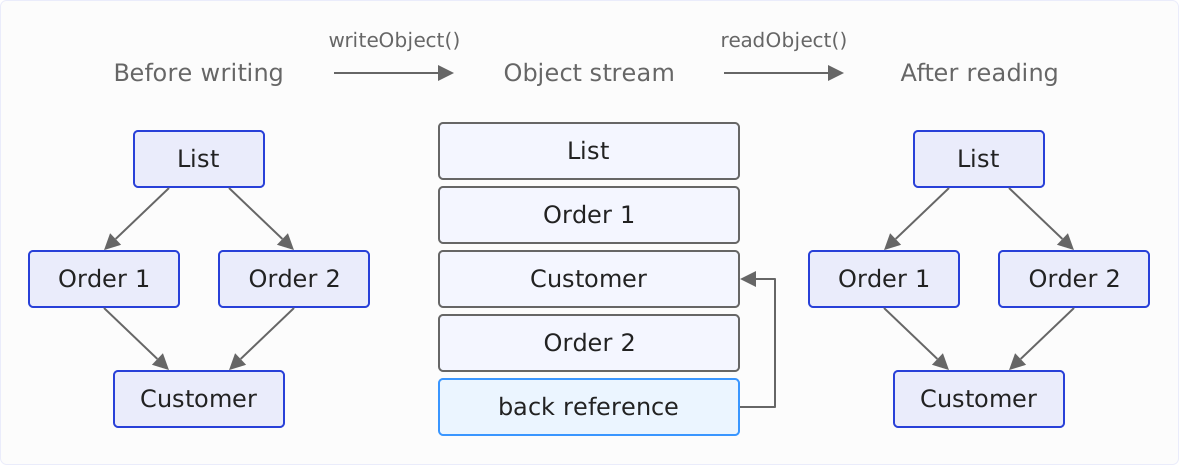
The table applies to the entire object stream, not just to one writeObject() call. If you write the two orders to the same object stream with two calls to writeObject(), the result is also “Same customer: true”.
Writing the Same Object Twice: reset() and writeUnshared()
The handle table has a downside. The following example writes an order, adds a second order item to it, and writes it again to the same object stream:
Order order = new Order(1001, ada);
order.addItem(new OrderItem("Notebook", 2, new BigDecimal("4.99")));

ByteArrayOutputStream bytes = new ByteArrayOutputStream();
try (var out = new ObjectOutputStream(bytes)) {
  out.writeObject(order);
  order.addItem(new OrderItem("Fountain pen", 1, new BigDecimal("39.90")));
  out.writeObject(order);
}
The program then reads both objects and prints the number of their order items:
First:  1 items
Second: 1 items
Same object: true
The second order item is missing. The second writeObject() call found the order in the table and wrote only a back reference – with the state from the first call. There is no exception. This bug only becomes apparent when someone compares the data.
Any program that keeps an object stream open for a long time and writes the same objects several times is at risk – for example, to repeatedly send the current state of an object over a socket.
ObjectOutputStream.reset() clears the table. After that, writeObject() writes every object in full again:
try (var out = new ObjectOutputStream(bytes)) {
  out.writeObject(order);
  order.addItem(new OrderItem("Fountain pen", 1, new BigDecimal("39.90")));
  out.reset();
  out.writeObject(order);
}
First: 1 items
Second: 2 items
Same object: falseThe second copy now has both order items.
writeUnshared() seems like an obvious alternative to reset(). According to its Javadoc, this method writes an object as a new object, even if it is already in the object stream. The result:
First:  1 items
Second: 1 items
Same object: false
The order itself arrives as a new object, but again has only one order item. writeUnshared() only applies to the object itself, not to the objects it references – and the list of order items is a back reference to the list from the first call.
The following diagram shows the three variants side by side. Each column shows the entries in the object stream, with the call that wrote them above each group; a back reference points with an arrow to the entry it refers to. The diagram leaves out the order items themselves; the list only shows their number. At the bottom is the second object that comes out when reading – “the same” means the same object as the first one read.
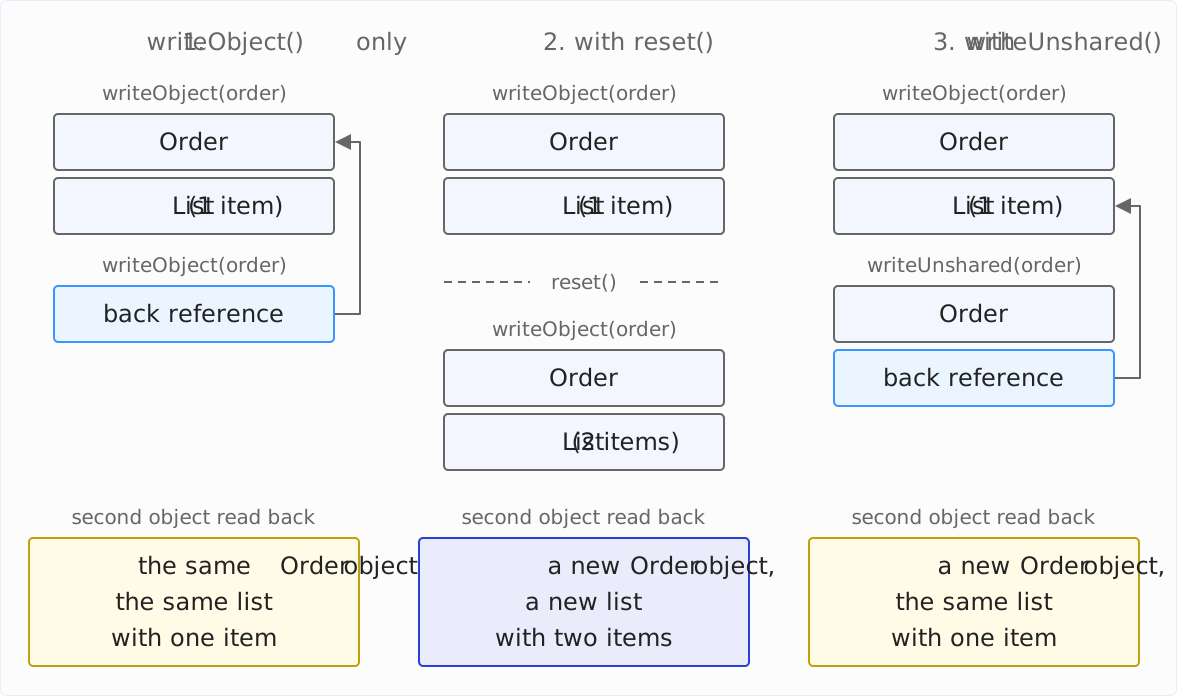
I therefore recommend reset(). With long-lived object streams, it has a second benefit: The handle table holds references to all objects written, and as long as an object is in the table, the garbage collector cannot remove it. An object stream that writes objects for hours without calling reset() keeps them all in memory.
Excluding Fields with transient
writeObject() does not write a field with the transient modifier to the object stream. Typical cases are:
- The value can be computed from other fields, e.g., a cached total.
- The value is not serializable, e.g., a listener, a database connection, or a
Thread. - The value should not leave the JVM, e.g., a password.
The following variant of the order has two transient fields: a cached total (total) and a list of listeners (listeners) that are notified of every new order item. The listeners are lambdas, and they are not serializable – without transient, writeObject() would therefore abort with a NotSerializableException.
public class Order implements Serializable {

  @Serial private static final long serialVersionUID = 1L;

  private final long id;
  private final List<OrderItem> items = new ArrayList<>();

  private transient BigDecimal total;
  private transient List<Consumer<Order>> listeners = new ArrayList<>();

  public Order(long id) {
    this.id = id;
  }

  public void addItem(OrderItem item) {
    items.add(item);
    total = null;
    for (Consumer<Order> listener : listeners) {
      listener.accept(this);
    }
  }

  public void onChange(Consumer<Order> listener) {
    listeners.add(listener);
  }

  public BigDecimal total() {
    if (total == null) {
      total = items.stream()
          .map(item -> item.price().multiply(BigDecimal.valueOf(item.quantity())))
          .reduce(BigDecimal.ZERO, BigDecimal::add);
    }
    return total;
  }

  public long id() { return id; }
}
The following program registers a listener, adds an order item, copies the order via serialization, and adds another order item to the copy. copy() is a helper method from the repository that serializes an object and immediately deserializes it again.
Order order = new Order(1001);
order.onChange(o -> System.out.println("Order " + o.id() + " changed"));
order.addItem(new OrderItem("Notebook", 2, new BigDecimal("4.99")));
System.out.println("Total: " + order.total());

Order copy = copy(order);
System.out.println("Total: " + copy.total());
copy.addItem(new OrderItem("Fountain pen", 1, new BigDecimal("39.90")));
Order 1001 changed
Total: 9.98
Total: 9.98
java.lang.NullPointerException: Cannot invoke "java.util.List.iterator()" because "this.listeners" is nullThe total is null after reading, and total() computes it again. For a field that computes itself on demand, transient is therefore not a problem.
The list of listeners is also null after reading – even though the field is initialized with new ArrayList<>(). A field initializer runs in the constructor, and deserialization doesn’t call the constructor of Order. A transient field therefore always has its default value after reading: null, 0, or false.
For fields that need an initial value, you write a readObject() method. The JVM calls it during deserialization instead of the default procedure:
@Serial
private void readObject(ObjectInputStream in)
    throws IOException, ClassNotFoundException {
  in.defaultReadObject();
  listeners = new ArrayList<>();
}
in.defaultReadObject() reads the fields from the object stream as before. Then the method sets the list of listeners to an empty list. For this, the field must not be final, because a final field can only be assigned in the constructor.
With the additional readObject() method, the example runs through. The following program proceeds like the first one, but after copying, it also registers a listener of its own on the copy:
Order order = new Order(1001);
order.onChange(o -> System.out.println("Order " + o.id() + " changed"));
order.addItem(new OrderItem("Notebook", 2, new BigDecimal("4.99")));

Order copy = copy(order);
copy.onChange(o -> System.out.println("Copy " + o.id() + " changed"));
copy.addItem(new OrderItem("Fountain pen", 1, new BigDecimal("39.90")));
System.out.println("Total: " + copy.total());
Order 1001 changed
Copy 1001 changed
Total: 49.88When the first order item is added, the original’s listener reports; when the second is added, only the copy’s listener does. The listener of the original is not registered on the copy, because the listeners list is transient and, after reading, a new empty list created by readObject(). If you want to react to changes to the copy, you have to register your listeners on the copy again.
The section Customizing Serialization shows what else readObject() can do.
serialVersionUID: Changing Classes Without Losing Old Object Streams
For each class, an object stream contains a version number, the serialVersionUID. When reading, ObjectInputStream compares it with the serialVersionUID of the class that is currently on the classpath. If the two differ, it throws an InvalidClassException.
The version number protects against reading data into a class that no longer matches it. How reliably it does so depends on who defines it. If the JVM computes it, it changes even when a class change doesn’t affect the data at all. If you define it yourself, you decide when old object streams become invalid.
The Computed serialVersionUID
If a class doesn’t declare a serialVersionUID, the JVM computes it the first time the class is serialized. It forms a hash value from the class name, the interfaces, all fields except the private static and private transient ones, the static initializer, and all non-private constructors and methods. Every change to one of these parts results in a different version number.
The example repository contains three versions of the Customer class without serialVersionUID:
- the original version with the fields
nameandemail, - the same class with an additional method
name(), - the original version with an additional line
assert email.contains("@");in the constructor.
ObjectStreamClass.lookup(type).getSerialVersionUID() returns the computed version numbers:
v1: 7580027934406189969
v2: 3508356520794417061
v3: -5861632015059223385
All three are different – including the third, even though the class has neither a new field nor a new method there. For an assert, however, javac generates a hidden static field $assertionsDisabled and a static initializer that sets it, and both go into the hash value. The Javadoc of Serializable also warns about this: The computed version number is sensitive to details that depend on the compiler.
If you write a customer to an object stream with the first version of the Customer class and read it back with the second version of the class, reading fails:
java.io.InvalidClassException: eu.happycoders.serialization.versioning.implicit.v2.Customer;
 local class incompatible: stream classdesc serialVersionUID = 7580027934406189969,
 local class serialVersionUID = 3508356520794417061
The new method name() doesn’t change anything about the data. Nevertheless, every object stream written with the old version of the class is unreadable with the new version.
Declaring the serialVersionUID Yourself
I recommend declaring a serialVersionUID in every serializable class, just like in the example classes:
@Serial private static final long serialVersionUID = 1L;The field must be static, final, and of type long; the Javadoc additionally recommends private. The @Serial annotation has existed since Java 14. It marks the field as part of serialization so that nobody considers it unused and deletes it.
The value itself is arbitrary. For the first version of the class, 1L is a good starting value. Only increase it when the class changes in such a way that old object streams should no longer be read.
If a class without serialVersionUID is already in use and object streams of it exist, you adopt the computed version number. The JDK tool serialver prints it:
$ serialver -classpath target/classes eu.happycoders.serialization.versioning.implicit.v1.Customer
eu.happycoders.serialization.versioning.implicit.v1.Customer:
    private static final long serialVersionUID = 7580027934406189969L;
With this line in the class, the old object streams remain readable, and the rules from the next section apply to further changes.
Compatible and Incompatible Class Changes
With a fixed serialVersionUID, ObjectInputStream compares the fields in the object stream with those of the class – by their names.
The following diagram shows this for an object stream of the first version of Customer with the fields name and email, read with a version in which email has been renamed to emailAddress, but the version number has not been changed. On the left are the entries in the object stream, in the middle those of the current class, and on the right the result when reading. A dashed frame stands for a field that is missing on one side:
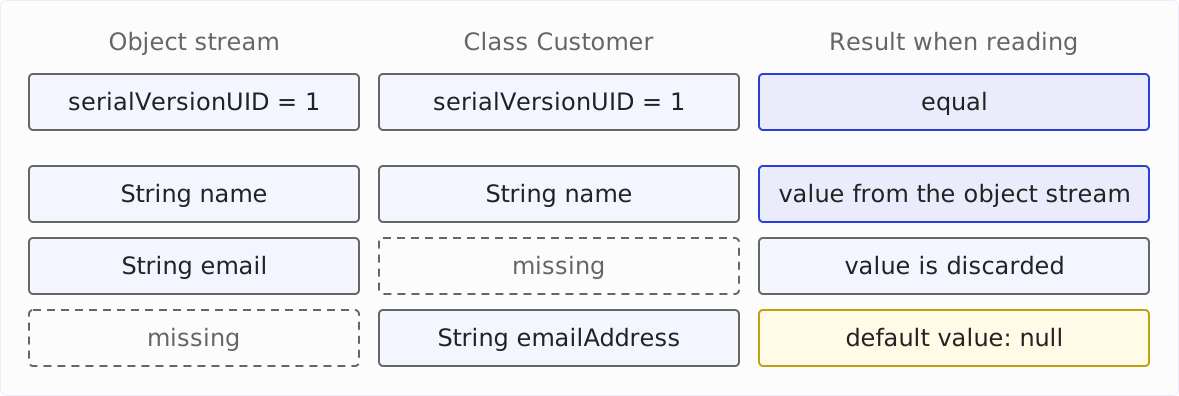
The version numbers match, so ObjectInputStream matches the fields. name is on both sides and gets its value from the object stream. There is no field for email in the current class, so the value is discarded. And emailAddress is not in the object stream, so the field gets its default value null.
The following table shows what happens for various changes to the class when an old object stream is read. Each row comes from a run of the program from the example repository: It writes with one version of Customer and reads with another version.
| Change to the class | Result when reading an old object stream |
|---|---|
| Field added | The new field has its default value |
| Field removed | The value in the object stream is discarded |
| Field renamed | The renamed field is null, the old value is discarded – without an error message |
| Type of an object field changed | ClassCastException as soon as there is a value in the object stream |
| Type of a primitive field changed | InvalidClassException |
| Method added or changed | No effect |
Two rows need an explanation.
For serialization, a renamed field is a removed field plus a new field, as the diagram above shows. The value is lost without an exception being thrown. The output after renaming email to emailAddress:
Customer[name=Ada Lovelace, emailAddress=null]If the type of an object field changes, ObjectInputStream only checks the type when assigning the value. In the following version of Customer, String email has become an EmailAddress email record:
public record EmailAddress(String value) implements Serializable {}

public class Customer implements Serializable {
  @Serial private static final long serialVersionUID = 1L;

  private final String name;
  private final EmailAddress email;  // previously: String email
  // constructor, toString()
}
An object stream of the first version can no longer be read with it:
java.lang.ClassCastException: cannot assign instance of java.lang.String to field
 eu.happycoders.serialization.versioning.explicit.v4.Customer.email
 of type eu.happycoders.serialization.versioning.explicit.v4.EmailAddress
 in instance of eu.happycoders.serialization.versioning.explicit.v4.Customer
If the object stream contains null for this field, there is no exception. Whether an old object stream is readable thus depends on its data.
My recommendation: Adding fields is not a problem; everything else is best tested with an old object stream before the new version goes live. And if a change makes old object streams unusable, increase the serialVersionUID – an InvalidClassException is better than silently wrong data.
If, on the other hand, old object streams should remain readable despite the change, keep the serialVersionUID the same and handle the change in readObject(). The section Reading Renamed Fields with readFields() shows how this works for a renamed field. You can’t do both: ObjectInputStream compares the version numbers before it calls readObject().
Finding Misdeclarations: -Xlint:serial, JFR, and @Serial
The JVM finds the fields and methods with which a class controls its serialization – the serialVersionUID and methods like readObject() from the section Customizing Serialization – by their names and signatures. A typo or a wrong type doesn’t lead to an error, but to the JVM ignoring the declaration.
The following class declares its serialVersionUID as int:
public class Customer implements Serializable {
  private static final int serialVersionUID = 1;
  // ...
}
The JVM looks for a field of type long, doesn’t find one, and computes the version number itself – with all the consequences from the section The Computed serialVersionUID.
There are two tools that report such errors. The first is the compiler with the -Xlint:serial option:
$ javac -Xlint:serial Customer.java
Customer.java:8: warning: [serial] serialVersionUID must be of type long in class Customer
  private static final int serialVersionUID = 1;
                           ^
Since Java 18, -Xlint:serial checks more than before, including misdeclared serialization methods and fields with a non-serializable type (JDK-8202056, JDK-8160675). It also warns if a serialVersionUID is missing.
The second tool is the JDK Flight Recorder. Since Java 23, it reports misdeclared serialization fields and methods at runtime as the event jdk.SerializationMisdeclaration – once per class, when it is serialized for the first time. The event is enabled in the profile settings, but not in the standard default settings:
$ java -XX:StartFlightRecording:settings=profile,filename=misdeclaration.jfr ...
$ jfr print --events jdk.SerializationMisdeclaration misdeclaration.jfr
jdk.SerializationMisdeclaration {
  startTime = 09:29:12.931 (2026-10-14)
  misdeclaredClass = eu.happycoders.serialization.versioning.misdeclared.Customer (classLoader = app)
  message = "serialVersionUID must be of type long"
}
This helps with classes from libraries whose source code you don’t compile.
And @Serial? According to its Javadoc, the annotation is intended to enable compilers to find misdeclared serialization members – just as @Override finds incorrectly overridden methods. Up to and including Java 27, javac doesn’t make use of this: A misspelled method readObjekt() (with k instead of c) annotated with @Serial compiles without a warning, even with -Xlint:serial. The annotation thus mainly documents; the check is done by -Xlint:serial, with or without @Serial.
Inheritance: Non-Serializable Superclasses
If a class implements Serializable, all its subclasses are serializable as well, and writeObject() writes the fields of the entire hierarchy.
Things are different if the superclass is not serializable. In the following example, the customer inherits its ID from an Entity class that does not implement Serializable. Both constructors print when they run:
public class Entity {

  private long id;

  public Entity() {
    System.out.println("Entity() called");
  }

  public Entity(long id) {
    this.id = id;
  }

  public long id() { return id; }
}

public class Customer extends Entity implements Serializable {

  @Serial private static final long serialVersionUID = 1L;

  private final String name;

  public Customer(long id, String name) {
    super(id);
    this.name = name;
    System.out.println("Customer(id, name) called");
  }

  @Override
  public String toString() {
    return "Customer[id=" + id() + ", name=" + name + "]";
  }
}
The following program creates a customer with the ID 42, serializes it, and reads it back:
Customer customer = new Customer(42, "Ada Lovelace");
System.out.println("Before: " + customer);
byte[] data = serialize(customer);
System.out.println("-- reading");
Object copy = deserialize(data);
System.out.println("After:  " + copy);
serialize() and deserialize() are two helper methods from the repository: The first writes an object into a byte array with ObjectOutputStream, the second reads it back from there with ObjectInputStream. The output:
Customer(id, name) called
Before: Customer[id=42, name=Ada Lovelace]
-- reading
Entity() called
After:  Customer[id=0, name=Ada Lovelace]
The ID is lost. writeObject() only writes the fields of the serializable classes, i.e., name, but not id.
When reading, ObjectInputStream calls the no-arg constructor of the first non-serializable superclass – here Entity(). It initializes the fields of this superclass; ObjectInputStream then sets the fields of the serializable classes below it from the object stream. For a class that inherits directly from Object, this constructor is Object(). When deserializing Order and Customer from the previous examples, only the constructor of Object therefore runs, none of their own.
The no-arg constructor must be accessible: public or protected, or without a modifier if the superclass is in the same package. If the superclass doesn’t have such a constructor, you can still write an object, but no longer read it. In the following variant, Entity only has the constructor with the ID:
public class Entity {

  private final long id;

  public Entity(long id) {
    this.id = id;
  }

  public long id() { return id; }
}
Customer remains as above, just without the output in the constructor. The following program writes a customer and tries to read it back:
Customer customer = new Customer(42, "Ada Lovelace");
byte[] data = serialize(customer);
System.out.println(data.length + " bytes written");
try {
  deserialize(data);
} catch (InvalidClassException e) {
  System.out.println(e);
}
Writing succeeds, reading fails:
123 bytes written
java.io.InvalidClassException: eu.happycoders.serialization.inheritance.nodefault.Customer;
 no valid constructor
If the superclass is yours, make it serializable. If not, the way out depends on its constructor:
- If it has an accessible no-arg constructor, you write its state to the object stream yourself with
writeObject()and read it back withreadObject()– the section Writing Additional Data withwriteObject()shows how. - If it doesn’t have one,
writeObject()andreadObject()don’t help: When reading,ObjectInputStreamaborts before it can call the class’sreadObject()method. In that case, instead of the customer, you write a proxy that rebuilds it via its regular constructor when reading – the section The Serialization Proxy Pattern withwriteReplace()shows how.
Customizing Serialization: readObject(), writeObject(), readResolve(), writeReplace()
A serializable class can customize the default procedure with five methods. The JVM finds them by name and signature:
| Method | Called | Purpose |
|---|---|---|
private voidwriteObject(ObjectOutputStream) | when writing, instead of the default procedure | write additional or different data |
private voidreadObject(ObjectInputStream) | when reading, instead of the default procedure | validate data, set transient fields, take over old fields |
private voidreadObjectNoData() | when reading an object stream that was written without this superclass | initialize the fields of the superclass |
Object writeReplace() | before writing | write a different object |
Object readResolve() | after reading | replace the object read |
writeReplace() and readResolve() may have any access modifier; the other three must be private.
An example of readObjectNoData(): If Customer inherits from an Entity superclass that did not yet exist or was not yet serializable in an earlier version, an object stream of this earlier version contains no data for Entity. When reading, ObjectInputStream then calls Entity’s readObjectNoData() instead of its readObject() method – provided that Entity has one; otherwise, the fields of Entity keep their default values.
Validating Data with readObject()
The constructor of Customer from the examples rejects an email address without “@”. Because deserialization doesn’t call the constructor, this check doesn’t apply there. If a program reads an object stream that contains a customer with the email address “no email”, it prints the customer like this:
Customer[name=Ada, email=no email]The object stream was written with a class of the same name without validation in the constructor, using the technique from the info box in the section The Computed serialVersionUID. An attacker can just as well build such an object stream by hand.
A readObject() method validates the data read just like the constructor:
public Customer(String name, String email) {
  if (!isValidEmail(email)) {
    throw new IllegalArgumentException("Invalid email: " + email);
  }
  this.name = name;
  this.email = email;
}

@Serial
private void readObject(ObjectInputStream in)
    throws IOException, ClassNotFoundException {
  in.defaultReadObject();
  if (!isValidEmail(email)) {
    throw new InvalidObjectException("Invalid email: " + email);
  }
}

private static boolean isValidEmail(String email) {
  return email != null && email.contains("@");
}
in.defaultReadObject() sets the fields from the object stream, then the method validates them. According to its Javadoc, the InvalidObjectException is intended for deserialized objects that fail a validation; it is an IOException. The attempt to read the invalid object stream now yields:
java.io.InvalidObjectException: Invalid email: no emailThe check is in a shared method so that the constructor and readObject() apply the same rule. If the constructor validates several fields or copies mutable arguments, readObject() must do the same.
Writing Additional Data with writeObject()
In the section Inheritance, the ID of the non-serializable superclass Entity was lost. With a pair of writeObject() and readObject(), the Customer object writes it to the object stream itself and reads it back from there. For this, Entity needs a method that sets the ID – here protected void setId(long id):
@Serial
private void writeObject(ObjectOutputStream out) throws IOException {
  out.defaultWriteObject();
  out.writeLong(id());
}

@Serial
private void readObject(ObjectInputStream in)
    throws IOException, ClassNotFoundException {
  in.defaultReadObject();
  setId(in.readLong());
}
out.defaultWriteObject() writes the fields of Customer as before, then writeLong() appends the ID. readObject() reads both back in the same order. The ID is now preserved:
Customer[id=42, name=Ada Lovelace]The specification requires readObject() to call defaultReadObject() – or readFields(), shown in the next section – exactly once before it reads additional data, even if it doesn’t read any. Therefore, first call defaultWriteObject() and defaultReadObject() in the two methods, even if the class itself has no fields.
Reading Renamed Fields with readFields()
In the section Compatible and Incompatible Class Changes, the email address was lost when email was renamed to emailAddress. With a readObject() method, the new version of the class takes over the old value – with an unchanged serialVersionUID:
public class Customer implements Serializable {

  @Serial private static final long serialVersionUID = 1L;

  private String name;
  private String emailAddress;

  // constructor, toString()

  @Serial
  private void readObject(ObjectInputStream in)
      throws IOException, ClassNotFoundException {
    ObjectInputStream.GetField fields = in.readFields();
    name = (String) fields.get("name", null);
    if (fields.defaulted("emailAddress")) {
      emailAddress = (String) fields.get("email", null);  // from the old version
    } else {
      emailAddress = (String) fields.get("emailAddress", null);
    }
  }
}
in.readFields() reads the fields from the object stream, but doesn’t set them; instead, it returns them as an object of type GetField. Its get() method returns the value of a field, even of a field that no longer exists in the current class – here email. The second parameter is the value that get() returns if the field is not in the object stream. defaulted() checks whether a field of the current class is missing from the object stream; for an object stream of the old version, this applies to emailAddress.
An object stream of the first version and an object stream of the new version thus both yield the email address:
== Renamed field, old stream
Customer[name=Ada Lovelace, emailAddress=ada@example.com]
== Renamed field, new stream
Customer[name=Ada Lovelace, emailAddress=ada@example.com]
The price: readFields() replaces defaultReadObject(); the specification allows exactly one of the two calls. The method must therefore set every field itself, and because this happens outside the constructor, none of these fields may be final.
Another option is to write a format version of your own to the object stream: writeObject() writes a number after defaultWriteObject(), e.g., with out.writeInt(2), and readObject() branches on this number. However, this only works for object streams that already contain this number – so the class has to write it from its first version on.
Controlling Instances with readResolve()
Some classes have a fixed set of instances and compare them with ==. The following class represents two statuses of an order as constants:
public final class Status implements Serializable {

  @Serial private static final long serialVersionUID = 1L;

  public static final Status OPEN = new Status("OPEN");
  public static final Status SHIPPED = new Status("SHIPPED");

  private final String name;

  private Status(String name) {
    this.name = name;
  }

  @Override
  public String toString() { return name; }
}
The private constructor prevents further instances – but not during deserialization:
Status status = copy(Status.OPEN);
System.out.println(status + " == Status.OPEN: " + (status == Status.OPEN));
OPEN == Status.OPEN: falseThe copy is a third Status object, and every comparison with == returns false.
readResolve() replaces the object read with a different one. The JVM calls the method after reading and returns its return value instead of the object read:
@Serial
private Object readResolve() throws ObjectStreamException {
  return switch (name) {
    case "OPEN" -> OPEN;
    case "SHIPPED" -> SHIPPED;
    default -> throw new InvalidObjectException("Unknown status: " + name);
  };
}
OPEN == ResolvingStatus.OPEN: trueIt is easier with an enum. For enums, serialization guarantees on its own that the same constant comes out after reading – the section Enums shows how.
The Serialization Proxy Pattern with writeReplace()
writeReplace() is the counterpart of readResolve(): The JVM calls it before writing and writes its return value instead of the object.
This allows you to implement the so-called serialization proxy pattern, which Joshua Bloch describes in Effective Java (Item 90). The idea: The class doesn’t write itself, but a simple stand-in object, a proxy, with its data. When reading, the proxy rebuilds the actual object in readResolve() via the constructor – with all validations.
The following example shows an order item as a class whose constructor rejects a quantity less than or equal to zero. The proxy is a private record:
public final class OrderItem implements Serializable {

  @Serial private static final long serialVersionUID = 1L;

  private final String product;
  private final int quantity;
  private final BigDecimal price;

  public OrderItem(String product, int quantity, BigDecimal price) {
    if (quantity <= 0) {
      throw new IllegalArgumentException("Quantity must be positive: " + quantity);
    }
    this.product = product;
    this.quantity = quantity;
    this.price = price;
  }

  @Serial
  private Object writeReplace() {
    return new SerializedForm(product, quantity, price);
  }

  @Serial
  private void readObject(ObjectInputStream in) throws InvalidObjectException {
    throw new InvalidObjectException("Serialization proxy required");
  }

  private record SerializedForm(String product, int quantity, BigDecimal price)
      implements Serializable {

    @Serial
    private Object readResolve() {
      return new OrderItem(product, quantity, price);
    }
  }

  // toString()
}
Three parts work together here:
- When writing,
writeReplace()replaces theOrderItemwith its proxy, anOrderItem.SerializedFormobject. The object stream therefore contains onlyOrderItem$SerializedForm, no fields ofOrderItem. - When reading, this proxy’s
readResolve()calls the constructor ofOrderItem, and the constructor validates the quantity. - Finally,
readObject()ofOrderItemrejects every object stream that contains anOrderItemobject directly. The class itself never writes such an object stream; it was written with an older version of the class without a proxy or built by someone who wants to bypass the validation.
After a copy via serialization, the object is an OrderItem again:
Stream contains OrderItem$SerializedForm: true
OrderItem: OrderItem[product=Notebook, quantity=2, price=4.99]
The JDK uses this pattern itself, e.g., for the lists from List.of() – more on this in the section Serializing Collections.
Externalizable
The Externalizable interface extends Serializable with two methods: writeExternal() and readExternal(). A class that implements it writes and reads its entire state itself, including the fields of its superclasses. When reading, the JVM creates the object via the public no-arg constructor and then calls readExternal().
The class thus determines the format completely by itself. In return, you have to reflect every class change in writeExternal() and readExternal() by hand, and the class needs a public no-arg constructor, so its fields cannot be final. Instead, I recommend writeObject() and readObject() or a serialization proxy.
Records, Enums, Lambdas, and Inner Classes
Special rules apply to four kinds of classes.
Records
The JVM serializes records via their components, and when reading, it calls the canonical constructor. A validation in the constructor therefore also runs during deserialization – for classes, that takes a readObject() method of their own.
The following example reads an object stream that contains an OrderItem with the quantity 0 into a record whose compact constructor rejects that:
public record OrderItem(String product, int quantity, BigDecimal price)
    implements Serializable {

  public OrderItem {
    if (quantity <= 0) {
      throw new IllegalArgumentException("Quantity must be positive: " + quantity);
    }
  }
}
java.io.InvalidObjectException: Quantity must be positive: 0
Cause: java.lang.IllegalArgumentException: Quantity must be positive: 0ObjectInputStream wraps the constructor’s IllegalArgumentException in an InvalidObjectException. The section Deserializing Records of the article about records shows a detailed example comparing a class and a record.
The serialization specification defines further differences from classes:
- The JVM ignores the methods
writeObject(),readObject(), andreadObjectNoData()for records;writeReplace()andreadResolve()still take effect. - The
serialVersionUIDof a record is0if it doesn’t declare one, and when reading,ObjectInputStreamdoesn’t compare it. A record therefore doesn’t need aserialVersionUID. - If you add a component to a record or remove one, old object streams remain readable; a new component gets its default value.
javac -Xlint:serial warns about the ignored methods, e.g., for a writeObject() method in the Point record:
Point.java:5: warning: [serial] serialization-related method writeObject is not effective in a record classFor data that you want to serialize, I therefore recommend records. They need neither serialVersionUID nor readObject(), and their validations also apply to deserialized objects.
Enums
For an enum constant, the JVM writes only its name to the object stream. When reading, it retrieves the constant with Enum.valueOf() – so after reading, you have the same constant as before:
OrderStatus status = copy(OrderStatus.OPEN);
System.out.println(status + " == OrderStatus.OPEN: " + (status == OrderStatus.OPEN));
OPEN == OrderStatus.OPEN: trueThe fields of an enum constant don’t end up in the object stream, the JVM ignores the five methods from the section Customizing Serialization, and the serialVersionUID of every enum is 0.
Because the name is in the object stream, old object streams can no longer be read after a constant has been renamed. The following example writes OrderStatus.SHIPPED and reads the object stream with a version of the enum in which the constant is called DELIVERED:
java.io.InvalidObjectException: enum constant SHIPPED does not exist in class
 eu.happycoders.serialization.special.renamed.OrderStatus
The order of the constants, on the other hand, doesn’t matter, and new constants don’t interfere with reading old object streams.
Lambdas
A lambda is only serializable if its target type extends Serializable and all the values it captures are serializable. Comparator doesn’t extend Serializable:
Comparator<Order> byId = (a, b) -> Long.compare(a.id(), b.id());
serialize(byId);
java.io.NotSerializableException: eu.happycoders.serialization.Ch8Special$$Lambda/0x000000ff01047000The exception names the class that the JVM has generated for the lambda; the hex number at the end changes from run to run.
With a so-called intersection cast, you give the lambda a target type that combines both interfaces:
Comparator<Order> byId =
    (Comparator<Order> & Serializable) (a, b) -> Long.compare(a.id(), b.id());
The lambda can now be serialized, and the object stream is 693 bytes long. It contains an object of the class java.lang.invoke.SerializedLambda, which names, among other things, the class in which the lambda is located and the name of the method into which javac has compiled the lambda body – here lambda$main$827f6d87$1. The object stream thus depends on a name that the compiler assigns.
With the same class, the object stream can be read again, even after the class has been recompiled. This is because javac forms the hash in the name from four parts: the signature of the enclosing method, the functional interface, the name of the variable to which the lambda is assigned, and the variables that the lambda captures. If one of these parts changes, the JVM no longer finds the method. Even renaming the variable byId makes old object streams unreadable:
java.io.InvalidObjectException: ReflectiveOperationException during deserialization
Cause: java.lang.IllegalArgumentException: Invalid lambda deserialization
This output is produced in two steps: The program Ch8LambdaNames from the repository writes the lambda; then the variable is renamed, the class is recompiled, and the object stream is read. The instructions are in the comment of the class.
More often than a single lambda, you serialize a collection that contains a lambda, e.g., a TreeSet with a comparator:
TreeSet<Order> orders = new TreeSet<>(Comparator.comparing(Order::id));
orders.add(order);
serialize(orders);
java.io.NotSerializableException: eu.happycoders.serialization.Ch8Special$$Lambda/0x000000ff01047800This is surprising, because Comparator.comparing() returns a serializable comparator – in the JDK, there is an intersection cast to Comparator<T> & Serializable. What is not serializable, however, is the method reference Order::id that the lambda in comparing() captures. An intersection cast on it solves the problem:
TreeSet<Order> orders = new TreeSet<>(
    Comparator.comparing((Function<Order, Long> & Serializable) Order::id));
I recommend not using lambdas as comparators in collections that are serialized, but a serializable comparator class of your own. Then the object stream depends on a class name that you define.
Inner Classes
An inner class – a non-static nested class, a local class, or an anonymous class – has a hidden field that references the instance of the outer class. Serialization writes this field as well.
In the following example, Draft is an inner class of OrderService, and OrderService is not serializable:
public class OrderService {

  public Draft newDraft(String customerName) {
    return new Draft(customerName);
  }

  public class Draft implements Serializable {
    @Serial private static final long serialVersionUID = 1L;

    private final String customerName;
    // constructor, toString()
  }
}
Serializing a Draft fails because of the outer class:
java.io.NotSerializableException: eu.happycoders.serialization.special.OrderServiceIf OrderService were serializable, the entire service would end up in the object stream. The specification therefore explicitly advises against serializing inner classes; in addition, the names of the hidden fields and of anonymous classes depend on the compiler.
A static nested class, on the other hand, has no reference to the outer instance and none of these problems – for Draft, a static in front of class is enough.
Serializing Collections
The collections of the JDK are serializable as long as their elements are. They don’t write their internal data structures, but their logical content. In an ArrayList, the internal array is transient; its writeObject() method writes the size and the elements. The capacity therefore doesn’t matter:
List<String> small = new ArrayList<>();
List<String> large = new ArrayList<>(10_000);
for (String product : List.of("Notebook", "Fountain pen", "Ink")) {
  small.add(product);
  large.add(product);
}
System.out.println("Capacity 10:     " + serialize(small).length + " bytes");
System.out.println("Capacity 10,000: " + serialize(large).length + " bytes");
Capacity 10: 90 bytes
Capacity 10,000: 90 bytesA HashMap does the same: Its bucket table is transient; it writes the key-value pairs and rebuilds the table when reading.
The immutable lists, sets, and maps from List.of(), Set.of(), and Map.of() use the serialization proxy pattern: Their writeReplace() method returns an object of the class CollSer, and its readResolve() creates an immutable collection again when reading.
List<String> products = List.of("Notebook", "Fountain pen", "Ink");
List<String> productsCopy = copy(products);
System.out.println(productsCopy.getClass().getName());
productsCopy.add("Eraser");
java.util.ImmutableCollections$ListN
java.lang.UnsupportedOperationExceptionThe views of collections are not serializable, e.g., the keySet() of a HashMap or the subList() of an ArrayList:
java.io.NotSerializableException: java.util.HashMap$KeySet
java.io.NotSerializableException: java.util.ArrayList$SubList
Before serializing a view, copy it into a collection of its own, e.g., with new ArrayList<>(stock.keySet()) or List.copyOf(stock.keySet()).
Deserialization Attacks and Filters
An object stream contains not only data, but also the names of the classes from which readObject() creates the objects. Whoever writes the object stream thus determines which classes the reading application loads and instantiates – from everything that is on its classpath.
If an application reads object streams from a source that an attacker controls, such as a cookie, a message, or an uploaded file, this is a gateway for attacks on this application.
How a Deserialization Attack Works
Many classes execute code during deserialization: in their readObject() method, or by calling hashCode(), equals(), or compare() on the objects read.
An example from the JDK is the PriorityQueue. Its readObject() method reads the elements and then restores the heap order – with the comparator that is also in the object stream. The following example serializes a PriorityQueue with a comparator that prints every call, and reads it back without any further precautions. The comparator:
public class LoggingComparator implements Comparator<String>, Serializable {

  @Serial private static final long serialVersionUID = 1L;

  @Override
  public int compare(String a, String b) {
    System.out.println("compare(" + a + ", " + b + ") called");
    return a.compareTo(b);
  }
}
The program that writes and reads the queue:
PriorityQueue<String> queue = new PriorityQueue<>(new LoggingComparator());
queue.add("Notebook");
queue.add("Fountain pen");
queue.add("Ink");
byte[] data = serialize(queue);

Object object = deserialize(data);
System.out.println("Read: " + object.getClass().getSimpleName());
The queue also calls the comparator when inserting. The following output shows only the lines produced when reading:
compare(Notebook, Ink) called
compare(Fountain pen, Ink) called
Read: PriorityQueue
compare() runs while readObject() is still reading – before the application even sees the object and could check it.
Instead of the harmless comparator, an attacker uses a chain of classes from widely used libraries whose methods call each other and ultimately reach, e.g., Runtime.exec(). Such a gadget chain executes a command on the server that the attacker has sent along. The best known of these chains hit application servers such as WebLogic, WebSphere, and JBoss in 2015; the article about the new features in Java 9 has the details.
The most important rule is therefore: Don’t deserialize data from sources you don’t trust. Where that isn’t possible, use a filter to restrict which classes readObject() may create at all.
A Filter for One Object Stream
Since Java 9 (JEP 290), you can pass an ObjectInputFilter to an ObjectInputStream. The filter is called for every class that occurs in the object stream, before the JVM creates an object of that class, and decides whether the class is allowed.
The easiest way to create a filter is from a pattern:
String pattern = "eu.happycoders.serialization.*;java.util.ArrayList;"
    + "java.math.BigDecimal;java.math.BigInteger;java.lang.Number;"
    + "java.lang.Object;!*";

try (var in = new ObjectInputStream(new ByteArrayInputStream(data))) {
  in.setObjectInputFilter(ObjectInputFilter.Config.createFilter(pattern));
  Object object = in.readObject();
  System.out.println("Read: " + object.getClass().getSimpleName());
} catch (InvalidClassException e) {
  System.out.println(e);
}
The pattern allows the classes that an order consists of and rejects everything else with !*. The program reads an order as before; the filter rejects the PriorityQueue before the comparator is called:
Read: Order
java.io.InvalidClassException: filter status: REJECTED
A pattern consists of entries separated by semicolons. The first entry that matches a class decides:
| Entry | matches |
|---|---|
java.math.BigDecimal | exactly this class |
eu.happycoders.serialization.* | all classes in this package |
eu.happycoders.** | all classes in this package and its subpackages |
java.util.Array* | all classes whose name starts like this |
java.base/* | all classes in the module java.base |
! in front of an entry | rejects what the entry describes |
Which classes an order needs is not obvious. The filter also checks:
- serializable superclasses, e.g.,
java.lang.NumberforBigDecimal, - objects inside other objects, e.g.,
BigIntegerinBigDecimal, - arrays that a class creates when reading, via their element type: When reading,
ArrayListreports theObject[]for its elements to the filter, which is why the pattern needsjava.lang.Object.
There are two things, on the other hand, that a pattern doesn’t check: strings, for which ObjectInputStream doesn’t call the filter at all, and arrays of primitive types such as byte[]. A pattern always lets them through, even with !*; you can only restrict them with the maxarray limit from the next section.
The easiest way to find the required classes is the log that the section A Filter for the Whole JVM shows.
The !* at the end is essential. If no entry matches, the result of the filter is “undecided” (UNDECIDED), and ObjectInputStream lets an undecided class through. Without !*, the pattern above therefore allows everything:
compare(Notebook, Ink) called
compare(Fountain pen, Ink) called
Read: PriorityQueue
Limits Against Denial of Service
Even without a gadget chain, an object stream can cause damage: It can keep the application busy for so long or make it occupy so much memory that it no longer responds.
In Effective Java (Item 85), Joshua Bloch shows a so-called deserialization bomb: 100 levels of nested HashSets, serialized in 5,744 bytes. When reading, every HashSet computes the hash codes of its elements, and the hash code of a set is the sum of the hash codes of its elements. Because every set contains two sets of the next level, the number of hashCode() calls doubles with every level – with 100 levels, reading practically never ends.
Limits that you write into the pattern help against this:
| Limit | restricts |
|---|---|
maxdepth | the depth of the object graph |
maxrefs | the number of objects and back references |
maxbytes | the length of the object stream in bytes |
maxarray | the length of each array |
With maxdepth=20, the filter rejects the bomb immediately:
5744 bytes
java.io.InvalidClassException: filter status: REJECTED
Rejected after 0.6 ms
A pattern can combine limits and classes, e.g., maxdepth=20;maxarray=10000;eu.happycoders.serialization.*;!*.
A Filter for the Whole JVM
setObjectInputFilter() only helps with object streams that your own code opens. If, on the other hand, a library deserializes, you can’t get at its ObjectInputStream.
That is what the JVM-wide filter is for. You set it with the system property jdk.serialFilter or with the security property of the same name in the JDK’s conf/security/java.security file. The repository contains a program that reads the PriorityQueue via a LegacyCache class that doesn’t set a filter itself:
$ java "-Djdk.serialFilter=eu.happycoders.serialization.*;java.util.ArrayList;java.math.*;java.lang.Number;java.lang.Object;!*" \
    -cp target/classes eu.happycoders.serialization.Ch10GlobalFilter
...
java.io.InvalidClassException: filter status: REJECTED
The exception doesn’t say which class the filter rejected. The log reveals it: ObjectInputStream logs every rejection via the java.io.serialization logger at level DEBUG, which java.util.logging outputs as FINE. With a configuration file like this one:
handlers = java.util.logging.ConsoleHandler
java.util.logging.ConsoleHandler.level = FINE
java.io.serialization.level = FINE
and the option -Djava.util.logging.config.file=serialfilter-logging.properties, the class appears in the log:
FINE: ObjectInputFilter REJECTED: class java.util.PriorityQueue, array length: -1, nRefs: 1, depth: 1, bytes: 87, ex: n/aAt level FINER (TRACE), ObjectInputStream also logs every allowed class. This is how you find out which classes a pattern has to allow. Since Java 17, there is also the JFR event jdk.Deserialization, which you have to enable in a JFR configuration.
Context-Specific Filters: The Filter Factory
A JVM-wide filter applies to every object stream. If it allows all classes that any part of the application needs, it is too permissive for each individual part.
That is why, since Java 17 (JEP 415), you can register a filter factory. It is called when an ObjectInputStream is created and when someone calls setObjectInputFilter(), and it determines the filter for this object stream. The factory receives two parameters: the filter that the object stream has so far, and the filter that is to be set. When an ObjectInputStream is created, these are null and the JVM-wide filter; when setObjectInputFilter() is called, they are the object stream’s previous filter and the one passed. The factory returns the filter that the object stream ultimately applies – or null for no filter.
The following factory applies a filter as long as a ScopedValue is bound. This way, you can pass a filter to a call into a library without changing the library:
private static final ScopedValue<ObjectInputFilter> ALLOWED =
    ScopedValue.newInstance();

static void main() throws Exception {
  ObjectInputFilter.Config.setSerialFilterFactory(Ch10FilterFactory::chooseFilter);

  byte[] queueData = PriorityQueues.serializedQueue();

  loadAndPrint(queueData);  // reads the queue

  ScopedValue.where(ALLOWED, ORDERS_ONLY).call(() -> {
    loadAndPrint(queueData);  // rejects the queue
    return null;
  });
}

private static ObjectInputFilter chooseFilter(
    ObjectInputFilter current, ObjectInputFilter next) {
  return ALLOWED.isBound() ? ObjectInputFilter.merge(ALLOWED.get(), next) : next;
}
In this example, ORDERS_ONLY is a filter with the pattern from the section A Filter for One Object Stream. loadAndPrint() calls LegacyCache.load(), which, like code from a library, opens its own ObjectInputStream and reads from it without a filter, and prints the result or the exception.
Outside the scope, the filter factory method chooseFilter() returns the requested filter unchanged – when the object stream is created, the JVM-wide one, i.e., none here. Inside the scope, merge() combines the filter from the ScopedValue with the requested one; if the requested one is null, merge() returns the first one unchanged:
compare(Notebook, Ink) called
compare(Fountain pen, Ink) called
Read: PriorityQueue
java.io.InvalidClassException: filter status: REJECTED
For combining filters, ObjectInputFilter has had four static methods since Java 17:
allowFilter(predicate, otherStatus)allows the classes to which aPredicateapplies and returnsotherStatusfor all others.rejectFilter(predicate, otherStatus)rejects the classes to which thePredicateapplies.merge(filter, anotherFilter)rejects what one of the two rejects and allows what one of them allows.rejectUndecidedClass(filter)rejects every class for which the filter is undecided – the!*for composite filters.
You can set a factory only once; a second call to setSerialFilterFactory() throws an IllegalStateException. Alternatively, you set it with the system property jdk.serialFilterFactory.
When Not to Use Java Serialization
The sections above show the downsides of Java serialization. In summary, there are four:
- The object stream is large. Every class appears in it with its name,
serialVersionUID, and field descriptions. - The object stream is tied to your classes. Class and field names are part of the format. If you rename or move a class, old object streams become unreadable; if you rename a field, its value is lost without an error message.
- Untrusted object streams are a security risk. They determine which classes the reading application creates and which code runs in the process.
- Deserialization bypasses the constructors. You have to repeat every validation in
readObject(). In the 2019 design note “Towards Better Serialization”, Brian Goetz writes that serialization creates objects via “extralinguistic mechanisms, bypassing constructors”.
A comparison with DataOutputStream shows how big the difference in the first point is. The following method writes only the values of an order – ID, name, email address, number of order items, and for each order item the product, quantity, and price:
private static void writeOrder(Order order, DataOutputStream out) throws IOException {
  out.writeLong(order.id());
  out.writeUTF(order.customer().name());
  out.writeUTF(order.customer().email());
  out.writeInt(order.items().size());
  for (OrderItem item : order.items()) {
    out.writeUTF(item.product());
    out.writeInt(item.quantity());
    out.writeUTF(item.price().toString());
  }
}
With it, the program writes the order from the introduction and 1,000 orders from 1,000 different customers, each with the same two order items, and, for comparison, both with ObjectOutputStream:
== One order
ObjectOutputStream: 822 bytes
DataOutputStream:   88 bytes
== 1,000 orders of 1,000 customers
ObjectOutputStream: 208425 bytes
DataOutputStream:   95790 bytes
For one order, Java serialization takes up more than nine times as much space. With 1,000 orders, it writes each class description only once, and the product names – string literals, i.e., one object each – also only once, followed by back references. An order then costs 208 bytes on average instead of 822; the difference is essentially the class descriptions. Nevertheless, 208,425 bytes are still 2.2 times as much as the 95,790 bytes of DataOutputStream.
Joshua Bloch devotes an entire chapter to serialization in Effective Java, Items 85 to 90 – that is where the deserialization bomb and the serialization proxy pattern come from.
For new code, I recommend a format that is not tied to your classes:
- JSON for data that people read or that programs in other languages process, e.g., with Jackson.
- Protocol Buffers or a similar schema format when size and speed matter and several versions of a format have to coexist.
DataOutputStreamfor a compact binary format of your own – the article aboutDataOutputStreamandDataInputStreamshows how.
I only recommend Java serialization where a framework requires it: with RMI, with HTTP sessions, or in a cache that requires Serializable. Then use records for the data, an explicit serialVersionUID for the other classes, and a filter for every object stream that comes from outside.
Common Mistakes
The sections above show each of the following mistakes with code and output:
- A field has a non-serializable type.
writeObject()aborts with aNotSerializableException; the cause can be deep in the object graph, e.g., in a method reference in aTreeSetcomparator or in the outer instance of an inner class. - A transient field is
nullafter reading. Field initializers and the constructor don’t run during deserialization; areadObject()method sets the initial value. - The explicit
serialVersionUIDis missing. A new method or anassertmakes all old object streams unreadable – with anInvalidClassException. - A field has been renamed. Its value is lost without an error message when old object streams are read – unless
readObject()takes it over withreadFields(). - The same object is written twice to an object stream. The second call writes only a back reference to the old state;
reset()helps against this,writeUnshared()doesn’t. - A validation is only in the constructor. Deserialization bypasses it; a class needs
readObject()for it, a record doesn’t. - A filter doesn’t end with
!*. It lets through all classes that it doesn’t name.
Summary
Java serialization uses ObjectOutputStream.writeObject() to write an object and everything reachable from it to an object stream, and ObjectInputStream.readObject() builds objects from it again – without calling constructors. Every class in the object graph must implement Serializable. Fields with transient don’t end up in the object stream and have their default value after reading. Shared objects appear in the object stream only once, followed by back references; this saves space, but returns the old state if you write a modified object again.
The serialVersionUID decides whether an old object stream matches the current class. Without an explicit declaration, the JVM computes it from the class, and even an assert changes it. With a fixed serialVersionUID, ObjectInputStream compares the fields by their names; new fields are then not a problem, renamed ones lose their values without an error message.
With readObject(), you validate the data you read; with writeObject(), you write additional data; with readResolve() and writeReplace(), you replace objects when reading and writing. The JVM serializes records via their canonical constructor, enums via their name.
An object stream determines which classes the reading application instantiates. Deserialization filters restrict this – for one object stream, for the whole JVM, or, with a filter factory, depending on the context.
My recommendations:
- Only use Java serialization where a framework requires it; for formats of your own, JSON, Protocol Buffers, or
DataOutputStreamare better suited. - Use records for data that you serialize.
- Declare a
serialVersionUIDin every serializable class and compile with-Xlint:serial. - Validate everything in
readObject()that the constructor validates. - Put a
BufferedOutputStreamorBufferedInputStreambetween file or socket streams and the object streams. - Don’t deserialize data from untrusted sources – and where you have to, only with a filter that ends with
!*.
You can find more articles on reading and writing files in the series this article belongs to, e.g., about reading files and writing files.
Did this article answer your questions? Then I’d be happy about a review on my ProvenExpert profile – it helps other developers find this content.