In this article, you will learn:
- How to find out the length of an array in Java,
- How to define the length of an array in Java,
- How much memory space an array occupies on the heap,
- And what the maximum size of an array is in Java.
We consider both one-dimensional and 2D arrays.
How to Find the Length of an Array in Java?
Let’s assume we get a Java array as follows:
String[] names = getNames();Then we find out the length of this array, i.e., the number of entries in it, as follows:
int numberOfNames = names.length;Note that length is a field on arrays, not a method call – unlike String.length() or List.size(). If you write names.length(), the compiler reports an error.
If you only have an array as an Object, for example in generic code, java.lang.reflect.Array.getLength(array) returns its length.
How to Get the Length of a 2D Array in Java?
With a two-dimensional array, things get a little more complicated. In Java, a two-dimensional array is an array of arrays. A matrix of height two and width three would be represented like this:
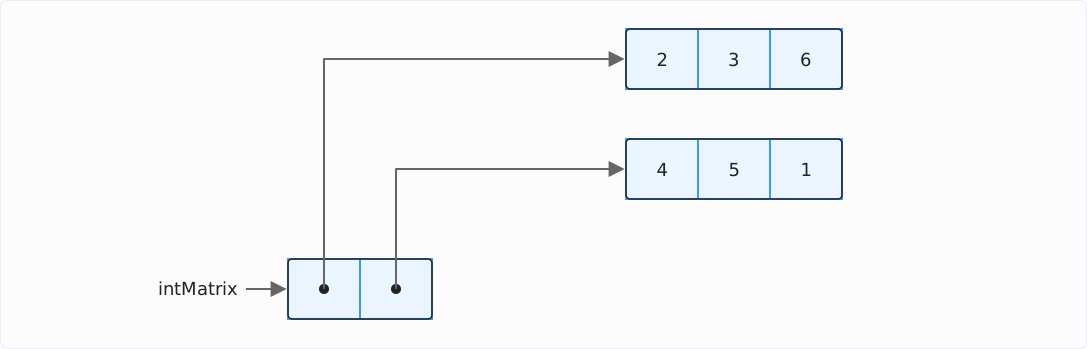
We can now determine the height and width as follows:
int[][] intMatrix = getMatrix();
int height = intMatrix.length;
int width = intMatrix[0].length;
The height is the length of the array (i.e., the number of rows the matrix contains), and the width is the length of the first row.
If the matrix has no rows, intMatrix[0] throws an ArrayIndexOutOfBoundsException – in that case, check beforehand that height is greater than 0.
Please note, however, that with a two-dimensional array in Java, the sub-arrays do not necessarily all have to be the same length. A 2D array could also look like this:
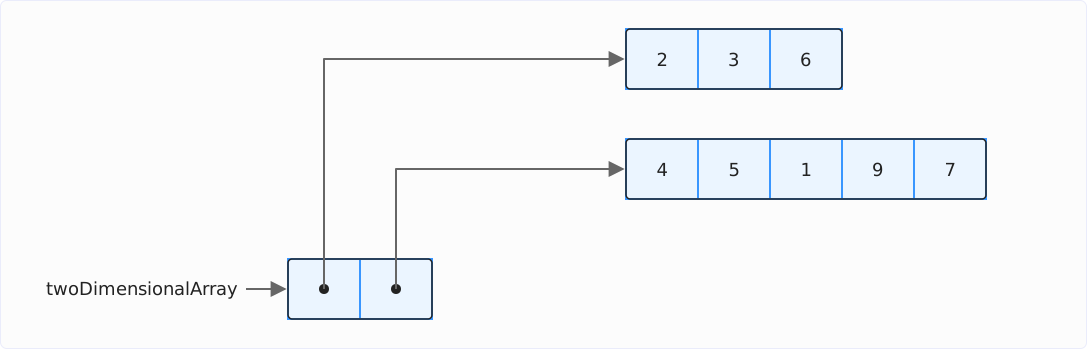
Here, we could calculate statistics on the row lengths:
int[][] twoDimensionalArray = {{2, 3, 6}, {4, 5, 1, 9, 7}};
IntSummaryStatistics statistics =
    Arrays.stream(twoDimensionalArray)
        .mapToInt(row -> row.length)
        .summaryStatistics();
System.out.println(statistics);
The following result would be output for the example matrix shown above:
IntSummaryStatistics{count=2, sum=8, min=3, average=4.000000, max=5}We have two rows, the sum of the lengths is 8 (that’s right: 5 plus 3), the minimum is 3, the average length is 4, and the maximum is 5.
By the way, IntSummaryStatistics.toString() formats the average with String.format() and therefore depending on the locale – on a system with a German language setting, it prints average=4,000000.
How to Set the Array Length in Java?
The length of an array is defined when it is initialized. The following code, for example, creates a string array of size four:
String[] fruits = {"jujube", "apple", "boysenberry", "cherry"};We can also define a string array of the same size as follows:
String[] fruits = new String[4];However, this array does not yet contain any values; it is initialized with null at each position. You can learn all about initializing arrays in the article How to Initialize Arrays in Java.
After initialization, we can no longer change the array length.
How to Set the Length of a 2D Array in Java?
You can also define the length of a 2D array in the two ways shown above – i.e., with predefined values:
int[][] twoDimensionalArray = {{2, 3, 6}, {4, 5, 1, 9, 7}};This code creates the two-dimensional array shown above with sub-arrays of different lengths.
And secondly, with default values (0 in the case of the type int):
int[][] twoDimensionalArray = new int[2][3];This code creates the following array:
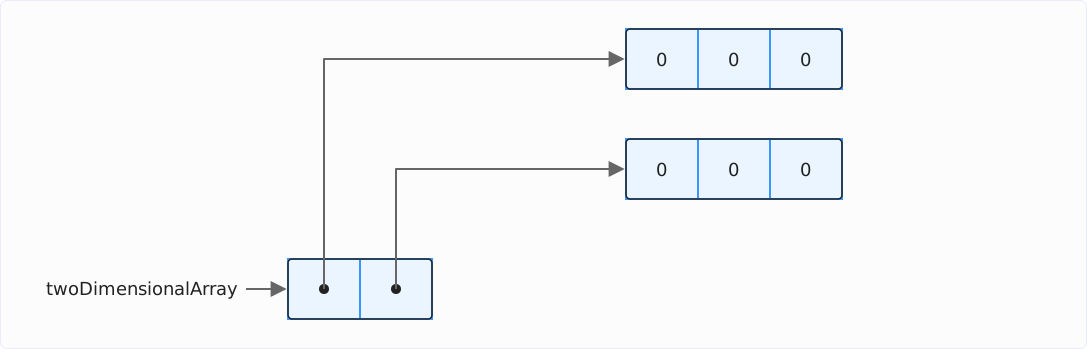
You can learn more about initializing 2D arrays in the article How to Initialize Arrays in Java.
How Much Memory Does a Java Array Take Up?
In the following, we look at the memory layout with compact object headers, which have been enabled by default since Java 27, and with compressed oops, i.e., compressed object references – the default setting on 64-bit machines with a heap of up to 32 GB.
An array is an object in Java; therefore, like any other object, it has an 8-byte object header. This is followed by four bytes in which the length of the array is stored. The actual elements of the array follow from byte 12 in sequential order.
The following diagram shows how the int array [6, 1, 1, 5, 7] is stored in memory up to Java 26 and how it has been stored since Java 27:
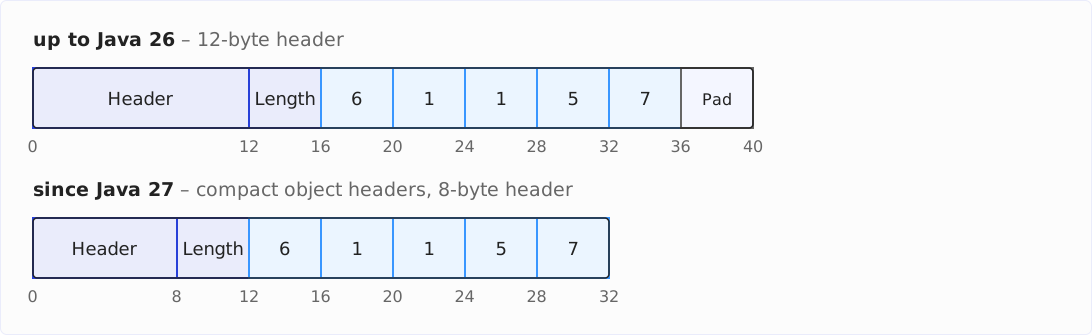
You can see that the smaller header saves eight bytes on this array – 40 bytes become 32. Up to Java 26, the elements ended at byte 36, and the last four bytes were padding – filler bytes that are not part of the array but cannot be used in any other way either; the following info box explains why. Since Java 27, the five int values fill the space up to byte 32 exactly.
Elements in primitive arrays each occupy the following memory space:
booleanandbyte: 1 byte eachshortandchar: 2 bytes eachintandfloat: 4 bytes eachlonganddouble: 8 bytes each
With short instead of int values, the array would have the following layout:

And with byte elements, it would have the following layout:

With long and double elements, there is one more thing to consider: 8-byte values must be stored at addresses divisible by eight so that the CPU can read and write them in a single memory access – unaligned 8-byte accesses are slower on some processor architectures and not allowed at all on others. The elements therefore do not start at byte 12 but at byte 16 – the four bytes in between remain unused.

We can calculate the total size of an array as follows:
Total size = align(8 bytes + 4 bytes + number of elements × size of element type in bytes)
The align function rounds the result up to the next value divisible by eight so that the result contains the padding. In long and double arrays, the elements start at byte 16; there, the formula is Total size = 16 bytes + number of elements × 8 bytes – no rounding up is needed, as the result is always divisible by eight.
This results in the following size for the int array with five elements:
Total size = align(8 bytes + 4 bytes + 5 × 4 bytes)
= align(32 bytes)
= 32 bytes
If we were to store the same five elements in a long array, it would have the following size:
Total size = 16 bytes + 5 × 8 bytes
= 56 bytes
With object arrays, it is not the objects themselves that are stored in the array but the references to the objects – 4 bytes each with compressed oops. The following diagram shows the memory layout of the string array shown above:
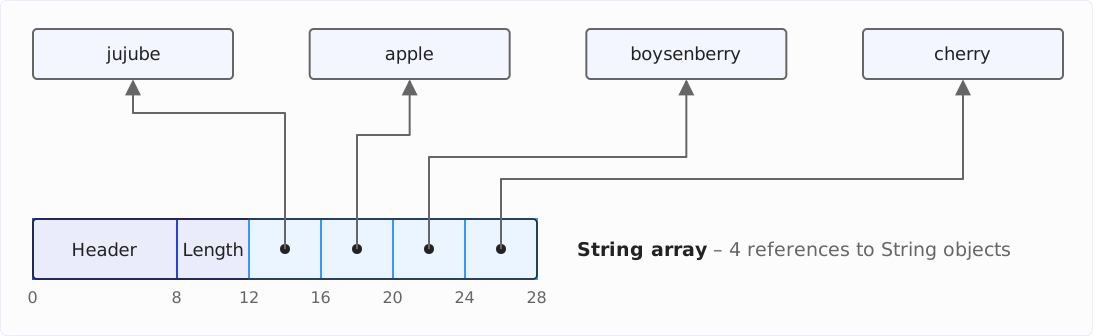
I have not shown the object layout of the strings themselves here, as this article is primarily about arrays, not strings. The strings also have a header, several fields, and a reference to a byte array, which in turn contains a header, a length field, and the characters of the string.
How Much Memory Does a 2D Array Take up in Java?
As you have seen above, a two-dimensional array is an array of arrays. Therefore, we must add the memory space of the outer array and that of all the inner arrays.
The matrix with two rows and three columns from the first 2D example has the following memory layout:
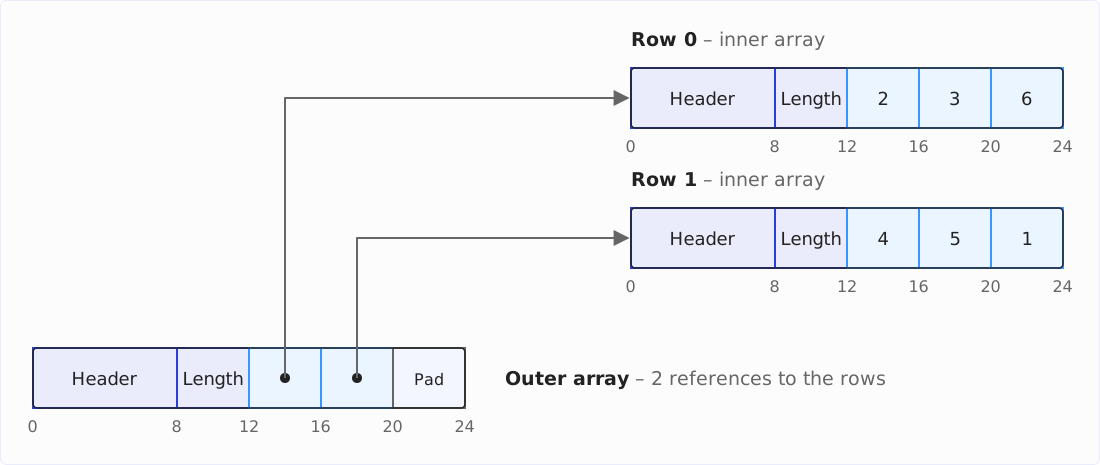
We can calculate the total size of this 2D array as follows:
Total size = align(8 bytes + 4 bytes + number of rows × 4 bytes)
+ number of rows × align(8 bytes + 4 bytes + number of columns × size of element type in bytes)
For the example matrix with two rows and three columns, the following results:
Total size = align(8 bytes + 4 bytes + 2 × 4 bytes) + 2 × align(8 bytes + 4 bytes + 3 × 4 bytes)
= align(20 bytes) + 2 × align(24 bytes)
= 24 bytes + 2 × 24 bytes
= 72 bytes
Max Array Size in Java
Java arrays use an int for the index, meaning the theoretical upper limit is Integer.MAX_VALUE, i.e., 2,147,483,647 elements.
According to the formula above, an int array of this size would occupy just over 8 GB. That shouldn’t be a problem for most modern computers.
When I try to create an array of this size – no matter which primitive type I use – I get the following error:
Exception in thread “main” java.lang.OutOfMemoryError: Requested array size exceeds VM limit
Only when I reduce the size by two to 2,147,483,645, does it work – and again with all primitive data types, even with long. The limit, therefore, has nothing to do with the available memory but is determined by the JVM.
Where does this limit come from? Internally, HotSpot measures object sizes not in bytes but in words of 8 bytes – and some code paths pass that number of words around as an int. The worst case is a long array: each element takes up one word, plus two words for the header and the length field. For the sum to still fit into an int, such an array may have at most Integer.MAX_VALUE - 2 elements – and the same limit applies to all element types, including int and byte, whose arrays are far smaller when measured in words. You can look this up in arrayOop.hpp, method max_array_length().
The size in bytes plays no role for this limit – the int array of more than 8 GB takes up just over a billion words. The following table shows the maximum array size for all primitive types – both in terms of the number of elements and the heap memory occupied on my JVM:
| Types | Maximum elements | Maximum size in the heap |
|---|---|---|
| boolean, byte | Integer.MAX_VALUE - 2 | 2,147,483,664 bytes (~ 2 GB) |
| short, char | Integer.MAX_VALUE - 2 | 4,294,967,304 bytes (~ 4 GB) |
| int, float | Integer.MAX_VALUE - 2 | 8,589,934,592 bytes (~ 8 GB) |
| long, double | Integer.MAX_VALUE - 2 | 17,179,869,176 bytes (~ 16 GB) |
Max Size of a 2D Array in Java
The upper limit described in the previous chapter applies to each array dimension. Theoretically, the following sizes would, therefore, be possible with two-dimensional arrays:
| Types | Maximum elements | Maximum size in the heap |
|---|---|---|
| boolean, byte | (Integer.MAX_VALUE - 2)² | ~ 4 exabytes (= 4 million terabytes) |
| short, char | (Integer.MAX_VALUE - 2)² | ~ 8 exabytes (= 8 million terabytes) |
| int, float | (Integer.MAX_VALUE - 2)² | ~ 16 exabytes (= 16 million terabytes) |
| long, double | (Integer.MAX_VALUE - 2)² | ~ 32 exabytes (= 32 million terabytes) |
In this case, the size is not limited by the JVM but by the available memory or the memory that the garbage collector can manage (e.g., 16 TB for the ZGC).
Conclusion
We can find the length of an array using array.length – length is a field, not a method. We can only set the length of an array when it is created; we cannot change it afterward.
Since Java 27, arrays have an 8-byte object header and a 4-byte length field, followed by the data (1 byte per byte/boolean, 2 bytes per short/char, 4 bytes per int/float or object reference, and 8 bytes per long/double). Up to Java 26, the header was 12 bytes in size.
An array can contain a maximum of Integer.MAX_VALUE - 2 elements (on most JVMs), regardless of the type of array elements.
Did this article save you time? Then I’d be happy if you invested a minute of it in a review on my ProvenExpert profile. Your feedback shows me that the work on these articles pays off.