
Articles about monorepos are numerous. So in this article, I will focus in particular on the practical aspects: performance and merging of existing repositories.
This article will answer the following questions in detail:
- What is a monorepo?
- What are the advantages and disadvantages of a monorepo?
- What is the performance of a Git monorepo?
- How to merge multiple Git repositories into one monorepo while keeping their history?
What is a Monorepo?
A monorepo (short for “monolithic repository”) is a repository that contains the source code of several or all projects of a team or company. Each project lives in a directory of its own.
Its counterpart is the polyrepo (also called multi-repo): each project has its own repository.
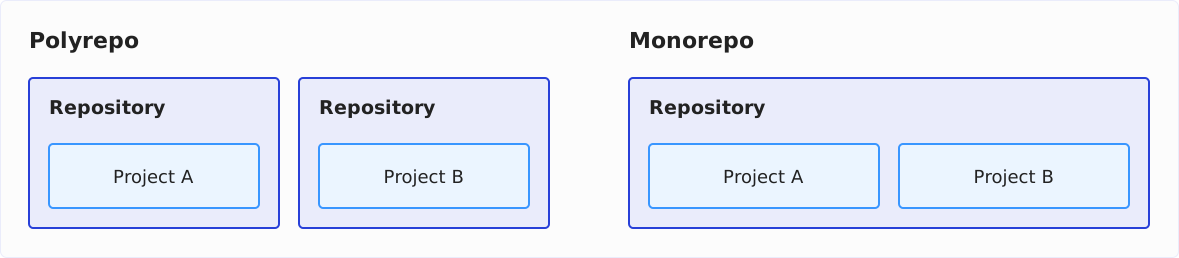
A monorepo is not a monolith: the projects in it remain independent libraries or services that can be built and deployed separately. Only their source code lives in one place.
Some of the largest Internet companies work with monorepos, among them Google, Meta (Facebook), and Microsoft.
Why Do I Know About Monorepos?
At AndroidPIT, we set up a new product in August 2016, which consisted of 25 microservices and 23 libraries in 2019, as a Git monorepo. In the beginning, all developers were hesitant, but our team decided to try it together. We kept the option open to split the repository again if we were dissatisfied. Two years later – after a mostly positive experience – we decided to merge all other products into monorepos, too.
Advantages and Disadvantages of Monorepos
Two articles on this topic are worth reading:
- Monorepos: Please don’t! – an appeal against monorepos
- Monorepos and the Fallacy of Scale – a defense of monorepos in direct response to the first article
In the following, you find the pros and cons as I experienced them in everyday development, and my view on the widespread criticisms.
What Are the Advantages of a Monorepo?
Reducing effort/costs:
- Fewer repositories:
Developers only need to check out and update one (or a few) repositories. New projects are created in subdirectories and automatically distributed to everyone on the team without them having to check out additional repos. - Consistency of the overall project:
Developers have a consistent status of the overall project at all times – not only on the main branch but also on feature branches and old commits. On the other hand, with many individual repositories, incompatibilities can occur quickly. - Atomic commits:
Developers can commit related changes to multiple subprojects together. - Easier merging:
Creating and merging branches for changes that involve multiple subprojects is time-consuming if the projects are stored in separate repositories. In a monorepo, you only have to merge once. - Easier resolution of merge conflicts:
Handling of merge conflicts is simplified since, in a monorepo, the complete code base is in a consistent state while handling the conflict. In the case of several repositories, it may be necessary to bring them to a consistent state manually.
Improved maintainability:
- Moving code:
Code can be moved between the directories of a monorepo much more smoothly than from one repository to another, allowing developers to adjust module boundaries when changing requirements or during refactorings easily. - Central documentation:
You can store cross-project documentation in the root folder of the monorepo.
Organizational:
- Transparency:
Monorepos result in all developers having access to the entire code base. In most cases, this is desirable, encourages cross-team collaboration, and allows developers to collaborate on code from other teams. - Reduced configuration:
Monorepos reduce the configuration effort of the source code management tools.
What Are the Disadvantages of a Monorepo?
I see real disadvantages mainly on the organizational side:
- Transparency:
The aspect listed under “advantages” that all developers have access to the entire code base is not desired in all organizations. For example, a service provider should not store the projects it develops for different customers in a monorepo. - Open-source libraries:
If subprojects are to be released as open-source components, a monorepo is obstructive.
I don’t share other frequently mentioned disadvantages:
- Performance problems:
Critics complain that monorepos lead to performance problems. I haven’t noticed any performance degradation in projects of the size most of us work with (see the section “Performance and Scalability of a Git Monorepo” below). - Increased disk space requirements:
Also, increased disk space requirements are criticized since each developer must clone the entire code base. Disk space is probably irrelevant in most projects nowadays: The Git repository of the Linux kernel, for example, occupies a little over 6 GB, including its complete history. The repositories of most companies are probably smaller. And if you only need a part, you don’t have to download everything (see “Large Monorepos: Partial Clone and Sparse Checkout” below). - More complex builds:
Monorepos supposedly make the build pipeline more complex. That’s not my experience either. You can easily build subprojects using sparse checkouts and path filters in the CI pipeline. - Complicated versioning:
Allegedly, versioning is getting more complicated. I can’t follow this either. It is possible to version the complete code base (with tags like “v1.0”) as well as single subprojects (with tags like “project-a-v1.0”). - Poorer modularization:
Some people believe that a monorepo is an obstacle to clean and effective modularization since developers are not forced to split the code into separate repositories. I see this as an advantage because module boundaries are not carved in stone by monorepos (see “Improved maintainability” above).
Performance and Scalability of a Git Monorepo
A widespread criticism of monorepos is their poor performance and scalability.
From my experience at AndroidPIT and IONOS, I can say that there should be no performance problems in most teams. In most companies, the entire codebase is probably smaller than the Linux kernel (around 28 million lines of C code in a little over 64,000 files according to cloc, as of October 2026), which is also managed by Git (and for which Git was originally developed).
From 2019 to 2023, I worked on a Java backend at IONOS whose monorepo was smaller than the Linux kernel but of a comparable order of magnitude. Cloning the entire repository took less than a minute, and switching branches took between 0.2 and 1.5 seconds, depending on the age of the branch.
Most of us work in companies of this order of magnitude, so I don’t see any practical problems with the scalability of a monorepo.
Large Monorepos: Partial Clone and Sparse Checkout
Should a monorepo grow large after all, Git comes with two tools that let you download and check out only the part you are working on:
- Partial clone:
git clone --filter=blob:nonedownloads only the commits and directory structures when cloning, but no file contents. Git fetches those when it needs them. - Sparse checkout:
git sparse-checkout setlimits the working directory to the specified directories and the files in the root directory.
For the monorepo we will merge in the following section, this looks as follows:
git clone --filter=blob:none --sparse \
  https://github.com/SvenWoltmann/sparse-checkout-demo.git
cd sparse-checkout-demo
git sparse-checkout set project-a
With --sparse, the working directory contains only the files in the root directory after cloning; git sparse-checkout set project-a adds the project-a directory. project-b stays out.
Merging Multiple Git Repositories While Retaining Their History
Let’s say we have two projects, “project-a” (exemplarily created at https://github.com/SvenWoltmann/project-a) and “project-b” (https://github.com/SvenWoltmann/project-b), which we want to combine into a repository “sparse-checkout-demo.” We want to arrange the two projects in subdirectories with the respective project names:
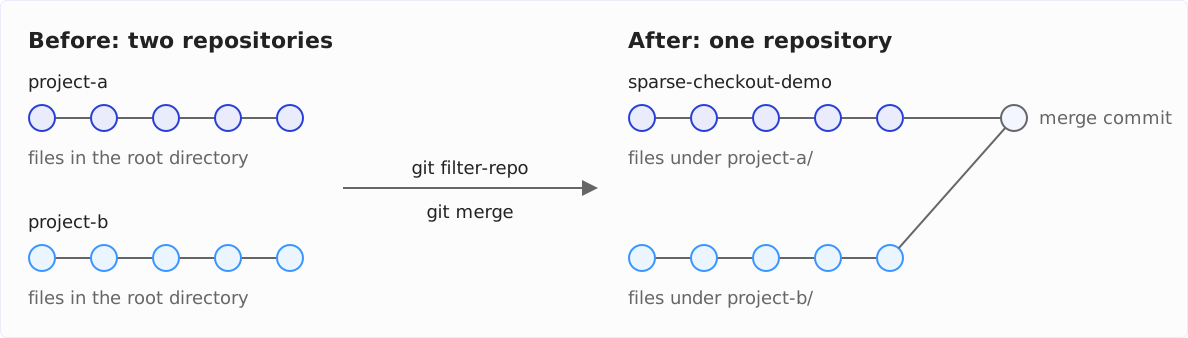
To rewrite the history of the projects, we use git filter-repo. Git does come with git filter-branch, but its documentation advises against using it and recommends git filter-repo instead. The tool is not part of the Git distribution; you install it with your package manager (e.g., brew install git-filter-repo) or with pipx install git-filter-repo.
First, we clone both projects, create the directory for the monorepo, and initialize a Git repository there (alternatively create one via GitHub and clone it):
git clone https://github.com/SvenWoltmann/project-a.git
git clone https://github.com/SvenWoltmann/project-b.git

mkdir sparse-checkout-demo
git init sparse-checkout-demo
Clone the projects fresh even if you already have them locally. git filter-repo rewrites the history irreversibly and therefore refuses to work in a repository that does not look like a fresh clone.
With the following commands, we merge project A into the monorepo:
cd project-a
git filter-repo --to-subdirectory-filter project-a
cd ../sparse-checkout-demo
git remote add project-a ../project-a
git fetch project-a
git merge --allow-unrelated-histories project-a/main
git remote rm project-a
--to-subdirectory-filter project-a moves all files into the project-a subdirectory in every commit. The output of git filter-repo starts with this notice:
NOTICE: Removing 'origin' remote; see 'Why is my origin removed?'
        in the manual if you want to push back there.
        (was https://github.com/SvenWoltmann/project-a.git)
That is intentional: every rewritten commit gets a new ID, and without origin, the old history cannot accidentally be merged back into the new one.
git merge then prints nothing. Since the monorepo is still empty, Git takes over the history of project A without creating a merge commit.
We repeat the same for project B:
cd ../project-b
git filter-repo --to-subdirectory-filter project-b
cd ../sparse-checkout-demo
git remote add project-b ../project-b
git fetch project-b
git merge --allow-unrelated-histories project-b/main
git remote rm project-b
This time, git merge creates a merge commit that joins the two histories. For this, Git opens an editor with a prepared commit message that you can accept. Afterward, you see this output:
Merge made by the 'ort' strategy.
 project-b/.gitignore                               |   2 +
 project-b/README.md                                |  60 +++++++++++++++++++++
 project-b/img/big-o-cheat-sheet-mockup.png         | Bin 0 -> 120226 bytes
 project-b/img/java-versions-cheat-sheet-mockup.png | Bin 0 -> 475522 bytes
 .../mastering-data-structures-product-mockup.png   | Bin 0 -> 130068 bytes
 project-b/pom.xml                                  |  13 +++++
 .../src/main/java/eu/happycoders/demo/b/B.java     |   7 +++
 7 files changed, 82 insertions(+)
 create mode 100644 project-b/.gitignore
 create mode 100644 project-b/README.md
 create mode 100644 project-b/img/big-o-cheat-sheet-mockup.png
 create mode 100644 project-b/img/java-versions-cheat-sheet-mockup.png
 create mode 100644 project-b/img/mastering-data-structures-product-mockup.png
 create mode 100644 project-b/pom.xml
 create mode 100644 project-b/src/main/java/eu/happycoders/demo/b/B.java
That’s it!
Using ls and git log --oneline --graph, you can see that both subprojects and their commits are included in the monorepo:
ls
git log --oneline --graph
project-a project-b
* 79ed240 Merge remote-tracking branch 'project-b/main'
|\
| * bf0bdc6 README: append the shared resources block
| * 0ba7fdf Update README links to GitHub
| * 8c6f410 Add link to project website to README.md.
| * f93dd81 Initial commit of project-b.
| * bd7057a Initial commit
* 2b5d62d README: append the shared resources block
* e63b16b Update README links to GitHub
* 14a9568 Add link to project website to README.md.
* c103177 Initial commit of project-a.
* d8bf9fa Initial commitThe sparse-checkout-demo repository on GitHub shows what the finished monorepo looks like.
In this example, git filter-repo took less than a second per project. When we combined the modules that make up the website at AndroidPIT, still with git filter-branch, it took about three and a half hours. According to its documentation, git filter-repo is multiple orders of magnitude faster.
Summary
In this article, I’ve compared the pros and cons of Git monorepos. In my opinion, the pros outweigh the cons, so monorepos are an excellent choice for most teams. The often criticized performance and scalability issues don’t affect the teams of most organizations, and easier refactoring of code across module boundaries increases the maintainability of code.
I have shown, step by step, how to merge existing repositories while preserving their history.
If you don’t want to have all projects in a single repository, you can limit monorepos to those projects that are closely interwoven and where shared branching and merging make sense. You can also convert your projects into monorepos one by one and, just as easily, run monorepos and single projects side by side.
Did you take something away from this article? With a review on my ProvenExpert profile, you help other developers assess whether these articles are worth reading – and you help me understand which content is most useful to you.