
This article explains:
- How to compare two objects in Java?
- What is a
Comparator, and what do you need it for? - What are the possibilities for creating a
Comparator? - How to create a
ComparatorwithComparator.comparing()? - What is the difference between
ComparatorandComparable?
But first, the question: Why do you want to compare a Java object with another?
The most common application for comparing two objects is the sorting of object lists or arrays. To sort objects, the program has to compare them and find out if one object is smaller, larger, or equal to another.
The interfaces Comparable and Comparator, which this article is about, also control the order in TreeMap and TreeSet, the head of a PriorityQueue, the result of Collections.max(), and the sorting in Stream.sorted().
You can find the article’s source code in this GitHub repository.
How to Compare Two Objects in Java?
You compare Java primitives (int, long, double, etc.) using the operators <, <=, ==, !=, >=, >.
That does not work for objects: the compiler rejects < and >, and == only checks whether it is the same object.
For objects, you either use a compare() or a compareTo() method instead. I will explain both methods using Strings and a self-written Student class as examples.
How to Compare Two Strings in Java?
Suppose we have the following two strings:
String s1 = "Happy";
String s2 = "Coders";
Now we want to determine if s1 is less than, greater than, or equal to s2. In other words: whether – according to alphabetical sorting – s1 would come before or after s2.
We do that as follows:
int result = s1.compareTo(s2);The result variable now contains:
- a value less than 0 if
s1comes befores2according to alphabetical sorting - 0, if
s1ands2are equal (i.e.s1.equals(s2)istrue) - a value greater than 0 if
s1comes afters2according to alphabetical sorting
In the example above, result would be greater than 0 because “Happy” would be sorted after “Coders”.
Sorting Strings in Java
The compareTo() method is called internally by Arrays.sort() and Collections.sort() to sort an array or list of objects, for example as follows:
public class NameSortExample {
  public static void main(String[] args) {
    String[] names = {"Mary", "James", "Patricia", "John", "Jennifer", "Robert"};
    Arrays.sort(names);
    System.out.println(Arrays.toString(names));
  }
}
The program prints the names in alphabetical order:
[James, Jennifer, John, Mary, Patricia, Robert]All other ways to sort objects and primitives like int, long, and double are shown in the tutorial “Sorting in Java”.
But what if we don’t want to sort strings alphabetically at all, but by their length, for example? For this, we need a so-called Comparator. Before we get to that, let me first explain the Comparable interface, which we just used.
The Java Comparable Interface
The String.compareTo() method we used above comes from the java.lang.Comparable interface, which is implemented by the String class.
The Comparable interface defines only this single method. All classes whose objects should be comparable implement it. Besides String, these are, for example, Integer, Long, BigInteger, LocalDate, LocalDateTime, Instant, and many more.
The order resulting from the compareTo() method is called “natural order”: Strings are sorted alphabetically; dates and times are sorted in chronological order.
compareTo() has a so-called contract (an agreement every implementation must keep): the sign flips when you swap the sides (sgn(a.compareTo(b)) == -sgn(b.compareTo(a))), and the order is transitive – if a is less than b and b is less than c, then a is less than c. If an implementation violates the contract, the sort result is undefined. Sometimes the JDK notices it itself: since Java 7, the TimSort algorithm throws an IllegalArgumentException with the message “Comparison method violates its general contract!”.
The following section will show you how to make a custom class comparable (and thus sortable).
Java Comparable Example
To make custom classes comparable and thus sortable, you have to implement the Comparable interface and its compareTo() method.
The following example shows how to do this for a Student class that should be sorted by matriculation number (ID) by default:
public class Student implements Comparable<Student> {
  private int id;
  private String firstName;
  private String lastName;

  // ... constructor ...
  // ... getters and setters ...
  // ... toString() method ...

  @Override
  public int compareTo(Student o) {
    if (this.id < o.id) {
      return -1;
    } else if (this.id == o.id) {
      return 0;
    } else {
      return 1;
    }
  }
}
Using the ternary operator, you can write the compareTo() method as a one-liner:
@Override
public int compareTo(Student o) {
  return this.id < o.id ? -1 : (this.id == o.id ? 0 : 1);
}
It is even more elegant to call the static Integer.compare() method to compare the two int values:
@Override
public int compareTo(Student o) {
  return Integer.compare(this.id, o.id);
}
The JIT compiler inlines the call to Integer.compare(); it costs nothing at runtime.
And here is an example that creates three students, writes them to a list, and then sorts them:
public class StudentSortExample {
  public static void main(String[] args) {
    List<Student> students = new ArrayList<>();
    students.add(new Student(47271, "Kerrie", "Adkins"));
    students.add(new Student(99319, "Aarron", "Wicks"));
    students.add(new Student(11056, "Kaya", "Molina"));

    Collections.sort(students);

    System.out.println("students = " + students);
  }
}
As expected, the students are sorted by their matriculation number (I inserted the line breaks manually for clarity):
students = [Student{id=11056, firstName='Kaya', lastName='Molina'},
    Student{id=47271, firstName='Kerrie', lastName='Adkins'},
Student{id=99319, firstName='Aarron', lastName='Wicks'}]Let’s get back to the String that we want to sort by length, not alphabetically.
The Java Comparator Interface
To sort two objects by an order other than their natural order (or to sort objects of classes that do not implement Comparable at all), we have to use the java.util.Comparator interface.
The interface defines the method compare(T o1, T o2) to compare the two passed objects. The method has the following return values – analogous to the compareTo() method:
- a value less than 0 if
o1is less thano2 - 0, if
o1ando2rank equally in this order – which does not mean thato1.equals(o2)istrue: the length comparator in the next section returns 0 for “Mary” and “John” - a value greater than 0 if
o1is greater thano2
Java Comparator Example: Sorting Strings by Length
A comparator that compares strings by their length would be implemented as follows:
public class StringLengthComparator implements Comparator<String> {
  @Override
  public int compare(String o1, String o2) {
    if (o1.length() < o2.length()) {
      return -1;
    } else if (o1.length() == o2.length()) {
      return 0;
    } else {
      return 1;
    }
  }
}
Again we can compress the code to a single line using the ternary operator:
@Override
public int compare(String o1, String o2) {
  return o1.length() < o2.length() ? -1 : (o1.length() == o2.length() ? 0 : 1);
}
We can use the StringLengthComparator as follows:
public class NameSortByLengthExample {
  public static void main(String[] args) {
    String[] names = {"Mary", "James", "Patricia", "John", "Jennifer", "Robert"};
    Arrays.sort(names, new StringLengthComparator());
    System.out.println(Arrays.toString(names));
  }
}
The names are no longer sorted alphabetically, but by their length in ascending order:
[Mary, John, James, Robert, Patricia, Jennifer]How to Create a Comparator?
Up to Java 7, you could create a comparator – as shown in the example above – only by implementing the Comparator interface.
Since Java 8, you can also write a comparator as a lambda expression or – as you will see in a moment – using the methods Comparator.comparing(), thenComparing(), and reversed().
Comparator as a Public Class
Using the example StringLengthComparator, we have already seen the first variant: We write a public class and pass an instance of it to the sorting method:
Arrays.sort(names, new StringLengthComparator());If we want to sort by string length in several places, we can also extract a constant:
private static final StringLengthComparator STRING_LENGTH_COMPARATOR =
    new StringLengthComparator();
Alternatively, we could define a singleton:
public class StringLengthComparator implements Comparator<String> {
  public static final StringLengthComparator INSTANCE = new StringLengthComparator();

  private StringLengthComparator() {}

  @Override
  public int compare(String o1, String o2) {
    return Integer.compare(o1.length(), o2.length());
  }
}
A public class also gives us the possibility to control the sorting behavior by constructor parameters. For example, we could make the sort order configurable:
public class StringLengthComparator implements Comparator<String> {
  public static final StringLengthComparator ASC = new StringLengthComparator(true);
  public static final StringLengthComparator DESC = new StringLengthComparator(false);

  private final boolean ascending;

  private StringLengthComparator(boolean ascending) {
    this.ascending = ascending;
  }

  @Override
  public int compare(String o1, String o2) {
    int result = Integer.compare(o1.length(), o2.length());
    return ascending ? result : -result;
  }
}
We would use this comparator, for example, as follows to sort our list of names in descending order:
Arrays.sort(names, StringLengthComparator.DESC);A public class thus gives us the most freedom in defining our comparator – since Java 8, we no longer need it for the sort direction, as the section “Sorting in Descending Order With reversed()” shows.
Comparator as an Anonymous Class
If we need a comparator in only one place, we can also define it as an anonymous class.
With the following code, for example, we sort our students by last name:
students.sort(new Comparator<Student>() {
  @Override
  public int compare(Student o1, Student o2) {
    return o1.getLastName().compareTo(o2.getLastName());
  }
});
The List.sort() method also only exists since Java 8; before that, you write Collections.sort(students, comparator).
Since some last names occur more frequently, we should sort by last and first name. We do this by first checking if the last names are the same. If this is the case, we also compare the first names:
students.sort(new Comparator<Student>() {
  @Override
  public int compare(Student o1, Student o2) {
    int result = o1.getLastName().compareTo(o2.getLastName());
    if (result == 0) {
      result = o1.getFirstName().compareTo(o2.getFirstName());
    }
    return result;
  }
});
In both cases, a modern IDE like IntelliJ will tell us that you can do this more elegantly from Java 8 on (and ideally it will also offer to refactor the code for us):
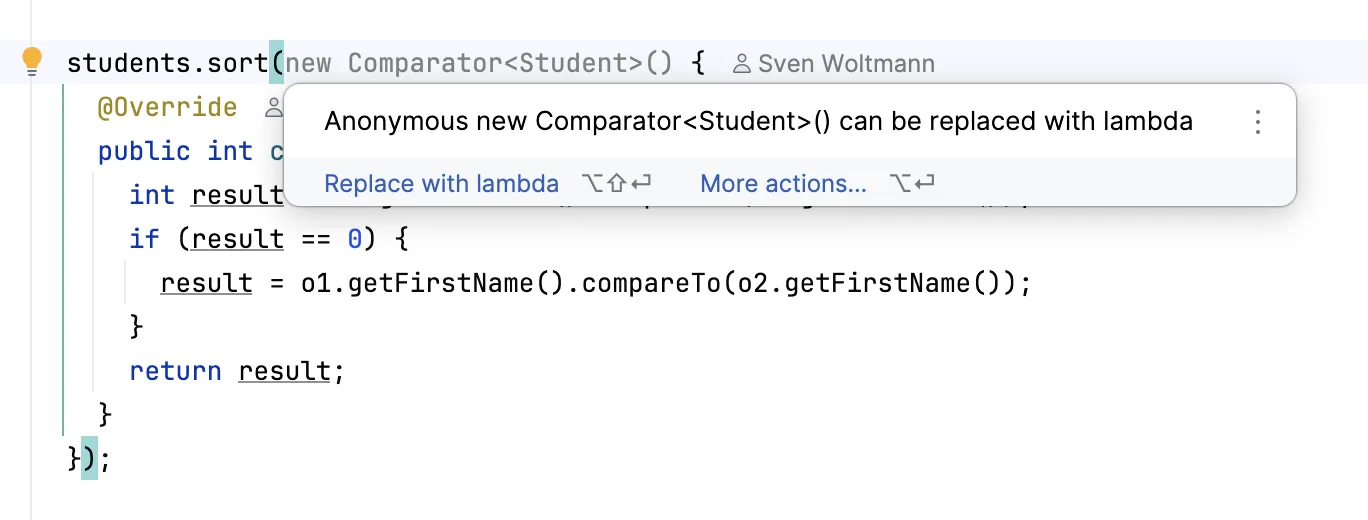
You will find out what the result is in the next section.
Writing a Java Comparator as a Lambda
From Java 8 on, we can use a lambda instead of the anonymous class. Sorting by last name is then done as follows:
students.sort((o1, o2) -> o1.getLastName().compareTo(o2.getLastName()));Sorting by last and first name is also made shorter by the lambda notation:
students.sort((o1, o2) -> {
  int result = o1.getLastName().compareTo(o2.getLastName());
  if (result == 0) {
    result = o1.getFirstName().compareTo(o2.getFirstName());
  }
  return result;
});
It gets shorter with the method that I show in the following section. A modern IDE also offers us this step:
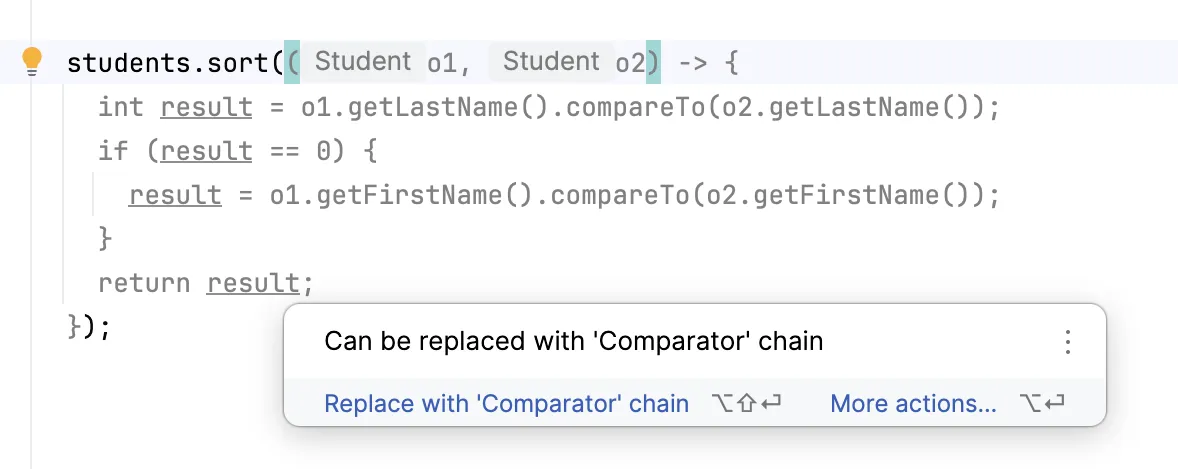
Creating a Comparator With Comparator.comparing()
The shortest way to construct a comparator is Comparator.comparing() together with the methods thenComparing() and reversed() that you call on the result – also since Java 8, including variants for the primitive data types int, long, and double.
To sort the students by last name, we can write the following:
students.sort(Comparator.comparing(Student::getLastName));We simply pass a reference to the method that returns the value to be sorted by. The Javadoc calls this value the so-called sort key and the parameter of comparing() accordingly keyExtractor – the term comes up again below with the null values.
Sorting by Multiple Criteria With thenComparing()
We sort by last and first names as follows:
students.sort(Comparator.comparing(Student::getLastName)
    .thenComparing(Student::getFirstName));
This notation makes it easy for us to also cover the scenario where two students have the same last name and the same first name. To sort them additionally by ID, we just have to add a thenComparingInt():
students.sort(Comparator.comparing(Student::getLastName)
    .thenComparing(Student::getFirstName)
    .thenComparingInt(Student::getId));
Comparator.comparing() and the comparator chains we can build with it not only make the code shorter but also more expressive: you see at a glance what is being sorted by.
Sorting in Descending Order With reversed()
You sort in descending order with reversed():
students.sort(Comparator.comparing(Student::getLastName).reversed());reversed() reverses the entire chain before it – with comparing(…).thenComparing(…).reversed(), both criteria. The StringLengthComparator with the constants ASC and DESC from the section “Comparator as a Public Class” thus shrinks to a single line:
Arrays.sort(names, Comparator.comparingInt(String::length).reversed());For the natural order and its reverse, there are Comparator.naturalOrder() and Comparator.reverseOrder().
Sorting null Values With nullsFirst() and nullsLast()
Comparator.comparing() throws a NullPointerException as soon as an element’s key is null – in the example, a missing last name. The second parameter of comparing(), a comparator for the key, takes care of that – here Comparator.nullsLast(), which sorts null to the end and passes all other keys on to the given comparator:
students.sort(Comparator.comparing(Student::getLastName,
    Comparator.nullsLast(Comparator.naturalOrder())));
Objects without a last name thus end up at the end, with nullsFirst() at the beginning. A Comparator.nullsLast(comparator) around the whole chain, on the other hand, treats null as an element of the students list, not as a key.
Sorting Streams With Comparator.comparing()
The same comparator chain also sorts a stream:
List<Student> sorted = students.stream()
    .sorted(Comparator.comparing(Student::getLastName))
    .toList();
Comparable vs. Comparator – Summary
In the course of the article, we learned about the interfaces java.lang.Comparable and java.util.Comparator. The table compares them:
Comparable | Comparator | |
|---|---|---|
| Package | java.lang | java.util |
| Method | compareTo(T o) | compare(T o1, T o2) |
| Implemented by | the class itself | a separate object |
| Orders per class | exactly one, the natural order | any number |
| Created via | implements Comparable<T> | class, anonymous class, lambda, or Comparator.comparing() |
| Typical call | Collections.sort(list) | list.sort(comparator) |
Using a Comparator, we can also sort objects that do not implement the Comparable interface, i.e., that do not have a natural order.
Since Java 8, comparators can be defined in a single line, as for example in students.sort(Comparator.comparing(Student::getLastName)).
My recommendation: use Comparable only for the one obvious order of a class – such as an ID or a point in time – and every other order as a Comparator with Comparator.comparing(). And never implement compareTo() by subtraction.
If you enjoyed this article, I’d appreciate a review on my ProvenExpert profile.