Java 12, released on March 19, 2019, is the first “interim” release after the Long-Term-Support (LTS) release Java 11.
The changes to Java 12 are somewhat moderate compared to the previous versions. For the first time since Java 7, there is no final change to the language itself.
I have sorted the changes by relevance for daily developer work. I’ll start with enhancements to the class library. Next are performance improvements, experimental and preview features, and finally, minor changes you probably won’t encounter as a developer.
New String and Files Methods
After we got a few new String methods in Java 11 and the Files.readString() and writeString() methods, the JDK developers extended both classes again for Java 12.
String.indent()
To indent a string, we used to write a small helper method that put the desired number of spaces in front of the String. If it had to work across multiple lines, the method became correspondingly complex.
Java 12 has such a method built-in: String.indent(). The following example shows how to indent a multiline string by four spaces:
String s = "I am\na multiline\nString.";
System.out.println(s);
System.out.println(s.indent(4));
The program prints the following:
I am
a multiline
String.
    I am
    a multiline
    String.
With a negative value, indent() removes leading whitespace characters: indent(-2) removes up to two from each line. The method also normalizes the line terminators to \n and terminates the last line with a line break as well – which is why the println() in the example prints an empty line at the end.
String.transform()
The new String.transform() method applies an arbitrary function to a String and returns the function’s return value. Here are a few examples:
String uppercase = "abcde".transform(String::toUpperCase);
Integer i        = "12345".transform(Integer::valueOf);
BigDecimal big   = "1234567891011121314151617181920".transform(BigDecimal::new);
When you look at the source code of String.transform(), you will notice that there is no rocket science at work. The method reference is interpreted as a Function, and the String is passed to its apply() method:
public <R> R transform(Function<? super String, ? extends R> f) {
  return f.apply(this);
}
Then why use transform() instead of just writing the following?
String uppercase = "abcde".toUpperCase();
Integer i        = Integer.valueOf("12345");
BigDecimal big   = new BigDecimal("1234567891011121314151617181920");
One advantage of String.transform() is that the function to be applied can be determined dynamically at runtime, while in the latter notation, the conversion is fixed at compile time.
A second advantage shows when we apply several operations to a string one after the other – including our own helper methods such as MyStrings.addExclamation() and MyStrings.sanitize(). Without transform(), we have to nest the calls:
String input = "  Hello, World!  ";

String result = MyStrings.sanitize(
    MyStrings.addExclamation(
        input.strip()))
    .toLowerCase();
With transform(), this becomes a chain:
String result = input
    .strip()
    .transform(MyStrings::addExclamation)
    .transform(MyStrings::sanitize)
    .toLowerCase();
In the first variant, it is hard to see in which order the operations are applied to the input string; in the second notation, you can see it at a glance.
Files.mismatch()
You can use the Files.mismatch() method to compare the contents of two files.
The method returns -1 if both files are the same. Otherwise, it returns the position of the first byte at which both files differ. If one of the files ends before a difference is detected, the length of that file is returned.
There is no JEP for these methods; they are tracked in the bug tracker under JDK-8200434 (indent()), JDK-8203442 (transform()), and JDK-8202285 (Files.mismatch()).
The Teeing Collector
For some requirements, you may want to terminate a Stream with two collectors instead of one and combine the result of both collectors.
In the following example source code, we want to determine the difference between the largest and the smallest number in a stream of random numbers (we use Optional.orElseThrow() introduced in Java 10 to avoid being flagged for a “code smell”):
Stream<Integer> numbers = new Random().ints(100).boxed();

int min = numbers.collect(Collectors.minBy(Integer::compareTo)).orElseThrow();
int max = numbers.collect(Collectors.maxBy(Integer::compareTo)).orElseThrow();
long range = (long) max - min;
The program compiles but aborts at runtime with an exception:
Exception in thread "main" java.lang.IllegalStateException:
        stream has already been operated upon or closed
    at java.base/java.util.stream.AbstractPipeline.evaluate(AbstractPipeline.java:229)
    at java.base/java.util.stream.ReferencePipeline.collect(ReferencePipeline.java:578)
    at eu.happycoders.sandbox.TeeingCollectorTest.main(TeeingCollectorTest.java:12)
The exception text lets us know that we may terminate a Stream only once.
How can we solve this task then?
One variant would be to write a custom collector that accumulates minimum and maximum in a 2-element int array:
Stream<Integer> numbers = new Random().ints(100).boxed();

int[] result =
    numbers.collect(
        () -> new int[] {Integer.MAX_VALUE, Integer.MIN_VALUE},
        (minMax, i) -> {
          if (i < minMax[0]) minMax[0] = i;
          if (i > minMax[1]) minMax[1] = i;
        },
        (minMax1, minMax2) -> {
          if (minMax2[0] < minMax1[0]) minMax1[0] = minMax2[0];
          if (minMax2[1] > minMax1[1]) minMax1[1] = minMax2[1];
        });

long range = (long) result[1] - result[0];
This approach is quite complex and not very legible.
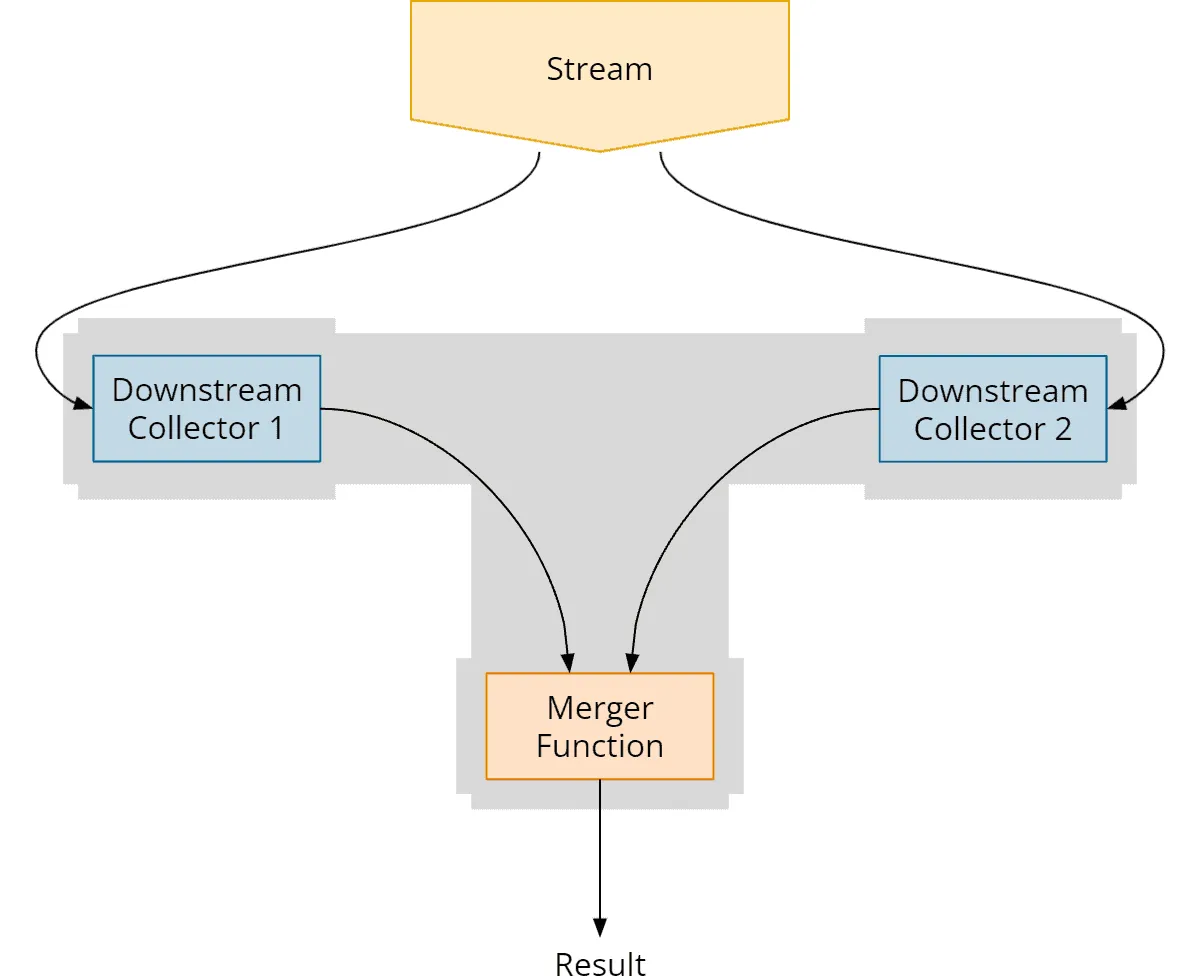
It is easier with the “Teeing Collector” introduced in Java 12. We can specify two collectors (called downstream collectors) and a merger function that combines the results of the two collectors:
Stream<Integer> numbers = new Random().ints(100).boxed();

long range =
    numbers.collect(
        Collectors.teeing(
            Collectors.minBy(Integer::compareTo),
            Collectors.maxBy(Integer::compareTo),
            (min, max) -> (long) max.orElseThrow() - min.orElseThrow()));
Much more elegant and readable, right?
Why is this collector called “Teeing Collector”?
The name comes from the English pronunciation of the letter “T”, as the collector’s graphical representation looks like a … “T”:
There is no JEP for the Teeing Collector; it is tracked in the bug tracker under JDK-8205461.
Support for Compact Number Formatting
Using the static method NumberFormat.getCompactNumberInstance(), we can create a formatter for the so-called “compact number formatting”. This is a form that is easy for humans to read, such as “2M” or “3 billion”.
The following example shows how some numbers are displayed – once in the short and once in the long compact form:
NumberFormat nfShort =
    NumberFormat.getCompactNumberInstance(Locale.US, NumberFormat.Style.SHORT);
NumberFormat nfLong =
    NumberFormat.getCompactNumberInstance(Locale.US, NumberFormat.Style.LONG);

System.out.println("        1,000 short -> " + nfShort.format(1_000));
System.out.println("      456,789 short -> " + nfShort.format(456_789));
System.out.println("    2,000,000 short -> " + nfShort.format(2_000_000));
System.out.println("3,456,789,000 short -> " + nfShort.format(3_456_789_000L));
System.out.println();
System.out.println("        1,000 long -> " + nfLong.format(1_000));
System.out.println("      456,789 long -> " + nfLong.format(456_789));
System.out.println("    2,000,000 long -> " + nfLong.format(2_000_000));
System.out.println("3,456,789,000 long -> " + nfLong.format(3_456_789_000L));
The program will print the following:
        1,000 short -> 1K
      456,789 short -> 457K
    2,000,000 short -> 2M
3,456,789,000 short -> 3B

        1,000 long -> 1 thousand
      456,789 long -> 457 thousand
    2,000,000 long -> 2 million
3,456,789,000 long -> 3 billion
“Compact Number Formats” is defined in the corresponding Unicode standard.
There is no JEP for Compact Number Formatting; it is tracked in the bug tracker under JDK-8177552.
Performance Improvements
The following improvements ensure that our Java applications start faster, have lower garbage collector latencies, and a better memory footprint.
Default CDS Archives
In the article on Java 10, you can find an introduction to Class-Data Sharing (CDS).
To enable class data sharing, you previously had to run java -Xshare:dump once for each Java installation to generate the classes.jsa shared archive file.
With the JDK Enhancement Proposal 341, the JDK has been shipped with this file included on all 64-bit platforms since Java 12, so that the execution of java -Xshare:dump is no longer necessary and Java applications use the default CDS archive by default.
Abortable Mixed Collections for G1
One of the goals of the G1 Garbage Collector is to adhere to specified maximum pause times for those cleanup tasks that it cannot do concurrently with the application – i.e., to not stop the application for longer than the specified time.
For G1, you specify this time with the -XX:MaxGCPauseMillis parameter. The default maximum pause time is 200 ms if you omit the parameter.
G1 uses a heuristic to determine a set of heap regions to clean up during such a stop-the-world phase (called the “collection set”).
Especially in the case of “mixed collections” (i.e., when cleaning up regions of young and old generations), it can happen – notably if the behavior of the application changes – that the heuristic determines a collection set that is too large and thus the application is interrupted longer than intended.
JDK Enhancement Proposal 344 optimizes the Mixed Collections to split the collection set into a mandatory and an optional part if the maximum pause time is repeatedly exceeded. The mandatory part is executed uninterruptibly – and the optional part in small steps until the maximum pause time is reached.
In the meantime, the algorithm tries to adjust the heuristic so that it can soon again determine collection sets that it can process in the given pause time.
Promptly Return Unused Committed Memory from G1
In environments where you pay for the memory you actually use, the garbage collector should quickly return unused memory to the operating system.
The G1 garbage collector can return memory, but it does so only during the garbage collection phase. However, no memory is returned if the heap allocation or the current rate of object allocations does not trigger a garbage collection cycle.
Suppose we have an application that runs a memory-intensive batch process only once a day but is pretty much idle the rest of the time. Thus, after the batch process has been processed, there is no reason for a garbage collection cycle, and we pay for memory containing unused objects (area highlighted in orange) for most of the day:
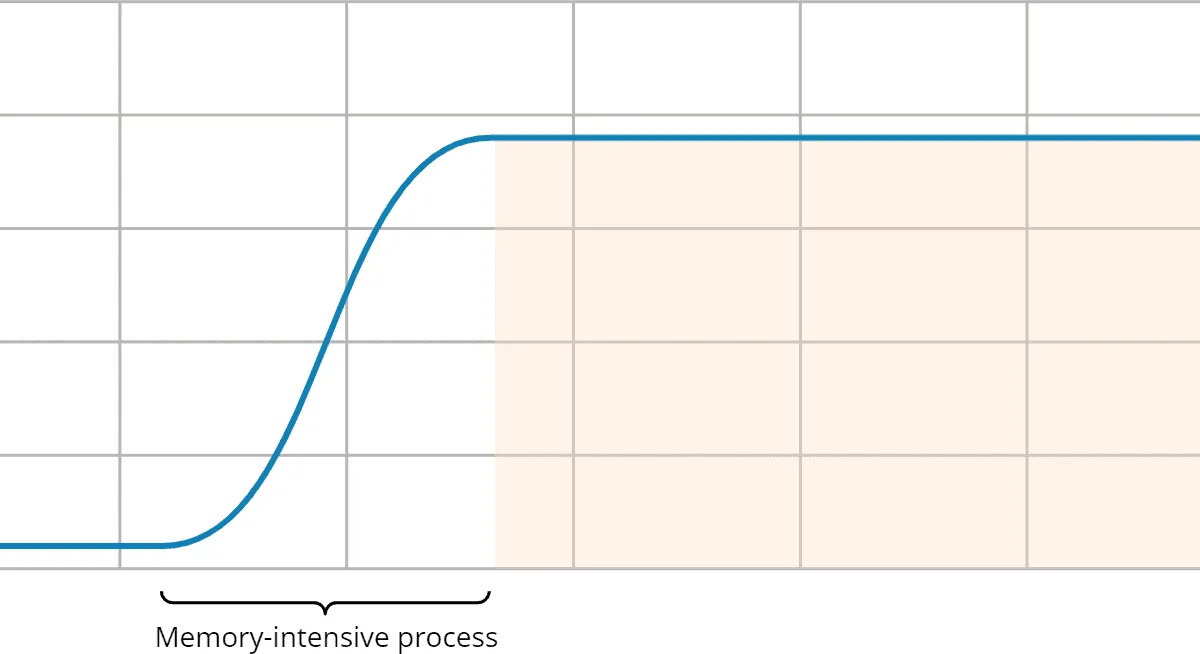
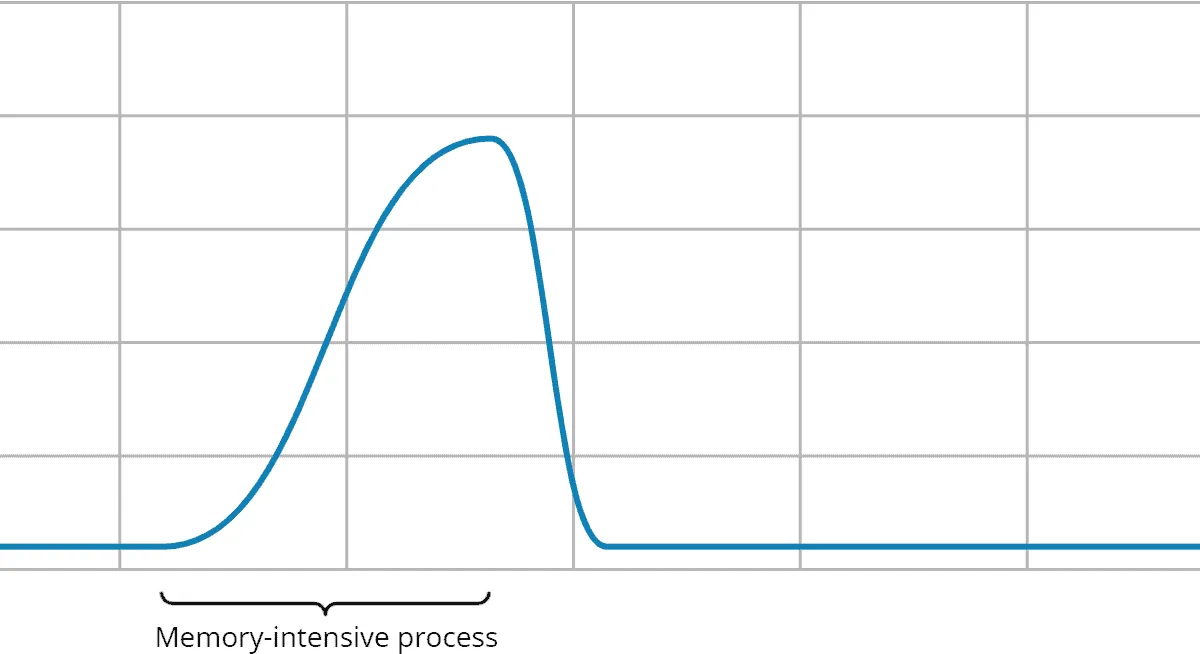
JEP 346 provides a solution to this problem. When the application is inactive, a concurrent garbage collection cycle is started periodically, releasing any memory that may no longer be needed.
This feature is disabled by default. You can enable it by specifying an interval in milliseconds in which G1 should check whether such a cycle should be started via the -XX:G1PeriodicGCInterval parameter. This way, it will return the memory quickly:
Experimental and Preview Features
This section lists experimental features and previews, i.e., features that are still in the development stage and may be modified based on feedback from the Java community until the final release.
Instead of going into detail about these features, I refer to the Java version in which the respective features became production-ready.
Switch Expressions (Preview)
Thanks to JDK Enhancement Proposal 325, we can now simplify switch statements by separating multiple cases with commas and using arrow notation to eliminate error-prone break statements:
switch (day) {
  case MONDAY, FRIDAY, SUNDAY -> System.out.println(6);
  case TUESDAY                -> System.out.println(7);
  case THURSDAY, SATURDAY     -> System.out.println(8);
  case WEDNESDAY              -> System.out.println(9);
}
Furthermore, we can use switch expressions to assign case-dependent values to a variable:
int numLetters = switch (day) {
  case MONDAY, FRIDAY, SUNDAY -> 6;
  case TUESDAY                -> 7;
  case THURSDAY, SATURDAY     -> 8;
  case WEDNESDAY              -> 9;
};
switch expressions can also be written using the conventional notation (with colon and break). When doing so, you specify the value to be returned after the break keyword:
int numLetters = switch (day) {
  case MONDAY, FRIDAY, SUNDAY:
    break 6;
  case TUESDAY:
    break 7;
  case THURSDAY, SATURDAY:
    break 8;
  case WEDNESDAY:
    break 9;
};
(In Java 13, break was replaced by yield.)
Switch Expressions have been production-ready since Java 14. You can find all details about them in the main article on Switch Expressions.
To use Switch Expressions in Java 12, you have to run javac and java with the --enable-preview parameter. Current IDEs no longer offer the preview language level of Java 12.
Shenandoah: A Low-Pause-Time Garbage Collector (Experimental)
In Java 11, Oracle’s “Z Garbage Collector” was introduced as an experimental feature.
Java 12 brings another low-latency garbage collector: “Shenandoah”, developed by Red Hat. Just like ZGC, Shenandoah aims to keep GC pauses short – independent of the heap size. To achieve this, it performs marking and evacuation concurrently with the application.
You can enable Shenandoah using the following option in the java command line:
-XX:+UnlockExperimentalVMOptions -XX:+UseShenandoahGC
Shenandoah and ZGC have been production-ready since Java 15; in the article about it, I describe both garbage collectors in more detail.
(This experimental release is defined in JDK Enhancement Proposal 189.)
Other Changes in Java 12 (Which You Don’t Necessarily Need to Know as a Java Developer)
In this section, I list changes that will not affect the daily work of most Java developers. However, it is certainly not wrong to have skimmed over the changes once.
Unicode 11
After Java 11 added support for Unicode 10, support was raised to Unicode 11 in Java 12. That means that, in particular, the classes String and Character have to handle the new characters, code blocks, and scripts added in Unicode 11.
For an example, see the section on Unicode 10 linked earlier.
There is no JEP for Unicode 11 support; it is tracked in the bug tracker under JDK-8209923.
ZGC: Concurrent Class Unloading
Since Java 12, ZGC can unload classes that are no longer needed – concurrently, without stopping the application for it; GC pauses do not get longer because of it. The feature is enabled by default and can be disabled with -XX:-ClassUnloading.
There is no JEP for this change; it is tracked in the bug tracker under JDK-8214897.
Microbenchmark Suite
Until Java 11, the microbenchmarks for the JDK class library were managed as a separate project. These benchmarks regularly measure the performance of the JDK class library and are used, for example, to ensure that JDK methods have not become slower with new Java releases.
JDK Enhancement Proposal 230 moves the existing collection of microbenchmarks into the JDK source code to simplify the execution and evolution of tests.
JVM Constants API
The constant pool of a .class file contains constants that arise when compiling a .java file. These are, for one thing, constants that are defined in the Java code, such as the string “Hello World!”, but also the names of referenced classes and methods (e.g., “java/lang/System”, “out”, and “println”). Each constant is assigned a number that the bytecode of the .class file references.
JDK Enhancement Proposal 334 intends to make it easier to write Java programs that read or write JVM bytecode. For this purpose, it provides new interfaces and classes to represent the elements in the constant pool.
These interfaces and classes are located in the new java.lang.constant package and form a hierarchy beginning with the ConstantDesc interface. A “Hello World!”, for example, is represented by the String class, which, since Java 12, also implements this interface (just like Integer, Long, Float, and Double).
It gets more complicated with constants that represent references to classes and their methods. We cannot use the reflection classes Class and MethodHandle because we do not necessarily know the referenced classes and methods, but only their names, parameters, and return values.
For this purpose, we now have (among others) the classes ClassDesc to denote a class and MethodHandleDesc and MethodTypeDesc to denote a method.
Further details of this rather exotic feature would go beyond the scope of this article.
One AArch64 Port, Not Two
Until Java 11, the JDK had two different ports for 64-bit ARM CPUs:
- “arm64” – developed by Oracle (as an extension of the 32-bit ARM port “arm”)
- “aarch64” – simultaneously but independently developed by Red Hat
JDK Enhancement Proposal 340 removes Oracle’s port to focus development resources on a single port.
Complete List of All Changes in Java 12
This article has presented all the features of Java 12 that are defined in JDK Enhancement Proposals, as well as enhancements to the class library and the JVM that are not associated with any JEP.
For a complete list of changes, see the official Java 12 Release Notes.
Summary
The changes in Java 12 are pretty manageable. We got a few new String and Files methods and the Teeing Collector, which allows us to terminate a Stream over two collectors and combine their results.
Class data sharing is now enabled by default, thanks to the classes.jsa shared archive file provided on 64-bit systems.
The G1 Garbage Collector can abort mixed collections if they take too long. It quickly returns unneeded memory to the operating system.
With Switch Expressions and the Shenandoah Garbage Collector, two experimental or preview features have also found their way into Java 12.
Did this article answer your questions? Then I’d be happy about a review on my ProvenExpert profile – it helps other developers find this content.