The last part of the tutorial series was about implementing a queue with a linked list. In this part, we implement a queue with an array – first a bounded queue (i.e., one with a fixed capacity) – and then an unbounded queue (i.e., one whose capacity can change). If you are new to the series: what a queue is and how the FIFO principle works is explained in the first part.
Let’s start with the simple variant, the bounded queue.
Implementing a Bounded Queue with an Array
We create an empty array and fill it from left to right (i.e., ascending from index 0) with the elements inserted into the queue.
The following image shows a queue with an array called elements, which can hold eight elements. So far, six elements have been inserted into the queue. tailIndex always indicates the next insertion position:
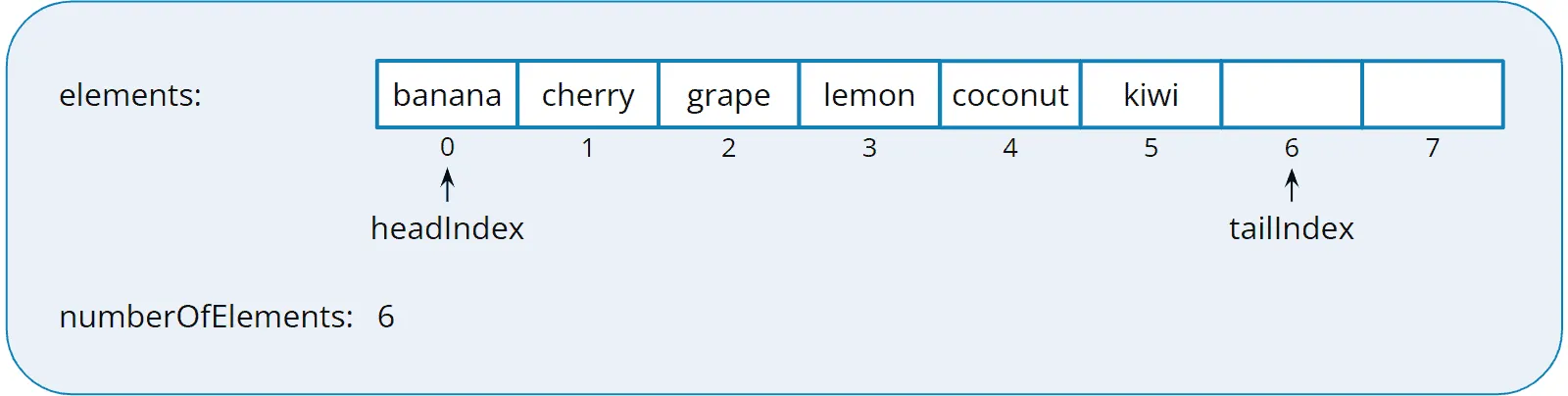
When dequeuing the elements, we also read them from left to right and remove them from the array. headIndex always shows the next read position.
The following illustration shows the queue after we have retrieved the first four of the six elements:
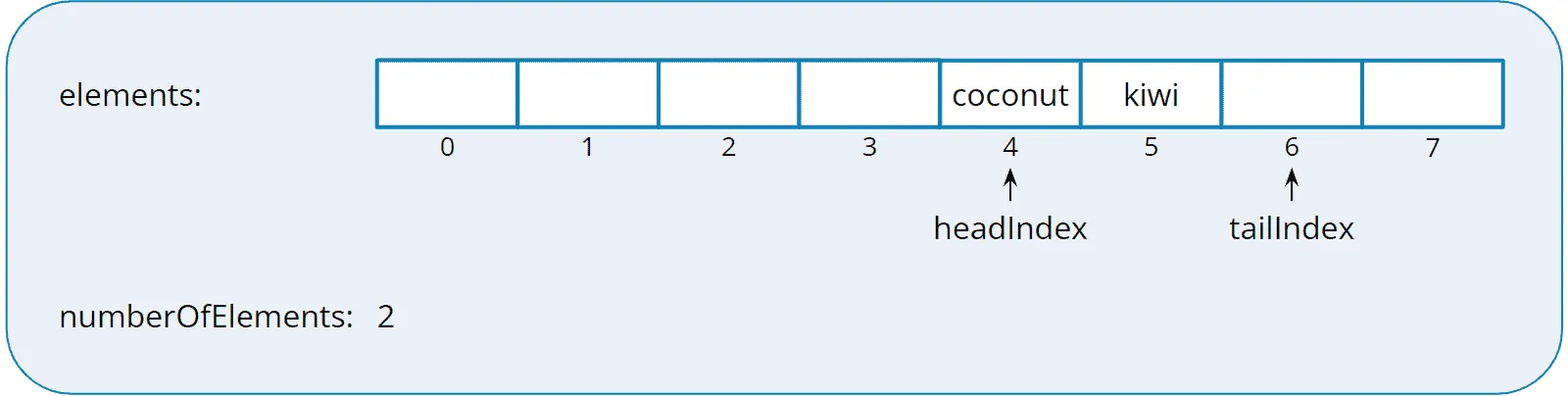
Now that we are near the end of the array, we could (without additional logic) write only two more elements to the queue. To fill up the queue to eight elements again, there are two possible solutions:
- We move the remaining elements to the left, to the beginning of the array. This operation is costly, especially for large arrays.
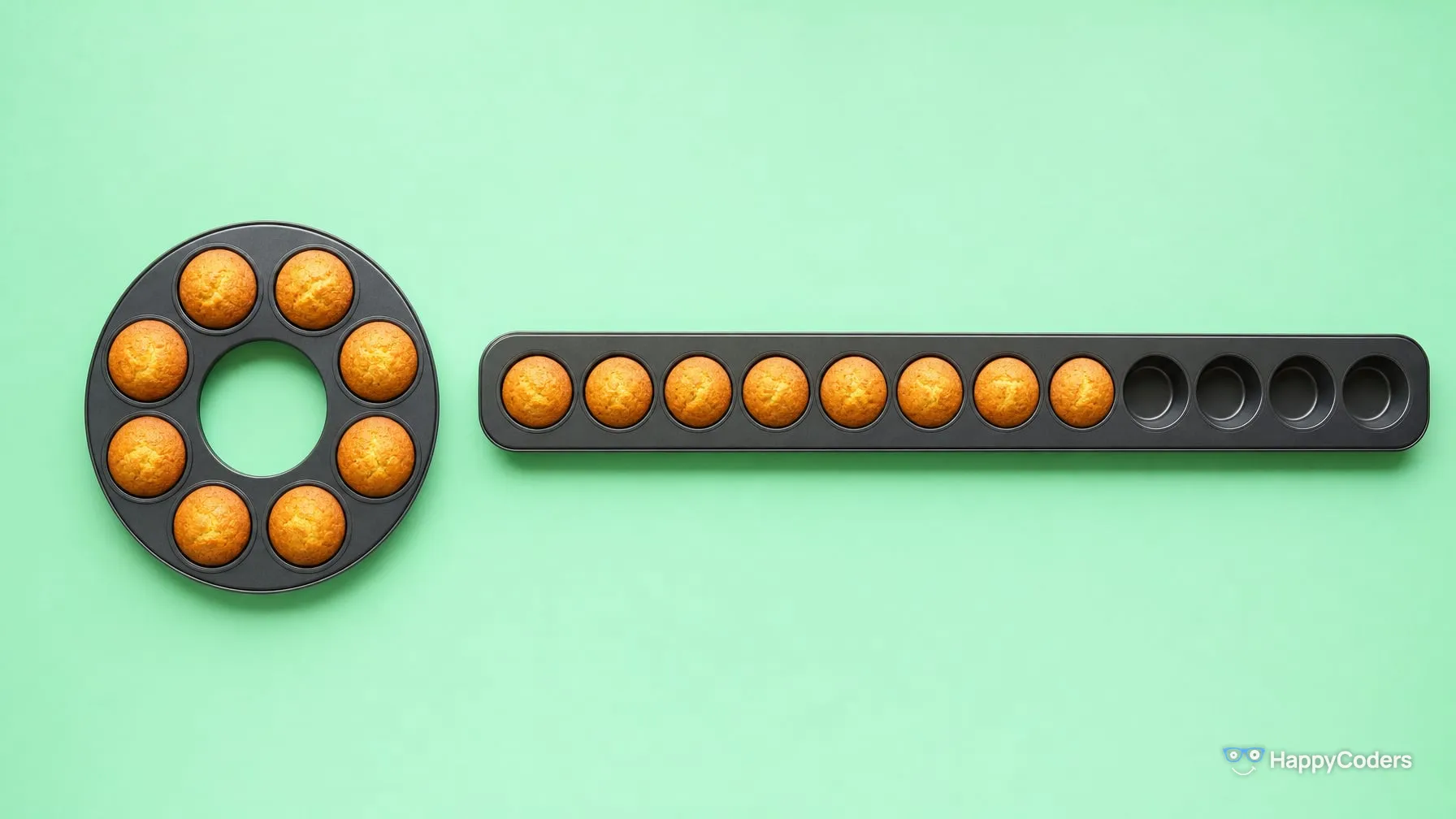
- The better solution is a ring buffer, also called a circular array. This means that when we reach the end of the array, we continue at its beginning. This applies to both the enqueue and dequeue operations.
Circular Array
To illustrate how a ring buffer works, I have rendered the array from the example as a circle:
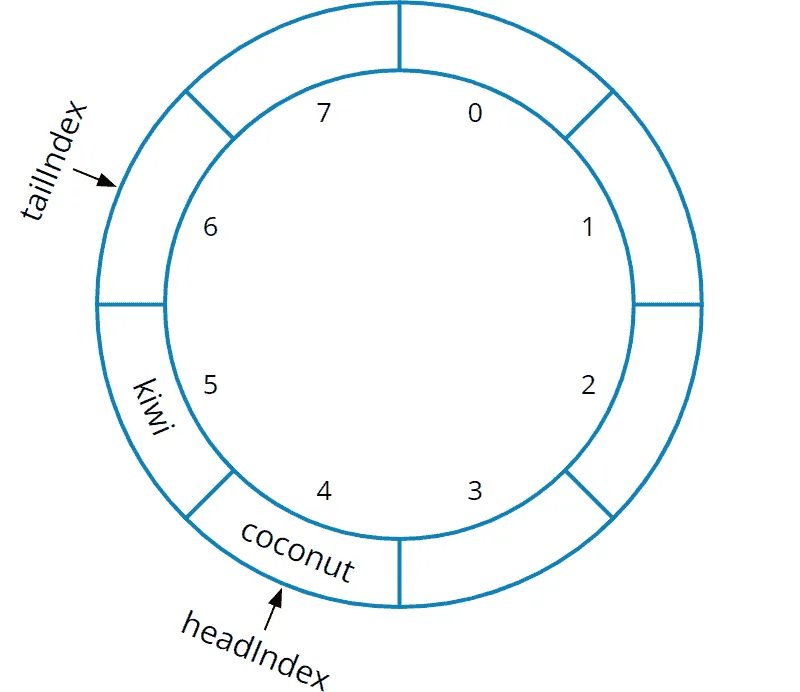
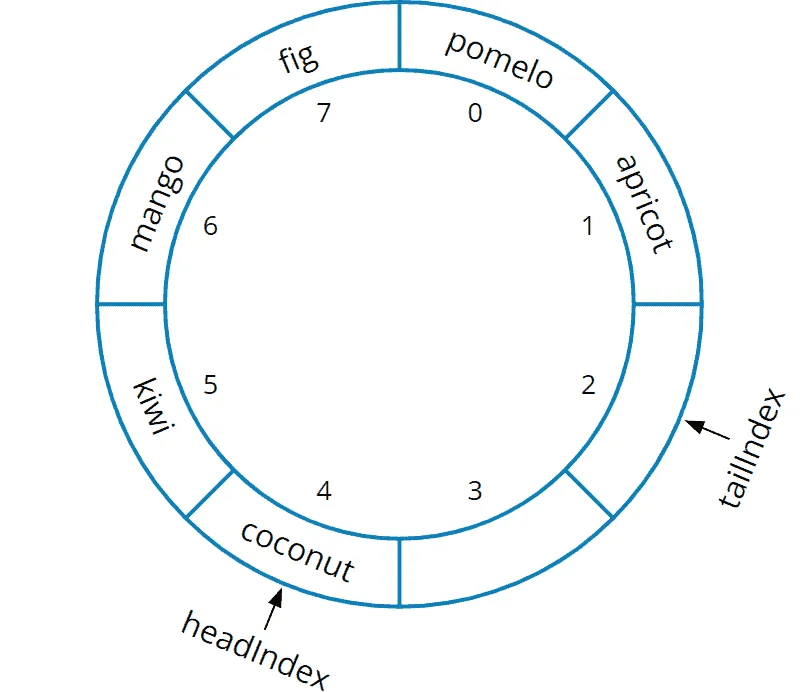
We insert additional elements clockwise. In the following example, we add “mango”, “fig”, “pomelo”, and “apricot” to positions 6, 7 – and then 0 and 1:
Back in the “flat” representation, the array now looks like this:
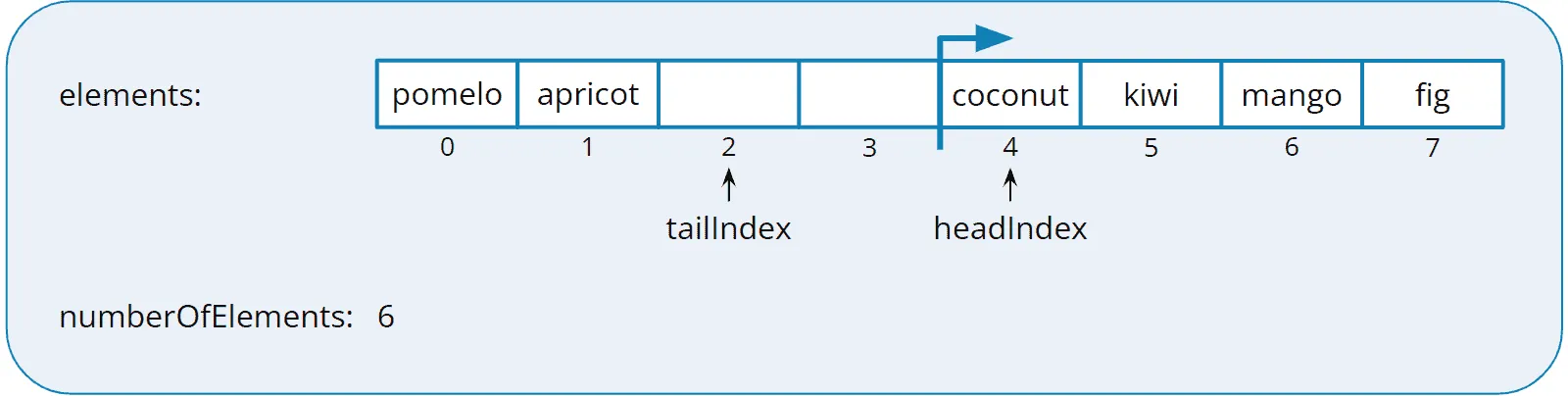
Both in the circle representation and this one, it is easy to see that the element “fig” at index 7 is followed by the element “pomelo” at index 0.
Dequeueing the elements works in the same way. With each dequeue operation, headIndex moves one position to the right, where 7 is not followed by 8 but by 0.
Full Queue vs. Empty Queue
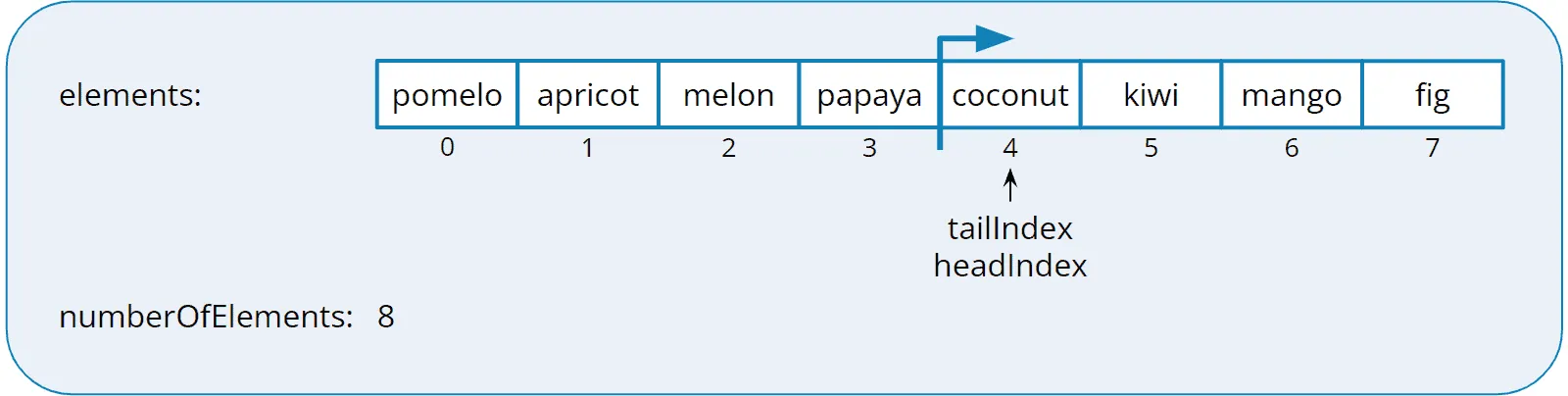
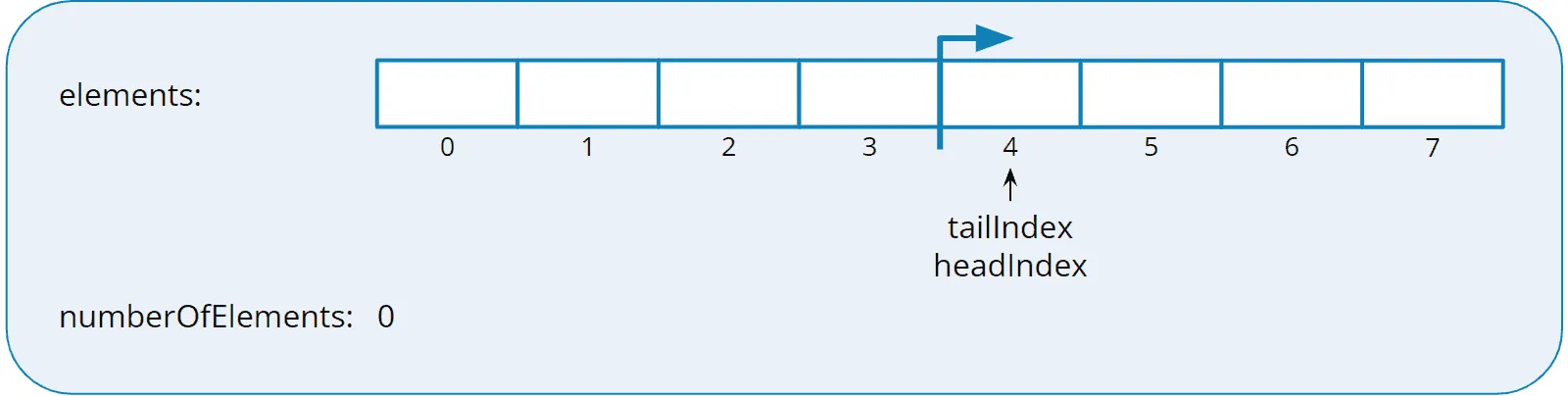
tailIndex and headIndex are in the same position for both an empty and a full queue. To be able to recognize when the queue is full, we also store the number of elements.
This is what a full queue might look like:
And so an empty one (e.g., after all eight elements have been taken from the queue just shown):
Storing the number of elements is not the only way to distinguish a full queue from an empty one, but it is the simplest. I explain the two other ways – always leaving one slot free, or checking the content of the slot both indices point to – and which JDK class takes which way in the section “Full or Empty? Three Answers” of the article about the ring buffer.
Source Code for the Bounded Queue Using an Array
Implementing a bounded queue with an array is quite simple. You can also find the following code in the BoundedArrayQueue class in the GitHub repository.
public class BoundedArrayQueue<E> implements Queue<E> {

  private final Object[] elements;
  private int headIndex;
  private int tailIndex;
  private int numberOfElements;

  public BoundedArrayQueue(int capacity) {
    if (capacity < 1) {
      throw new IllegalArgumentException("Capacity must be 1 or higher");
    }

    elements = new Object[capacity];
  }

  @Override
  public void enqueue(E element) {
    if (numberOfElements == elements.length) {
      throw new IllegalStateException("The queue is full");
    }
    elements[tailIndex] = element;
    tailIndex++;
    if (tailIndex == elements.length) {
      tailIndex = 0;
    }
    numberOfElements++;
  }

  @Override
  public E dequeue() {
    final E element = elementAtHead();
    elements[headIndex] = null;
    headIndex++;
    if (headIndex == elements.length) {
      headIndex = 0;
    }
    numberOfElements--;
    return element;
  }

  @Override
  public E peek() {
    return elementAtHead();
  }

  private E elementAtHead() {
    if (isEmpty()) {
      throw new NoSuchElementException();
    }

    @SuppressWarnings("unchecked")
    E element = (E) elements[headIndex];

    return element;
  }

  @Override
  public boolean isEmpty() {
    return numberOfElements == 0;
  }
}
In dequeue(), the method sets the field to null before advancing headIndex. Without this line, the array would hold a reference to the dequeued element until the field is overwritten – and the garbage collector could not free the object until then.
Note that BoundedArrayQueue does not implement the java.util.Queue interface, but a custom one that defines only the four methods enqueue(), dequeue(), peek(), and isEmpty() (see Queue in the GitHub repository):
public interface Queue<E> {
  void enqueue(E element);
  E dequeue();
  E peek();
  boolean isEmpty();
}
Neither class in this article is thread-safe. An array queue that several threads may use at the same time is the JDK’s ArrayBlockingQueue.
Find out how to use BoundedArrayQueue (and all other implementations of the Queue interface) in the QueueDemo program.
Implementing an Unbounded Queue with an Array
Implementing an unbounded queue, i.e., a queue with no size limit, is somewhat more complex. An array cannot grow. And even if it did – it could not grow at the end but would have to create free space at precisely the location where tailIndex and headIndex are pointing.
Let’s look again at the full queue from the end of the previous example:
To insert another element, we need to increase the queue’s capacity by increasing the size of the array.
The additional space, however, would have to appear between the tail and head of the queue, i.e., in the middle of the array:
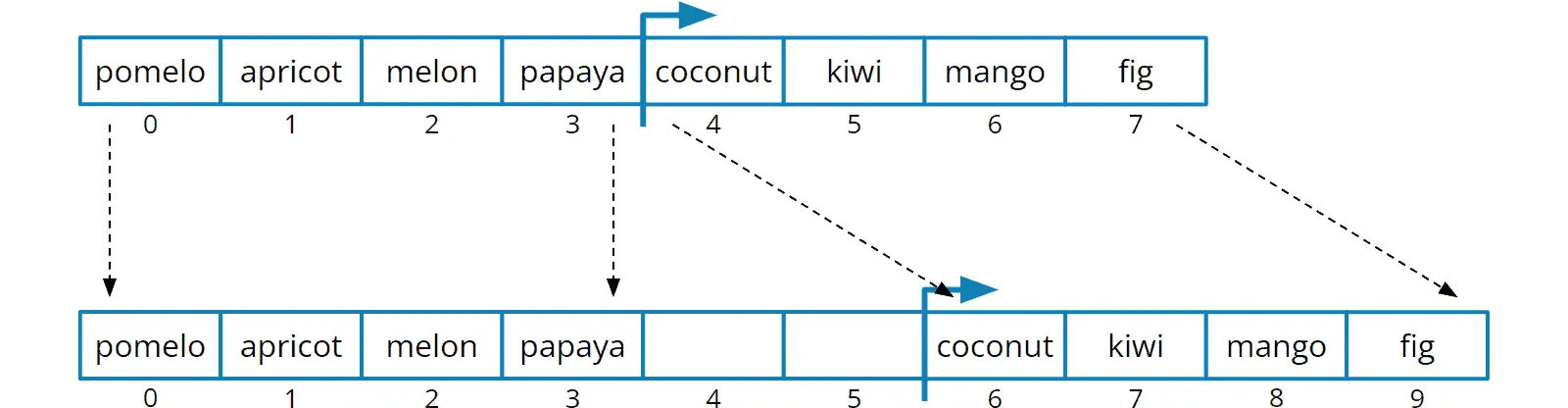
That is not readily possible. An array cannot grow – and certainly not in the middle. Instead, we have to create a new array and copy the existing elements into it.
But if we have to recopy the elements anyway, we can copy them in the correct order to the beginning of the new array, like this:
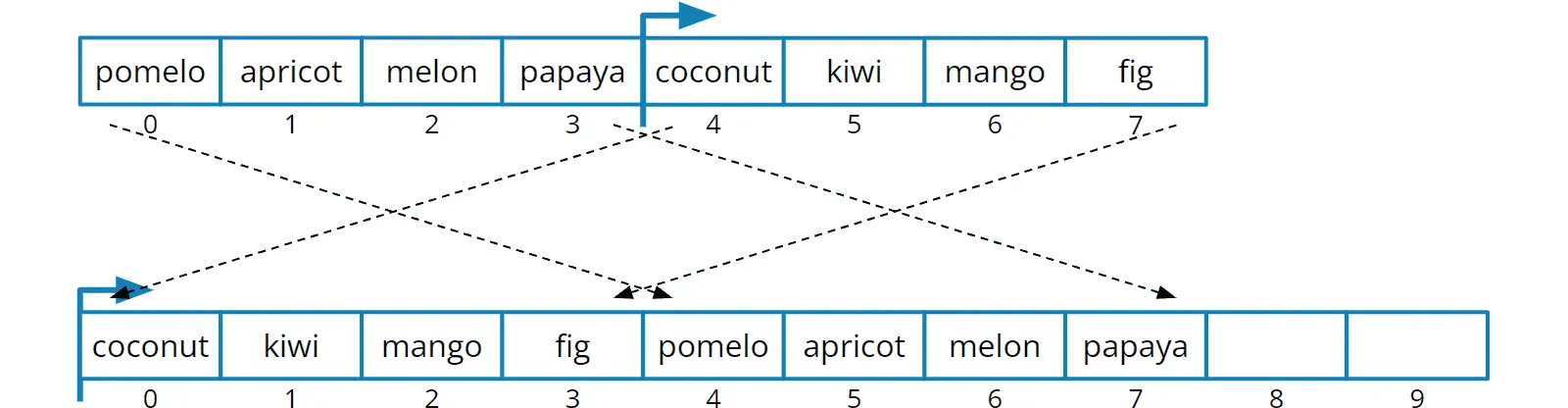
The code for this is not that complicated, as you will see in the next section.
Source Code for the Unbounded Queue Using an Array
The following code shows the ArrayQueue class from the tutorial GitHub repository.
There are two constructors: one that lets you specify the initial size of the array and a default constructor that sets the initial capacity to ten.
Each time the enqueue() method is called, it checks whether the array is full. If it is, it invokes the grow() method.
The grow() method first calls calculateNewCapacity() to calculate the new size of the array. I have printed this method here in simplified form: it multiplies the current size by 1.5.
The calculateNewCapacity() method in the GitHub repository doubles small arrays, grows arrays of 64 fields or more by half, and never exceeds Integer.MAX_VALUE - 8 – the limit that ArrayList and ArrayDeque also use as the maximum size for their arrays. However, the focus of this article should not be on determining the new size but on the actual expansion of the array.
Therefore, the growToNewCapacity() method creates the new array, copies the elements to the appropriate positions in the new array, and resets headIndex and tailIndex.
public class ArrayQueue<E> implements Queue<E> {

  private static final int DEFAULT_INITIAL_CAPACITY = 10;

  private Object[] elements;
  private int headIndex;
  private int tailIndex;
  private int numberOfElements;

  public ArrayQueue() {
    this(DEFAULT_INITIAL_CAPACITY);
  }

  public ArrayQueue(int capacity) {
    if (capacity < 1) {
      throw new IllegalArgumentException("Capacity must be 1 or higher");
    }

    elements = new Object[capacity];
  }

  @Override
  public void enqueue(E element) {
    if (numberOfElements == elements.length) {
      grow();
    }
    elements[tailIndex] = element;
    tailIndex++;
    if (tailIndex == elements.length) {
      tailIndex = 0;
    }
    numberOfElements++;
  }

  private void grow() {
    int newCapacity = calculateNewCapacity(elements.length);
    growToNewCapacity(newCapacity);
  }

  static int calculateNewCapacity(int currentCapacity) {
    return currentCapacity + currentCapacity / 2;
  }

  private void growToNewCapacity(int newCapacity) {
    Object[] newArray = new Object[newCapacity];

    // Copy to the beginning of the new array: tailIndex to end of the old array
    int oldArrayLength = elements.length;
    int numberOfElementsAfterTail = oldArrayLength - tailIndex;
    System.arraycopy(elements, tailIndex, newArray, 0, numberOfElementsAfterTail);

    // Append to the new array: beginning to tailIndex of the old array
    if (tailIndex > 0) {
      System.arraycopy(elements, 0, newArray, numberOfElementsAfterTail, tailIndex);
    }

    // Adjust head and tail
    headIndex = 0;
    tailIndex = oldArrayLength;
    elements = newArray;
  }

  // dequeue(), peek(), elementAtHead(), isEmpty() are the same as in
  // BoundedArrayQueue

}
The methods dequeue(), peek(), elementAtHead(), and isEmpty() are the same as in BoundedArrayQueue from the section before last. I have therefore not printed them again.
You may have noticed that the queue can grow but not shrink again. Perhaps our queue only needs to store a high number of elements during peak loads and would then occupy memory with a mostly empty array. We could extend the queue to copy its contents back to a smaller array after a certain grace period.
I leave this extension to you as a practice task.
Time Complexity of the Queue Using an Array
You can find an introduction to time complexity in the article “Big O Notation and Time Complexity – Easily Explained”.
enqueue() and dequeue() write or read one array field and advance one index – no matter how many elements the queue contains. So the time complexity of both operations is O(1).
When the array grows, growToNewCapacity() copies all elements. This one operation costs O(n). But it occurs less often with each growth: after copying n elements, another n/2 fit in before the array grows again. Averaged over many insertions, it stays at O(1) per enqueue() – this is called amortized O(1).
Advantages and Disadvantages of Implementing the Queue Using an Array
Implementing a queue with an array has two advantages over the linked list: the references to the elements sit next to each other in the array, without a node object per element – that saves memory and is more cache-friendly than a chain of nodes scattered across the heap. And the garbage collector has less to do because it walks a single array instead of a chain of nodes.
In return, an array wastes memory through unoccupied fields – after growing by half, a third of the array is empty. Copying when growing takes time, and the ring buffer logic makes the code more elaborate than the two references of the linked list.
As a rule, the advantages of the array implementation outweigh the disadvantages. That is why, in the JDK, ArrayDeque is my recommendation for a queue in single-threaded applications – which queue suits which purpose is covered in the section “Queue Implementations in Java: Which One to Use?” of the article about the Queue interface.
Outlook
In the next and last part of this tutorial series, I will show you how to implement a PriorityQueue yourself, based on a min-heap.
Was this article helpful to you? Then I’d be happy if you took a moment to leave a review on my ProvenExpert profile.