
Collectors.groupingBy() is a collector of the Java Stream API that groups the elements of a stream by a key. For each element, it computes the key with a function, and all elements with the same key end up in the same group.
This is how you group a list of books by genre:
Map<Genre, List<Book>> booksByGenre = BOOKS.stream()
    .collect(groupingBy(Book::genre));

System.out.println(booksByGenre.get(Genre.GOTHIC));
[Book[title=Frankenstein, author=Mary Shelley, year=1818, genre=GOTHIC],
Book[title=Dracula, author=Bram Stoker, year=1897, genre=GOTHIC]]If you know GROUP BY from SQL, you know the principle. As in SQL, you can then count, sum, or otherwise summarize the elements of the groups – that is the job of a second collector that you pass to groupingBy().
groupingBy() has existed since Java 8, in three variants. In this article, I show you which one to use when, which collectors you can combine with groupingBy(), and when partitioningBy() is the better tool.
In this article, you will find out
- how
groupingBy()distributes the elements into groups, - which three variants of
groupingBy()exist and how to choose the type of the map, - how to count, filter, transform, and summarize the elements of the groups with downstream collectors,
- how to group on several levels and by several fields,
- what happens with a
nullkey, - when
partitioningBy()is the better tool, - how to sort the result,
- how
groupingBy()behaves in parallel streams and whengroupingByConcurrent()fits, - which mistakes to avoid.
The Examples in This Article
The examples use the data model of the article on Java Streams – an enum Genre, a record Book, and a small library of eleven classics:
public enum Genre {
  NOVEL,
  GOTHIC,
  ADVENTURE,
  FANTASY,
  SCIENCE_FICTION
}

public record Book(String title, String author, int year, Genre genre) {}
public class Library {
public static final List<Book> BOOKS = List.of(
new Book("Pride and Prejudice", "Jane Austen", 1813, NOVEL),
new Book("Frankenstein", "Mary Shelley", 1818, GOTHIC),
new Book("Moby-Dick", "Herman Melville", 1851, ADVENTURE),
new Book("From the Earth to the Moon", "Jules Verne", 1865, SCIENCE_FICTION),
new Book("Alice's Adventures in Wonderland", "Lewis Carroll", 1865, FANTASY),
new Book("Around the World in Eighty Days", "Jules Verne", 1873, ADVENTURE),
new Book("Treasure Island", "Robert Louis Stevenson", 1883, ADVENTURE),
new Book("Kidnapped", "Robert Louis Stevenson", 1886, ADVENTURE),
new Book("The Time Machine", "H. G. Wells", 1895, SCIENCE_FICTION),
new Book("Dracula", "Bram Stoker", 1897, GOTHIC),
new Book("The War of the Worlds", "H. G. Wells", 1898, SCIENCE_FICTION));
}The eleven books are spread unevenly over the five genres: four books belong to the genre ADVENTURE, one each to NOVEL and FANTASY. Three of the eight authors have two books in the library: Jules Verne, Robert Louis Stevenson, and H. G. Wells.
The examples import the collectors statically, e.g., with import static java.util.stream.Collectors.groupingBy;. You can find the complete code of all examples in the GitHub repository java-streams-examples, in the package eu.happycoders.groupingby. The program prints long maps on a single line; in the article, they are wrapped after each entry so that you don’t have to scroll sideways.
How Does groupingBy() Work?
Here is the example from the introduction once more:
Map<Genre, List<Book>> booksByGenre = BOOKS.stream()
    .collect(groupingBy(Book::genre));
In its simplest form, groupingBy() takes one function, the so-called classifier. It computes the key of an element’s group from the element – in the example, Book::genre.
collect() calls the classifier for each book. If there is no group for the key yet, groupingBy() creates one. Then it adds the book to the group of its key. What comes back is a map from key to group.
What becomes of a group is decided by a second collector, the so-called downstream collector. Without one, it is toList(), and each group becomes a list, as in the example above.
The following diagram shows the process for five of the eleven books. On the left are the books in library order, with title and genre. On the right is the map that groupingBy(Book::genre) builds from them: each of its entries shows the key at the top and below it the list with the book titles of its group. The classifier stands above the arrows, and what is highlighted is the key in each case, the genre.
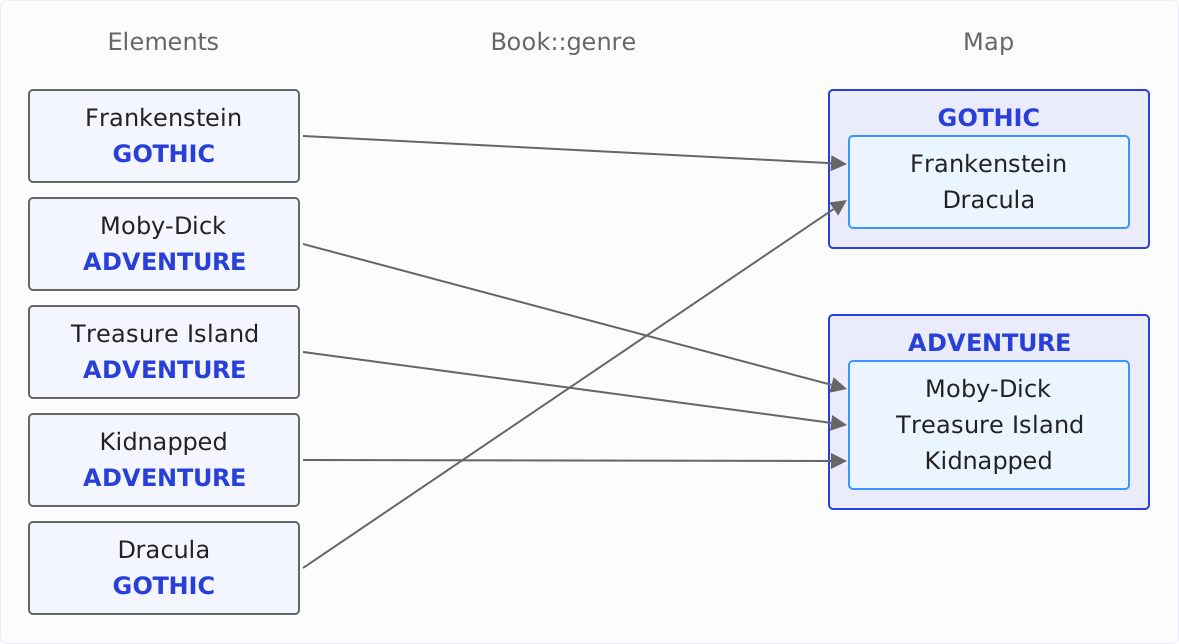
What the diagram also shows well: within a group, the order of the stream is preserved.
collect(groupingBy(Book::genre)) corresponds to the following loop:
Map<Genre, List<Book>> booksByGenre = new HashMap<>();
for (Book book : BOOKS) {
  booksByGenre.computeIfAbsent(book.genre(), genre -> new ArrayList<>()).add(book);
}
computeIfAbsent() returns the list for the book’s genre and creates it first if there is none yet. That is also how groupingBy() works in the JDK: for each element, it calls computeIfAbsent() on the map and then passes the element to the downstream collector of the group.
Like the keyMapper of toMap(), the classifier is of type Function. So it can compute any key you like, not just return a field – examples are shown in the section Computed Keys.
Today, the map is a HashMap, and the lists are of type ArrayList. That is not guaranteed: according to the Javadoc, there are no guarantees on the type, mutability, serializability, or thread-safety of the map and the lists.
A HashMap has no fixed order of its keys.
The following example prints the genres of the map:
System.out.println(booksByGenre.keySet());[NOVEL, GOTHIC, FANTASY, SCIENCE_FICTION, ADVENTURE]That is neither the order in which the constants are declared nor the one in which the genres appear in the library. A HashMap arranges its entries by the hash code of the key, and Enum.hashCode() returns the identity hash code of the constant. The JVM assigns it on the first call, from a number generator that advances with every identity hash code it hands out.
The same program therefore gets the same order on every start. A different program that hashes other objects before grouping gets a different order – in this article, for example, the examples of the next two sections.
If you need a fixed order, you determine the type of the map yourself and choose one with a deterministic order. How to do that is shown in the next section.
The Three Variants of groupingBy()
The Collectors class declares groupingBy() in three variants:
<T, K> Collector<T, ?, Map<K, List<T>>> groupingBy(
    Function<? super T, ? extends K> classifier)

<T, K, A, D> Collector<T, ?, Map<K, D>> groupingBy(
    Function<? super T, ? extends K> classifier,
    Collector<? super T, A, D> downstream)

<T, K, D, A, M extends Map<K, D>> Collector<T, ?, M> groupingBy(
    Function<? super T, ? extends K> classifier,
    Supplier<M> mapFactory,
    Collector<? super T, A, D> downstream)
Each variant extends the previous one by one argument. Unlike with toMap(), the argument for the map type, mapFactory, is not at the end but before the downstream collector. What the wildcards ? super T and ? extends K mean is explained in the article on functional interfaces; you don’t need them to use groupingBy().
groupingBy(classifier) – One List per Key
You know the first variant from the introduction. It collects the elements of each group into a list. In the JDK, it is implemented as a call of the second variant with toList() as the downstream collector.
The following example groups the books by author and prints the books by H. G. Wells:
Map<String, List<Book>> booksByAuthor = BOOKS.stream()
    .collect(groupingBy(Book::author));

booksByAuthor.get("H. G. Wells").forEach(System.out::println);
Book[title=The Time Machine, author=H. G. Wells, year=1895, genre=SCIENCE_FICTION]
Book[title=The War of the Worlds, author=H. G. Wells, year=1898, genre=SCIENCE_FICTION]groupingBy(classifier, downstream) – One Result per Group
The second argument is the downstream collector. It receives the elements of a group as if the group were a stream of its own, and it returns the value that ends up in the map under the group’s key.
The following example counts the books per genre with counting():
Map<Genre, Long> bookCountByGenre = BOOKS.stream()
    .collect(groupingBy(Book::genre, counting()));
{ADVENTURE=4,
SCIENCE_FICTION=3,
NOVEL=1,
GOTHIC=2,
FANTASY=1}Instead of lists, the map now holds numbers of type Long. Any collector you could pass directly to collect() works as a downstream collector – the ones you need most often are shown in the section Downstream Collectors.
groupingBy(classifier, mapFactory, downstream) – With Your Own Map Type
The middle argument, mapFactory, is a Supplier that creates a new, empty map. With it, you determine which map implementation groupingBy() collects into – and thus also the order of the keys.
There is no variant with a map type but without a downstream collector. If you want lists in a TreeMap, you pass toList() as the third argument.
The following sections show three map types with a fixed order.
EnumMap: By the Declaration of the Constants
If the key is an enum constant, an EnumMap is the right choice. It returns its entries in the order in which the constants are declared.
EnumMap has no constructor without arguments, because it needs to know the enum type – that is why you pass a lambda that calls the constructor with Genre.class:
Map<Genre, Long> bookCountByGenre = BOOKS.stream()
    .collect(groupingBy(Book::genre, () -> new EnumMap<>(Genre.class), counting()));
{NOVEL=1,
GOTHIC=2,
ADVENTURE=4,
FANTASY=1,
SCIENCE_FICTION=3}LinkedHashMap: By First Occurrence
With LinkedHashMap::new, the keys are in the order in which they first occur in the stream. In the library, the genre SCIENCE_FICTION with “From the Earth to the Moon” comes before FANTASY with “Alice’s Adventures in Wonderland”.
The following example counts the books per genre into a LinkedHashMap:
Map<Genre, Long> bookCountByGenre = BOOKS.stream()
    .collect(groupingBy(Book::genre, LinkedHashMap::new, counting()));
{NOVEL=1,
GOTHIC=2,
ADVENTURE=4,
SCIENCE_FICTION=3,
FANTASY=1}TreeMap: By Natural Order
A TreeMap sorts its keys by their natural order.
The following example collects the titles of all authors into a TreeMap, sorted alphabetically by name:
Map<String, List<String>> titlesByAuthor = BOOKS.stream()
    .collect(groupingBy(Book::author, TreeMap::new, mapping(Book::title, toList())));
{Bram Stoker=[Dracula],
H. G. Wells=[The Time Machine, The War of the Worlds],
Herman Melville=[Moby-Dick],
Jane Austen=[Pride and Prejudice],
Jules Verne=[From the Earth to the Moon, Around the World in Eighty Days],
Lewis Carroll=[Alice's Adventures in Wonderland],
Mary Shelley=[Frankenstein],
Robert Louis Stevenson=[Treasure Island, Kidnapped]}Here, the downstream collector mapping() turns each book into its title; how mapping() works is explained in the section Transforming Values.
Downstream Collectors
The downstream collector decides what is stored in the map under a key: the elements themselves, a field of the elements, a number, or an entirely different object.
The following table shows the collectors of the Collectors class that you use most often as a downstream collector – with the result they return per group and the Java version since which they exist. T is the type of the elements.
mapping(), filtering(), and flatMapping() themselves take a collector as their second argument, called downstream in the Javadoc. The table calls it the inner collector:
| Collector | Result per group | Since |
|---|---|---|
toList() | List<T> | Java 8 |
toSet() | Set<T> | Java 8 |
toCollection() | a collection of your choice | Java 8 |
toUnmodifiableList(),toUnmodifiableSet() | unmodifiable List<T> or Set<T> | Java 10 |
mapping(mapper, downstream) | result of the inner collector downstream over the transformed elements | Java 8 |
filtering(predicate, downstream) | result of the inner collector downstream over the elements that satisfy a condition | Java 9 |
flatMapping(mapper, downstream) | result of the inner collector downstream over the elements of the streams that a function returns per element | Java 9 |
counting() | count as Long | Java 8 |
summingInt(),summingLong(),summingDouble() | sum as Integer, Long, or Double | Java 8 |
averagingInt(),averagingLong(),averagingDouble() | average as Double | Java 8 |
summarizingInt(),summarizingLong(),summarizingDouble() | count, sum, minimum, average, and maximum in one object | Java 8 |
minBy(), maxBy() | smallest or largest element as Optional<T> | Java 8 |
joining() | joined strings | Java 8 |
reducing() | result of a reduction | Java 8 |
collectingAndThen() | result of a collector, post-processed by a function | Java 8 |
teeing() | results of two collectors, combined by a function | Java 12 |
groupingBy(), toMap(),partitioningBy() | another map | Java 8 |
The following sections go through the table. You already know toList() from the previous examples. toUnmodifiableList() and toUnmodifiableSet() work like toList() and toSet() – since Java 10, they return unmodifiable collections.
Transforming Values: mapping()
With groupingBy() alone, the groups contain whole Book objects. Usually, though, you only need one field, e.g., the title.
For this, mapping() is the counterpart of the stream operation map(): it transforms each element with a function and passes the result on to its inner collector, the collector in the second argument.
The following example collects the titles per author into lists:
Map<String, List<String>> titlesByAuthor = BOOKS.stream()
    .collect(groupingBy(Book::author, mapping(Book::title, toList())));
{Bram Stoker=[Dracula],
Robert Louis Stevenson=[Treasure Island, Kidnapped],
Mary Shelley=[Frankenstein],
Jane Austen=[Pride and Prejudice],
Lewis Carroll=[Alice's Adventures in Wonderland],
Herman Melville=[Moby-Dick],
Jules Verne=[From the Earth to the Moon, Around the World in Eighty Days],
H. G. Wells=[The Time Machine, The War of the Worlds]}mapping() needs an inner collector, here toList(). So a downstream collector can itself have an inner collector – you can nest collectors as deeply as you like.
Joining Strings: joining()
joining() joins strings into a single string.
The following example uses joining() as the inner collector of mapping() to join the titles of each group, separated by a comma and a space:
Map<String, String> titlesByAuthor = BOOKS.stream()
    .collect(groupingBy(Book::author, mapping(Book::title, joining(", "))));

System.out.println(titlesByAuthor.get("Robert Louis Stevenson"));
Treasure Island, Kidnappedjoining() collects the strings of each group in a StringJoiner, and the effort grows linearly with the number of titles. With toMap() and a merge function that concatenates two strings, it would grow quadratically instead – as the article on toMap() shows in the section Concatenating Values.
Choosing a Collection: toSet() and toCollection()
The following example collects the names of the authors per genre and prints them for the genre ADVENTURE:
Map<Genre, List<String>> authorsByGenre = BOOKS.stream()
    .collect(groupingBy(Book::genre, mapping(Book::author, toList())));

System.out.println(authorsByGenre.get(Genre.ADVENTURE));
[Herman Melville, Jules Verne, Robert Louis Stevenson, Robert Louis Stevenson]Robert Louis Stevenson appears twice in the list because he wrote two adventure books. With toSet() instead of toList(), mapping() collects the names into a Set, and each name appears in it only once – in the order of a HashSet, i.e., without a fixed order.
toCollection() collects into a collection of your choice. It takes a Supplier that creates a new, empty collection.
With TreeSet::new as the Supplier, toCollection() collects the names into a TreeSet. A TreeSet holds each value only once and keeps its elements sorted, alphabetically for strings.
The following example collects the names of the authors per genre into a TreeSet and prints them for the genre ADVENTURE:
Map<Genre, Set<String>> authorsByGenre = BOOKS.stream()
    .collect(groupingBy(
        Book::genre,
        mapping(Book::author, toCollection(TreeSet::new))));

System.out.println(authorsByGenre.get(Genre.ADVENTURE));
[Herman Melville, Jules Verne, Robert Louis Stevenson]Counting: counting()
counting() counts the elements of each group.
The following example counts the books per author:
Map<String, Long> bookCountByAuthor = BOOKS.stream()
    .collect(groupingBy(Book::author, counting()));
{Bram Stoker=1,
Robert Louis Stevenson=2,
Mary Shelley=1,
Jane Austen=1,
Lewis Carroll=1,
Herman Melville=1,
Jules Verne=2,
H. G. Wells=2}The count is always of type Long, because the JDK implements counting() as summingLong(e -> 1L): it adds 1L for each element.
If you need the count as an Integer, count with summingInt() and a function that returns 1 for each element:
Map<String, Integer> bookCountByAuthor = BOOKS.stream()
    .collect(groupingBy(Book::author, summingInt(book -> 1)));

System.out.println(bookCountByAuthor.get("Jules Verne"));2summingInt() adds up the values that a ToIntFunction computes from the elements – with book -> 1, the sum is the count. I still recommend counting() unless you explicitly need an Integer, because its name says what it does.
Average and Statistics: averagingInt() and summarizingInt()
averagingInt() computes the average of the values that a function returns for the elements.
The following example computes the average publication year per genre:
Map<Genre, Double> averageYearByGenre = BOOKS.stream()
    .collect(groupingBy(Book::genre, averagingInt(Book::year)));
{GOTHIC=1857.5,
SCIENCE_FICTION=1886.0,
NOVEL=1813.0,
ADVENTURE=1873.25,
FANTASY=1865.0}The average is always a Double, even if the values are int.
If you need several figures of the same group, summarizingInt() returns them in one object of type IntSummaryStatistics: count, sum, minimum, average, and maximum.
The following example prints these statistics for the genre SCIENCE_FICTION:
Map<Genre, IntSummaryStatistics> yearStatsByGenre = BOOKS.stream()
    .collect(groupingBy(Book::genre, summarizingInt(Book::year)));

IntSummaryStatistics stats = yearStatsByGenre.get(Genre.SCIENCE_FICTION);
System.out.println(stats);
IntSummaryStatistics{count=3, sum=5658, min=1865, average=1886.000000, max=1898}toString() formats the average with String.format() in the default locale – on a system set to German, the output shows 1886,000000.
The individual values are returned by the methods getCount(), getSum(), getMin(), getAverage(), and getMax():
System.out.println(stats.getMin() + "–" + stats.getMax());1865–1898summarizingInt() goes through each group only once. With individual collectors, you would need three groupings or nested teeing() calls for minimum, maximum, and average – the latter are introduced in the section Combining Two Collectors.
Minimum and Maximum: minBy() and maxBy()
minBy() returns the smallest element of each group according to a Comparator, maxBy() the largest.
The following example finds the oldest book per genre and prints it for the genre ADVENTURE:
Map<Genre, Optional<Book>> oldestBookByGenre = BOOKS.stream()
    .collect(groupingBy(Book::genre, minBy(Comparator.comparingInt(Book::year))));

System.out.println(oldestBookByGenre.get(Genre.ADVENTURE));
Optional[Book[title=Moby-Dick, author=Herman Melville, year=1851, genre=ADVENTURE]]The result is an Optional because minBy() can also meet an empty stream when you pass it directly to collect(). As a downstream collector of groupingBy(), on the other hand, the Optional is never empty: groupingBy() creates a group only when an element arrives for it, so each group has at least one element.
In the JDK, minBy() is implemented as reducing(BinaryOperator.minBy(comparator)). The same example with reducing() is shown in the article on reduce(), in the section Collectors.reducing().
Post-Processing the Result: collectingAndThen()
As a downstream collector, minBy() and maxBy() return an Optional, which you usually don’t want in the map. collectingAndThen() applies a function to the result of another collector.
The following example uses minBy() to find the oldest book per genre, unwraps the Optional, and keeps only the title:
Map<Genre, String> oldestTitleByGenre = BOOKS.stream()
    .collect(groupingBy(
        Book::genre,
        collectingAndThen(
            minBy(Comparator.comparingInt(Book::year)),
            oldest -> oldest.orElseThrow().title())));
{GOTHIC=Frankenstein,
SCIENCE_FICTION=From the Earth to the Moon,
NOVEL=Pride and Prejudice,
ADVENTURE=Moby-Dick,
FANTASY=Alice's Adventures in Wonderland}orElseThrow() never throws an exception here, because each group has at least one element. toMap() with BinaryOperator.minBy() as the merge function also does the job without an Optional – as the article on toMap() shows in the section The Oldest Book per Author.
Filtering: filtering()
Java 9 introduced filtering(). It passes only those elements to its inner collector that satisfy a condition.
The following example collects the titles of the books published after 1880 per genre:
Map<Genre, List<String>> titlesAfter1880ByGenre = BOOKS.stream()
    .collect(groupingBy(
        Book::genre,
        filtering(book -> book.year() > 1880, mapping(Book::title, toList()))));
{GOTHIC=[Dracula],
SCIENCE_FICTION=[The Time Machine, The War of the Worlds],
NOVEL=[],
ADVENTURE=[Treasure Island, Kidnapped],
FANTASY=[]}The genres NOVEL and FANTASY are in the map with empty lists, because their books were published before 1880.
With filter() before groupingBy(), on the other hand, they are missing entirely:
Map<Genre, List<String>> titlesAfter1880ByGenre = BOOKS.stream()
    .filter(book -> book.year() > 1880)
    .collect(groupingBy(Book::genre, mapping(Book::title, toList())));
{GOTHIC=[Dracula],
SCIENCE_FICTION=[The Time Machine, The War of the Worlds],
ADVENTURE=[Treasure Island, Kidnapped]}filter() removes the books before groupingBy() sees them. filtering(), by contrast, lets groupingBy() see every book and create the group, and filters only within the group.
I recommend filter() if you are only interested in the groups with matches, and filtering() if the map should contain every key that occurs in the data – for example, for a report that also shows empty groups. A genre without a single book in the library, however, is not in the map even with filtering().
Flattening Elements: flatMapping()
Java 9 also introduced flatMapping(), the counterpart of the stream operation flatMap(). It turns each element into a stream and passes that stream’s elements on to its inner collector.
For an example, we need a second record from the article on Java Streams.
An Author has a name and a list of books, and the list Library.AUTHORS contains the eight authors of the library with their books:
public record Author(String name, List<Book> books) {}The following example groups the authors by the number of their books and collects the titles of these books into one list:
Map<Integer, List<String>> titlesByBookCount = AUTHORS.stream()
    .collect(groupingBy(
        author -> author.books().size(),
        flatMapping(author -> author.books().stream().map(Book::title), toList())));
{1=[Pride and Prejudice, Frankenstein, Moby-Dick, Alice's Adventures in Wonderland, Dracula],
2=[From the Earth to the Moon, Around the World in Eighty Days, Treasure Island, Kidnapped,
The Time Machine, The War of the Worlds]}With mapping(Author::books, toList()), you would get a list of lists per key (a separate list of books for each author). flatMapping(), on the other hand, appends the elements of the streams to one single list.
Combining Two Collectors: teeing()
Java 12 introduced teeing(). It passes each element to two collectors and combines their results at the end with a function.
The following example finds the oldest and the newest book per genre and stores both titles in a record:
record OldestAndNewest(String oldest, String newest) {}

Map<Genre, OldestAndNewest> oldestAndNewestByGenre = BOOKS.stream()
    .collect(groupingBy(
        Book::genre,
        teeing(
            minBy(Comparator.comparingInt(Book::year)),
            maxBy(Comparator.comparingInt(Book::year)),
            (oldest, newest) -> new OldestAndNewest(
                oldest.orElseThrow().title(), newest.orElseThrow().title()))));

System.out.println(oldestAndNewestByGenre.get(Genre.SCIENCE_FICTION));
OldestAndNewest[oldest=From the Earth to the Moon, newest=The War of the Worlds]The two collectors minBy() and maxBy() see every book of the group, and the function in the third argument receives their two results. Without teeing(), you would have to create two streams and group twice.
Reducing: reducing()
reducing() combines the elements of a group with a function that merges two values into one – just like the stream operation reduce(). For the common cases, there are ready-made collectors such as counting(), summingInt(), and minBy(), whose names say what they do. When you still need reducing() and which three variants exist is shown in the article on reduce(), in the section Collectors.reducing().
Another Map: groupingBy(), toMap(), and partitioningBy()
If the downstream collector is itself a collector that builds a map, the value of each group becomes a map.
- With
groupingBy()as the downstream collector as well, you group on several levels – that is shown in the next section. - An example with
toMap()as the downstream collector is shown in the article ontoMap(), in the section Nested Maps. partitioningBy()has a section of its own in this article.
Grouping on Several Levels
With groupingBy() as the downstream collector as well, you divide each group into further groups.
The following example groups the books by genre into an EnumMap and, within each genre, by author into a TreeMap:
Map<Genre, Map<String, List<String>>> titlesByAuthorByGenre = BOOKS.stream()
    .collect(groupingBy(
        Book::genre,
        () -> new EnumMap<>(Genre.class),
        groupingBy(Book::author, TreeMap::new, mapping(Book::title, toList()))));

titlesByAuthorByGenre.forEach((genre, titlesByAuthor) ->
    System.out.println(genre + ": " + titlesByAuthor));
NOVEL: {Jane Austen=[Pride and Prejudice]}
GOTHIC: {Bram Stoker=[Dracula],
Mary Shelley=[Frankenstein]}
ADVENTURE: {Herman Melville=[Moby-Dick],
Jules Verne=[Around the World in Eighty Days],
Robert Louis Stevenson=[Treasure Island, Kidnapped]}
FANTASY: {Lewis Carroll=[Alice's Adventures in Wonderland]}
SCIENCE_FICTION: {H. G. Wells=[The Time Machine, The War of the Worlds],
Jules Verne=[From the Earth to the Moon]}Jules Verne appears in two genres, with one book each.
You get his adventure book from the map via both levels:
System.out.println(titlesByAuthorByGenre.get(Genre.ADVENTURE).get("Jules Verne"));[Around the World in Eighty Days]With each level, the type of the map gets longer, and each get() returns null if the key is missing at its level.
I therefore recommend the nested map if you go through the result level by level – for example, for a report with one heading per genre. If, on the other hand, you need the value for a combination of keys, a composite key is simpler. It is shown in the section Grouping by Several Fields.
Choosing the Key
Computed Keys
The classifier doesn’t have to return a field. It can also compute the key from the element.
The following example groups the books by the decade in which they were published and then sorts the decades with a TreeMap:
Map<Integer, List<String>> titlesByDecade = BOOKS.stream()
    .collect(groupingBy(
        book -> book.year() / 10 * 10,
        TreeMap::new,
        mapping(Book::title, toList())));
{1810=[Pride and Prejudice, Frankenstein],
1850=[Moby-Dick],
1860=[From the Earth to the Moon, Alice's Adventures in Wonderland],
1870=[Around the World in Eighty Days],
1880=[Treasure Island, Kidnapped],
1890=[The Time Machine, Dracula, The War of the Worlds]}The integer division book.year() / 10 drops the last digit, and * 10 turns the result back into a year: 1897 becomes 189 and then 1890. Decades without a book, like the 1820s, are not in the map.
Grouping by Several Fields
If you want to group by two fields at once, you need a key that contains both. A record is the right choice for this: it generates equals() and hashCode() from its components, and two records with the same values are the same key.
The following example counts the books per combination of author and genre:
record AuthorAndGenre(String author, Genre genre) {}

Map<AuthorAndGenre, Long> bookCountByAuthorAndGenre = BOOKS.stream()
    .collect(groupingBy(
        book -> new AuthorAndGenre(book.author(), book.genre()),
        LinkedHashMap::new,
        counting()));

bookCountByAuthorAndGenre.forEach((key, count) ->
    System.out.println(key + "=" + count));
AuthorAndGenre[author=Jane Austen, genre=NOVEL]=1
AuthorAndGenre[author=Mary Shelley, genre=GOTHIC]=1
AuthorAndGenre[author=Herman Melville, genre=ADVENTURE]=1
AuthorAndGenre[author=Jules Verne, genre=SCIENCE_FICTION]=1
AuthorAndGenre[author=Lewis Carroll, genre=FANTASY]=1
AuthorAndGenre[author=Jules Verne, genre=ADVENTURE]=1
AuthorAndGenre[author=Robert Louis Stevenson, genre=ADVENTURE]=2
AuthorAndGenre[author=H. G. Wells, genre=SCIENCE_FICTION]=2
AuthorAndGenre[author=Bram Stoker, genre=GOTHIC]=1The LinkedHashMap returns the author-genre combinations in the order in which they first occur in the library.
You get the value for a combination with a new record with the same values:
AuthorAndGenre key = new AuthorAndGenre("Jules Verne", Genre.ADVENTURE);
System.out.println(bookCountByAuthorAndGenre.get(key));1An obvious alternative would be to join the two fields into a string, e.g., with book -> book.author() + "-" + book.genre(). That works, but it loses the types: you only get the genre back from the key Jules Verne-ADVENTURE by splitting the string again, and a name that itself contains a hyphen makes the splitting ambiguous. I therefore recommend a record as the key.
null Keys
If the classifier returns null for an element, groupingBy() throws a NullPointerException.
The following example appends “The Invisible Man” by H. G. Wells to the library as a twelfth book, without a genre:
List<Book> books = new ArrayList<>(BOOKS);
books.add(new Book("The Invisible Man", "H. G. Wells", 1897, null));

Map<Genre, List<Book>> booksByGenre = books.stream()
    .collect(groupingBy(Book::genre));
java.lang.NullPointerException: element cannot be mapped to a null key
at java.base/java.util.Objects.requireNonNull(Objects.java:246)
at java.base/java.util.stream.Collectors.lambda$groupingBy$0(Collectors.java:1113)The two lines of the stack trace show where the exception comes from: groupingBy() checks each key with Objects.requireNonNull() before it inserts it into the map – even if the map, like a HashMap, would accept a null key. In this, it differs from toMap(), which accepts a null key as long as the map allows it. The message does not name the element whose key is missing.
How you deal with this depends on whether the elements without a key belong in the result.
If they don’t, you filter them out first:
Map<Genre, Long> bookCountByGenre = books.stream()
    .filter(book -> book.genre() != null)
    .collect(groupingBy(Book::genre, counting()));
{SCIENCE_FICTION=3,
NOVEL=1,
FANTASY=1,
ADVENTURE=4,
GOTHIC=2}If they should form a group of their own, you wrap the key in an Optional. The books without a genre are then under the key Optional.empty().
The following example collects the titles per genre and prints the group without a genre:
Map<Optional<Genre>, List<String>> titlesByGenre = books.stream()
    .collect(groupingBy(
        book -> Optional.ofNullable(book.genre()),
        mapping(Book::title, toList())));

System.out.println(titlesByGenre.get(Optional.empty()));
[The Invisible Man]If the enum belongs to your own code, a constant of its own like UNKNOWN for the missing value is the clearer solution, because then nobody has to work with Optional keys.
partitioningBy()
Collectors.partitioningBy() splits the elements into exactly two groups by a yes-or-no question. Instead of a classifier, it takes a Predicate, and the keys of the map are true and false.
The following example splits the books into those published before 1850 and the rest:
Map<Boolean, List<Book>> booksBefore1850 = BOOKS.stream()
    .collect(partitioningBy(book -> book.year() < 1850));

System.out.println(booksBefore1850.get(true));
[Book[title=Pride and Prejudice, author=Jane Austen, year=1813, genre=NOVEL],
Book[title=Frankenstein, author=Mary Shelley, year=1818, genre=GOTHIC]]Like groupingBy(), partitioningBy() takes a downstream collector as its second argument:
Map<Boolean, List<String>> titlesBefore1850 = BOOKS.stream()
    .collect(partitioningBy(
        book -> book.year() < 1850,
        mapping(Book::title, toList())));
{false=[Moby-Dick, From the Earth to the Moon, Alice's Adventures in Wonderland,
Around the World in Eighty Days, Treasure Island, Kidnapped, The Time Machine,
Dracula, The War of the Worlds],
true=[Pride and Prejudice, Frankenstein]}There is no third variant with a map type.
You would get the same groups with groupingBy(book -> book.year() < 1850). The difference shows when one of the two groups is empty.
The following example counts the books published before 1800 – first with partitioningBy(), then with groupingBy():
Map<Boolean, Long> countBefore1800 = BOOKS.stream()
    .collect(partitioningBy(book -> book.year() < 1800, counting()));

Map<Boolean, Long> countBefore1800Grouped = BOOKS.stream()
    .collect(groupingBy(book -> book.year() < 1800, counting()));
{false=11, true=0}
{false=11}According to the Javadoc, the map returned by partitioningBy() always contains both keys. In the JDK, it is an object of the private class Collectors.Partition with exactly two fields, forTrue and forFalse. For both, partitioningBy() creates an empty intermediate result of the downstream collector right at the start. With groupingBy(), on the other hand, the key true is missing because no book returned it, and get(true) returns null.
I recommend partitioningBy() for any split by a yes-or-no question: the name says what happens, and get(true) and get(false) never return null.
Sorting the Result
By Key
You sort by key by explicitly choosing a sorted map: a TreeMap for the natural order, an EnumMap for the order of the enum constants. Examples are shown in the section on the variant with your own map type.
By Value
TreeMap and EnumMap sort only by key. To sort by value, you therefore stream the entries of the finished map, sort them by value, and then collect them into a LinkedHashMap, which keeps the new order.
The following example sorts the authors in descending order by the number of their books and, for the same number, alphabetically:
Map<String, Long> bookCountByAuthor = BOOKS.stream()
    .collect(groupingBy(Book::author, counting()));

Map<String, Long> sortedByCount = bookCountByAuthor.entrySet().stream()
    .sorted(Map.Entry.<String, Long>comparingByValue()
        .reversed()
        .thenComparing(Map.Entry.comparingByKey()))
    .collect(toMap(
        Map.Entry::getKey,
        Map.Entry::getValue,
        (first, second) -> first,
        LinkedHashMap::new));
{H. G. Wells=2,
Jules Verne=2,
Robert Louis Stevenson=2,
Bram Stoker=1,
Herman Melville=1,
Jane Austen=1,
Lewis Carroll=1,
Mary Shelley=1}The compiler needs the type witness <String, Long> before comparingByValue(): without it, it does not infer the type of the entries once reversed() follows, and it reports incompatible types. How reversed() and thenComparing() work is explained in the article on Comparator and Comparable.
The merge function (first, second) -> first is never called, because the keys are unique – it is only there because the toMap() variant with a map type requires one.
If you only need the first entries, e.g., the three authors with the most books, limit() cuts off the stream of entries:
List<String> topAuthors = bookCountByAuthor.entrySet().stream()
    .sorted(Map.Entry.<String, Long>comparingByValue()
        .reversed()
        .thenComparing(Map.Entry.comparingByKey()))
    .limit(3)
    .map(Map.Entry::getKey)
    .toList();
[H. G. Wells, Jules Verne, Robert Louis Stevenson]Within the Groups
The elements of a group are in the order of the stream. If you sort the stream before groupingBy(), the elements of each group are therefore sorted as well.
The following example sorts the titles of each genre alphabetically:
Map<Genre, List<String>> titlesByGenre = BOOKS.stream()
    .sorted(Comparator.comparing(Book::title))
    .collect(groupingBy(
        Book::genre,
        () -> new EnumMap<>(Genre.class),
        mapping(Book::title, toList())));

titlesByGenre.forEach((genre, titles) -> System.out.println(genre + "=" + titles));
NOVEL=[Pride and Prejudice]
GOTHIC=[Dracula, Frankenstein]
ADVENTURE=[Around the World in Eighty Days, Kidnapped, Moby-Dick, Treasure Island]
FANTASY=[Alice's Adventures in Wonderland]
SCIENCE_FICTION=[From the Earth to the Moon, The Time Machine, The War of the Worlds]groupingBy() vs. toMap()
Both groupingBy() and toMap() build a map. toMap() stores exactly one value per key and throws an IllegalStateException for a second one unless you specify a merge function. groupingBy(), on the other hand, expects several elements per key from the start.
I recommend groupingBy() as soon as a key can have multiple values, and toMap() when it has exactly one. How both collectors solve the same task and where each fits better is shown in the article on toMap(), in the section toMap() vs. groupingBy().
groupingBy() in Parallel Streams and groupingByConcurrent()
In a parallel stream, groupingBy() collects each piece into a map of its own and then merges the maps in pairs: it inserts each entry of one map into the other with merge(), and for a key that both maps have, the downstream collector combines the two groups. The Javadoc warns that this merging can be expensive.
The order is preserved in the process: the downstream collector toList() appends the group of the later piece to that of the earlier one, so that each list is in the order of the stream even in parallel.
Collectors.groupingByConcurrent() takes a different approach. It has the same three variants as groupingBy(), and all threads collect into one shared ConcurrentMap – without a map type, into a ConcurrentHashMap. In return, the Javadoc holds out the prospect of better performance in parallel streams.
The precondition for groupingByConcurrent() is that the order within the groups does not matter. The threads insert their elements into the groups at the same time, and the order in which the elements end up in a list is random.
The following example groups the numbers from 0 to 99,999 by their remainder when divided by three and prints the first five numbers of the group with remainder 0 (i.e., the numbers divisible by three) – first with groupingBy(), then with groupingByConcurrent():
Map<Integer, List<Integer>> byRemainder = IntStream.range(0, 100_000)
    .boxed()
    .parallel()
    .collect(groupingBy(i -> i % 3));

Map<Integer, List<Integer>> byRemainderConcurrent = IntStream.range(0, 100_000)
    .boxed()
    .parallel()
    .collect(groupingByConcurrent(i -> i % 3));

System.out.println(byRemainder.get(0).subList(0, 5));
System.out.println(byRemainderConcurrent.get(0).subList(0, 5));
In five runs, groupingBy() returns the same numbers five times, the smallest of the group:
[0, 3, 6, 9, 12]
[0, 3, 6, 9, 12]
[0, 3, 6, 9, 12]
[0, 3, 6, 9, 12]
[0, 3, 6, 9, 12]
groupingByConcurrent() returns five different ones in five runs:
[66408, 66411, 66414, 66417, 66420]
[66408, 16407, 66411, 16410, 66414]
[91407, 91410, 91413, 91416, 91419]
[57813, 57816, 57819, 57822, 57825]
[34377, 34380, 34383, 34386, 34389]groupingByConcurrent() is not automatically faster, either. If the downstream collector does not have the characteristic CONCURRENT – and toList() does not – groupingByConcurrent() adds each element to its group in a synchronized block. With only a few keys in the map, the threads then wait for each other. In the measurement in the article on parallel streams, groupingByConcurrent() was therefore slower than groupingBy() – the numbers are in the section The Cost of Combining in Collectors.
I therefore recommend groupingByConcurrent() only for parallel streams in which the order within the groups does not matter and a measurement shows that it is faster than groupingBy().
Common Mistakes
get() Returns null for a Missing Group
A group only exists for keys that at least one element has returned. For any other key, get() returns null.
The following example groups the books published after 1880 and asks for the number of novels:
Map<Genre, List<Book>> booksAfter1880ByGenre = BOOKS.stream()
    .filter(book -> book.year() > 1880)
    .collect(groupingBy(Book::genre));

int novelCount = booksAfter1880ByGenre.get(Genre.NOVEL).size();
java.lang.NullPointerException: Cannot invoke "java.util.List.size()" because the return value of "java.util.Map.get(Object)" is nullNo novel was published after 1880, so there is no group NOVEL.
getOrDefault() returns the value you pass as the second argument for a missing key:
int novelCount = booksAfter1880ByGenre.getOrDefault(Genre.NOVEL, List.of()).size();0If the group should be in the map even when it is empty, filter with filtering() instead of filter(), as shown in the section Filtering.
counting() Returns Long, Not Integer
The following example tries to collect the number of books per author into a Map<String, Integer>:
Map<String, Integer> bookCountByAuthor = BOOKS.stream()
    .collect(groupingBy(Book::author, counting()));
The compiler rejects the code:
error: incompatible types: inference variable D has incompatible equality constraints Integer,LongD is the type parameter for the result of the downstream collector, and counting() returns Long. Declare the map as Map<String, Long> – or count with summingInt(book -> 1) if you need Integer, as shown in the section Counting.
Map Type Without a Downstream Collector
The following example tries to group the books into lists in a TreeMap and passes only the classifier and the map type for this:
Map<Genre, List<Book>> booksByGenre = BOOKS.stream()
    .collect(groupingBy(Book::genre, TreeMap::new));
The compiler finds no matching variant:
error: no suitable method found for groupingBy(Book::genre,TreeMap::new)The variant with a map type has three parameters, and the downstream collector comes after the map type.
With toList() as the third argument, the example compiles:
Map<Genre, List<Book>> booksByGenre = BOOKS.stream()
    .collect(groupingBy(Book::genre, TreeMap::new, toList()));
Summary
groupingBy() groups the elements of a stream by a key that the classifier computes for each element. Without a further argument, each group becomes a list. With a downstream collector as the second argument, you determine what becomes of each group – e.g., a count with counting(), a list of titles with mapping(), or the oldest book with minBy(). The third variant determines the type of the map, and thus the order of the keys, with an argument between the classifier and the downstream collector.
groupingBy() rejects null keys with a NullPointerException, and a key without an element does not exist in the map. partitioningBy() splits the elements by a yes-or-no question, and its map always contains both keys.
Five recommendations for everyday use:
- Use
groupingBy()as soon as a key can have multiple elements, andtoMap()when it has exactly one. - Summarize the elements of each group with a downstream collector instead of going through the lists again after grouping.
- Don’t rely on the order of the map; pass
TreeMap::new,LinkedHashMap::new, or, for enum keys, anEnumMapif you need a specific order. - Group by several fields with a record as the key.
- Use
partitioningBy()for a split by a yes-or-no question.
How collect() fits into a stream pipeline and which other collectors exist is shown in the article on Java Streams.
If this article has helped you, I would greatly appreciate a positive review on my ProvenExpert profile. Your feedback helps me improve my content and motivates me to write new informative articles.