
In Java 15, text blocks (multiline strings) were introduced under Project Amber.
In this article, you will learn:
- Why do we need text blocks?
- How to notate text blocks in Java?
- How to indent a text block?
- Which escape sequences can or must we use in a text block?
- How do you insert values into a text block?
Multiline Strings in Java
Before Java 15, when we wanted to define a multiline string in Java, it usually looked like this:
String sql =
    "  SELECT id, firstName, lastName\n"
        + "    FROM Employee\n"
        + "   WHERE departmentId = \"IT\"\n"
        + "ORDER BY lastName, firstName";

String html =
    "<html>\n"
        + "  <body>\n"
        + "    <p>Hello World!</p>\n"
        + "  </body>\n"
        + "</html>";
We had to replace line breaks and quotes with escape sequences (\n and \"). And to split the string into several lines in a somewhat readable way, we had to divide it and concatenate it again with +. That was not too bad (because the compiler made a single string out of it again), but it was not pleasant either.
Text Block Notation
Starting with Java 15, we can notate multiline strings as “text blocks”:
String sql = """
      SELECT id, firstName, lastName
        FROM Employee
       WHERE departmentId = "IT"
    ORDER BY lastName, firstName""";

String html = """
    <html>
      <body>
        <p>Hello World!</p>
      </body>
    </html>""";
The text block starts and ends with three quotation marks each. The following rules apply:
- The starting quotes must be followed by a line break (which does not become part of the string).
- If there is a line break before the ending quotes, this line break will be part of the string.
- You do not need to escape single or double quotes within the text block, but you may (though static code analysis tools such as SonarQube recommend not doing so).
- If you want to write more than two quotation marks in a row, you have to escape every third of them.
- A quotation mark directly before the closing
"""must be escaped:\".
One of the first questions developers ask themselves is:
How Far Must the Text Block Be Indented?
The answer is: it doesn’t matter.
The text block starts at the character that is furthest to the left in any of the non-blank lines (in the first example above, at the “O” of “ORDER BY”; and in the second example, at the angle brackets in the first and last line). If the closing quotation marks stand on a line of their own, they count too – more on that in a moment.
The following three notations all lead to the same result:
    String sql1 = """
          SELECT id, firstName, lastName
            FROM Employee
           WHERE departmentId = "IT"
        ORDER BY lastName, firstName""";

    String sql2 = """
                   SELECT id, firstName, lastName
                     FROM Employee
                    WHERE departmentId = "IT"
                 ORDER BY lastName, firstName""";

    String sql3 = """
  SELECT id, firstName, lastName
    FROM Employee
   WHERE departmentId = "IT"
ORDER BY lastName, firstName""";
All three strings have the following content – regardless of the indentation in the source code:
  SELECT id, firstName, lastName
    FROM Employee
   WHERE departmentId = "IT"
ORDER BY lastName, firstName
Modern IDEs give us a hand here by showing the left margin of the text block (IntelliJ by a green line):
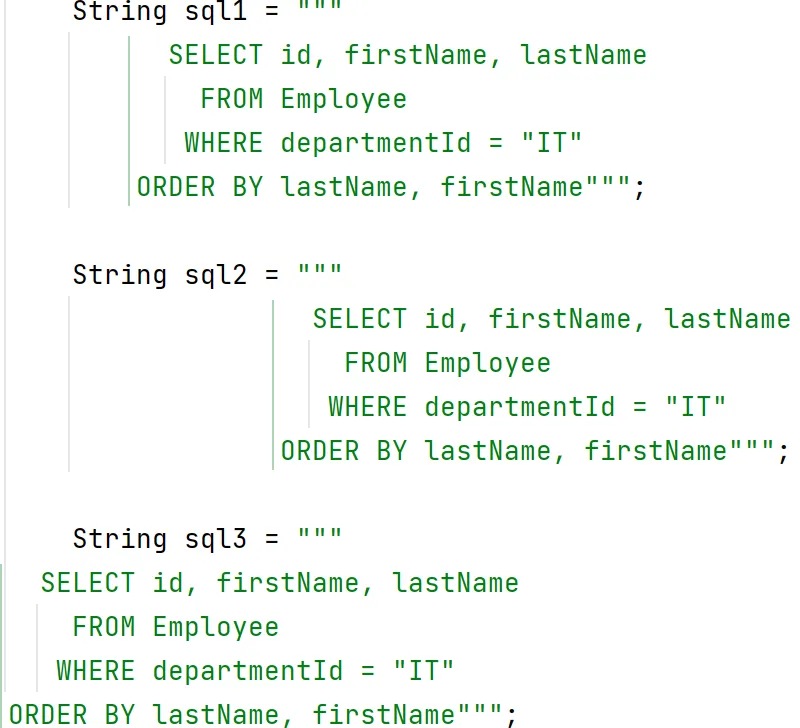
The spaces to the left of the text block’s margin are part of the so-called incidental white space: they come from the indentation of the source code, and the compiler removes them. The spaces to the right of the margin – in the example, the two before “SELECT”, the four before “FROM”, and the three before “WHERE” – are essential white space: they belong to the content and remain in the string.
But what if you want to create a text block that is indented?
There is a trick for this: You insert a line break before the closing quotation marks and place the quotation marks where the text block should start, e.g., like this:
String sql = """
      SELECT id, firstName, lastName
        FROM Employee
       WHERE departmentId = "IT"
    ORDER BY lastName, firstName
  """;
The text block is now indented by two characters.
However, it also has a line break at the end. We can remove this with an escape sequence. Escape sequences are discussed in the following chapter.
Escape Sequences in Text Blocks
The compiler processes the content of a text block in three steps: First, it normalizes the line terminators – CR and CRLF become LF, so a text block saved on Windows does not contain \r\n. Then it strips the incidental white space, i.e., the common indentation on the left and the spaces at the end of each line. Only after that does it interpret the escape sequences.
The following diagram shows the three steps in this order and, for each step, what changes in it:

Text blocks have the advantage that the escape sequences most commonly used in strings, namely \" for quotes and \n for a line break, are no longer needed.
Instead, there are two new escape sequences:
Escape Sequence: Backslash at the End of the Line
In the previous chapter, you saw that you can indent a text block by inserting a line break before the closing quotation marks. However, this line break is then also contained in the string. To remove it, you can put a backslash at the end of the last line:
String sql = """
      SELECT id, firstName, lastName
        FROM Employee
       WHERE departmentId = "IT"
    ORDER BY lastName, firstName\
  """;
The backslash at the line end ensures that the string does not contain a line break at that position.
This feature is not limited to the last line – you can end any line with a backslash:
String sql = """
    SELECT id, firstName, lastName \
    FROM Employee
    WHERE departmentId = "IT" \
    ORDER BY lastName, firstName""";
This string thus contains only a single line break after “Employee”:
SELECT id, firstName, lastName FROM Employee
WHERE departmentId = "IT" ORDER BY lastName, firstName
This feature is helpful if you want to split a one-line string, e.g., a very long log statement, over several lines in the source code.
This escape sequence exists only in text blocks – in a regular string literal, the compiler reports “illegal escape character”.
Escape Sequence: \s
Another escape sequence you can use to format a text block is \s.
Trailing spaces are removed from each line by default, as in the following example (the dots are supposed to represent the spaces):
String text = """
    one·····
    two·····
    three···""";

text.lines().map(line -> "|" + line + "|").forEachOrdered(System.out::println);
The output of this code snippet is:
|one|
|two|
|three|
To preserve the spaces, you can replace them with the escape sequence \s:
String text = """
    one\s\s\s\s\s
    two\s\s\s\s\s
    three\s\s\s""";
It is clearer and completely sufficient if we only escape the last space:
String text = """
    one    \s
    two    \s
    three  \s""";
Thus, the program prints the desired result:
|one     |
|two     |
|three   |
By the way, \s also works in regular string literals: "a\sb" results in a b.
The Three New String Methods
Along with text blocks, three new methods have arrived in the String class – all since Java 15:
formatted(Object... args)inserts values into the string. It is equivalent toString.format(text, args)but comes after the text block, which is often easier to read.stripIndent()removes the incidental white space of a multiline string, i.e., the common indentation and the spaces at the end of each line – with the same algorithm the compiler applies to text blocks.translateEscapes()interprets escape sequences that are stored as text in a string, e.g., a\nread from a file.
You will need formatted() most often, because a text block cannot embed variables – Java has no string interpolation. The following example inserts the department and the sort field into the SQL query:
String sql = """
      SELECT id, firstName, lastName
        FROM Employee
       WHERE departmentId = "%s"
    ORDER BY %s""".formatted("IT", "lastName");
The string sql then contains:
  SELECT id, firstName, lastName
    FROM Employee
   WHERE departmentId = "IT"
ORDER BY lastNameHistory of Text Blocks in Java
Text blocks were first introduced via JDK Enhancement Proposal (JEP) 355 as a preview feature in Java 13. They followed JEP 326, “Raw String Literals”, which Jim Laskey and Brian Goetz withdrew before the release of Java 12: after the feedback on the draft, they no longer considered the design mature enough for a preview. Their reasoning is in this post by Brian Goetz on the jdk-dev mailing list.
In the second preview, JEP 368, the above-mentioned escape sequences were added in Java 14.
Due to positive feedback, text blocks were released as a production-ready feature in Java 15 by JEP 378 without further changes.
Summary
Text blocks finally allow us to notate multiline strings in Java code conveniently. They are enclosed in triple quotes. Quotation marks and line breaks no longer have to be replaced by confusing escape sequences.
You insert values with formatted() – even in 2026, Java has no string interpolation.
Did this article save you time? Then I’d be happy if you invested a minute of it in a review on my ProvenExpert profile. Your feedback shows me that the work on these articles pays off.