
After many years of development as part of Project Panama, the final version of the “Foreign Function & Memory API” was released with Java 22 in March 2024.
In this article, you will find out:
- What is the Foreign Function & Memory API?
- What is the difference between FFM API and JNI?
- How do you call external code with the FFM API?
- How do you write and read external memory with the FFM API?
- How do you call your own libraries, and what do you need jextract for?
- What do the terms Arena, Memory Segment, Memory Layout and Function Descriptor mean?
You can find the source code for the article in this GitHub repository.
What is the Foreign Function & Memory API?
The Foreign Function & Memory API (FFM API for short) enables Java developers to easily call functions from libraries written in other programming languages (e.g., the standard C library) from within Java.
The FFM API also makes it possible to securely access memory from Java not managed by the JVM, i.e., memory outside the Java heap.
I will show you how this works in the next but one section. First, you should know why the FFM API was developed in the first place.
Difference Between the FFM API and JNI
To access foreign code – i.e., code outside the JVM – Java developers had to use the Java Native Interface (JNI), which has existed since Java 1.1. Anyone who has ever done this knows that it is not a pleasant task:
- JNI is cumbersome to use: You have to write a lot of Java and C boilerplate code and synchronize it with changes in the native code. Tools have been provided for this, but they only make the task marginally easier.
- JNI is error-prone: Errors when accessing native memory can easily cause the JVM to crash.
- JNI is slow as soon as data crosses the boundary: passing Java objects via JNI is expensive. That is why many libraries allocate off-heap memory via
sun.misc.Unsafeand pass only its address.
The FFM API, on the other hand, is:
- Easy to use, as you will see in the following section. The stated goal of JEP 454 is to replace JNI with a concise, readable, pure-Java API – without C glue code and header files.
- Secure: Access to native memory is managed by so-called arenas, which ensure that memory addresses are valid and throw an exception otherwise (instead of crashing the JVM). The methods that open the way into native code – such as
Linker.downcallHandle()– are considered “restricted,” however: an incorrectly described signature of the native function can still crash the JVM. That is why the JVM warns when they are called, as you will see in the first example. - Fast: JEP 454 aims for an overhead comparable to or lower than that of JNI. When converting C strings to Java strings, the FFM API in Java 22 was 2.7 to 4 times as fast as JNI, depending on the string length – 43 instead of 144 nanoseconds for 100 bytes.
With the finalization of the FFM API by JEP 454, there is, in most cases, no longer any reason to use JNI.
A few niches still remain for JNI: when native code needs to reach deep into the JVM – for example, to read and write fields of Java objects or create new objects – JNI still offers capabilities that go beyond the FFM API’s upcalls.
Now we come to the exciting question: How does the FFM API work?
Foreign Function & Memory API – Examples
The new API is best explained using examples. I will first show you a simple example that calls the strlen() function of the standard C library. Next comes a more complex example that calls C’s qsort() function, which in turn calls a Java callback function to compare any two elements.
I will then explain the components of the Foreign Function & Memory API in more detail.
Example 1: strlen() Function of the Standard C Library
Let’s start with a simple example (you can find it in the FFMTestStrlen class in the GitHub repository). The following code uses the standard C library’s strlen() function to calculate the length of the string “Happy Coding!”
Let’s take a look at the definition of this C function:
size_t strlen( const char* str );The function has one parameter:
str– pointer to the null-terminated string to be examined
The return type, size_t, stands for an unsigned integer.
I will first show you the program for calling this function. You can find a short explanation of the individual steps in the comments and a more detailed explanation below the program code.
public class FFMTestStrlen {
  public static void main(String[] args) throws Throwable {
    // 1. Get a linker - the central element for accessing foreign functions
    Linker linker = Linker.nativeLinker();

    // 2. Get a lookup object for commonly used libraries
    SymbolLookup stdlib = linker.defaultLookup();

    // 3. Get the address of the "strlen" function in the C standard library
    MemorySegment strlenAddress = stdlib.findOrThrow("strlen");

    // 4. Define the input and output parameters of the "strlen" function
    FunctionDescriptor descriptor =
        FunctionDescriptor.of(ValueLayout.JAVA_LONG, ValueLayout.ADDRESS);

    // 5. Get a handle to the "strlen" function
    MethodHandle strlen = linker.downcallHandle(strlenAddress, descriptor);

    // 6. Get a confined memory area (one that we can close explicitly)
    try (Arena offHeap = Arena.ofConfined()) {

      // 7. Convert the Java String to a C string and store it in off-heap memory
      MemorySegment str = offHeap.allocateFrom("Happy Coding!");

      // 8. Invoke the "strlen" function
      long len = (long) strlen.invoke(str);
      System.out.println("len = " + len);
    }
    // 9. Off-heap memory is deallocated at end of try-with-resources
  }
}
What exactly happens in this code? (The following numbering refers to the corresponding comments in the source code.)
- Using the static method
Linker.nativeLinker(), we get a linker – the central component that orchestrates access to external functions. - We use
Linker.defaultLookup()to obtain aSymbolLookupobject, which we can use to retrieve the memory addresses of frequently used library functions. Which libraries these are depends on the operating system and CPU. - Using
SymbolLookup.findOrThrow(…), we ask for the memory address of thestrlen()function. If the function does not exist, the method throws aNoSuchElementException. (findOrThrow()has existed since Java 23; in Java 22, you writefind(…).orElseThrow()–find()returns anOptional<MemorySegment>.) - We use a so-called function descriptor to specify the
strlen()function’s input and output parameters. The first argument,ValueLayout.JAVA_LONG, defines the return type of the function.JAVA_LONGmatchessize_ton 64-bit systems;linker.canonicalLayouts().get("size_t")gives you the matching layout on any platform. The second argument,ValueLayout.ADDRESS, defines the type of the first (and only) function parameter as a memory address (that of the string whose length we want to determine). When calling the native function, the function descriptor will ensure that Java types are properly converted to C types and vice versa. - The method
Linker.downcallHandle(…)provides us with aMethodHandlefor the function at the specified memory address and the previously defined function descriptor. Method handles are nothing new – they have been around since Java 7. Arena.ofConfined()provides us with a so-called arena – an object that manages access to native memory – more on this later.Arena.allocateFrom(…)reserves a native memory block and stores in it the character sequence “Happy Coding!” in UTF-8 format.- With
MethodHandle.invoke(…), we call the C functionstrlen(); we cast the result to along(the function descriptor defined in step 4 ensures that we can do this). - At the end of the try-with-resources block,
Arena.close()is called, and all memory blocks managed by this arena are released.
The Foreign Function & Memory API elements shown here – memory segment, arena, value layout, and function descriptor – are described in more detail in the chapter FFM API Components.
Starting the Sample Program
If you save the source code with the imports from the GitHub repository, but without the package line, in the FFMTestStrlen.java file, you can execute it as follows:
$ java FFMTestStrlen.java
WARNING: A restricted method in java.lang.foreign.Linker has been called
WARNING: java.lang.foreign.Linker::downcallHandle has been called by FFMTestStrlen in an unnamed module (file:/home/user/ffm/FFMTestStrlen.java)
WARNING: Use --enable-native-access=ALL-UNNAMED to avoid a warning for callers in this module
WARNING: Restricted methods will be blocked in a future release unless native access is enabled

len = 13
To suppress the warning, you must start the program as follows:
$ java --enable-native-access=ALL-UNNAMED FFMTestStrlen.java
len = 13
The string length has been computed correctly!
Example 2: qsort() Function of the Standard C Library
Next, let’s try a more complex example. We want to use the qsort() function to sort an array of integers. To do this, we first need to take a look at the definition of this function:
void qsort( void *ptr, size_t count, size_t size,
            int (*comp)(const void *, const void *) );
The function uses the following parameters:
ptr– pointer to the array to be sortedcount– number of elements in the arraysize– size of the individual elements of the array in bytescomp– comparison function that returns a negative integer value if the first argument is smaller than the second, a positive integer value if the first argument is larger than the second, and zero if the arguments are equal
Signature of the comparison function:
int cmp(const void *a, const void *b);Again, I will first show you the complete program code with comments. I will then explain the new components of this example in more detail.
public class FFMTestQsort {
  public static void main(String[] args) throws Throwable {
    // 1. Get a linker - the central element for accessing foreign functions
    Linker linker = Linker.nativeLinker();

    // 2. Get a lookup object for commonly used libraries
    SymbolLookup stdlib = linker.defaultLookup();

    // 3. Get the address of the "qsort" function in the C standard library
    MemorySegment qsortAddress = stdlib.findOrThrow("qsort");

    // 4. Define the input and output parameters of the "qsort" function:
    FunctionDescriptor qsortDescriptor =
        FunctionDescriptor.ofVoid(
            ValueLayout.ADDRESS,
            ValueLayout.JAVA_LONG,
            ValueLayout.JAVA_LONG,
            ValueLayout.ADDRESS);

    // 5. Get a method handle to the "qsort" function
    MethodHandle qsortHandle = linker.downcallHandle(qsortAddress, qsortDescriptor);

    // 6. Define the input and output parameters of the "compare" function:
    FunctionDescriptor compareDescriptor =
        FunctionDescriptor.of(
            ValueLayout.JAVA_INT,
            ValueLayout.ADDRESS.withTargetLayout(ValueLayout.JAVA_INT),
            ValueLayout.ADDRESS.withTargetLayout(ValueLayout.JAVA_INT));

    // 7. Get a handle to the "compare" function
    MethodHandle compareHandle =
        MethodHandles.lookup()
            .findStatic(
                FFMTestQsort.class, "compare", compareDescriptor.toMethodType());

    // 8. Get a confined memory area (one that we can close explicitly)
    try (Arena offHeap = Arena.ofConfined()) {
      // 9. Allocate off-heap memory and store unsorted array in it
      int[] unsorted = createUnsortedArray();
      MemorySegment arrayAddress =
          offHeap.allocateFrom(ValueLayout.JAVA_INT, unsorted);

      // 10. Allocate off-heap memory for an "upcall stub" to the comparison function
      MemorySegment compareAddress =
          linker.upcallStub(compareHandle, compareDescriptor, offHeap);

      // 11. Invoke the qsort function
      qsortHandle.invoke(
          arrayAddress,
          unsorted.length,
          ValueLayout.JAVA_INT.byteSize(),
          compareAddress);

      // 12. Read array from off-heap memory
      int[] sorted = arrayAddress.toArray(ValueLayout.JAVA_INT);
      System.out.println("sorted   = " + Arrays.toString(sorted));
    }
    // 13. Off-heap memory is deallocated at end of try-with-resources
  }

  private static int compare(MemorySegment aAddr, MemorySegment bAddr) {
    int a = aAddr.get(ValueLayout.JAVA_INT, 0);
    int b = bAddr.get(ValueLayout.JAVA_INT, 0);
    return Integer.compare(a, b);
  }

  private static int[] createUnsortedArray() {
    ThreadLocalRandom random = ThreadLocalRandom.current();
    int[] unsorted =
        IntStream.generate(() -> random.nextInt(1000)).limit(10).toArray();
    System.out.println("unsorted = " + Arrays.toString(unsorted));
    return unsorted;
  }
}
The specifics of this program compared to the previous one:
-
Step 4: For the function descriptor, we use the
FunctionDescriptor.ofVoid(…)method sinceqsort(…)has no return value. We specify the following arguments:ValueLayout.ADDRESS– for the pointer to the array to be sortedValueLayout.JAVA_LONG– for the number of elements in the arrayValueLayout.JAVA_LONG– for the size of the individual array elementsValueLayout.ADDRESS– for the address of the comparison function
-
Step 6: Here, we define a function descriptor for the comparison function: the first argument,
ValueLayout.JAVA_INT, specifies the return type; the second and third arguments, eachValueLayout.ADDRESS.withTargetLayout(ValueLayout.JAVA_INT), stand for the memory addresses of the two array elements to be compared. -
Step 7: Here, we generate a method handle for the comparison function.
-
Step 9: Using the
Arena.allocateFrom(…)method, we allocate off-heap memory for an integer array and store the passed array in it. -
Step 10: With
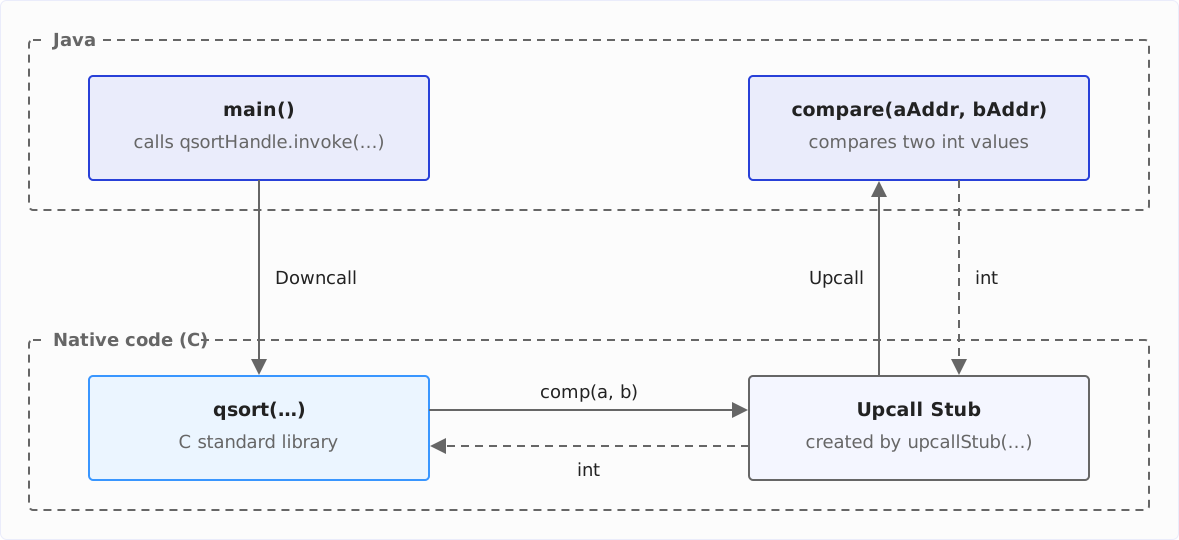
Linker.upcallStub(…), we allocate off-heap memory for a so-called “upcall stub” for the comparison function. The C function can later use this stub to call the Java callback methodcompare(…). -
Step 11: We specify the address of this stub as the fourth argument when calling the
qsort(…)function. -
Step 12: With
MemorySegment.toArray(…), we convert the array stored at the off-heap memory addressarrayAddressback into a Java array.
The following diagram shows how the calls go back and forth between Java and C. Java code is at the top, native code at the bottom. Solid arrows are calls, dashed ones are return values; the upcall stub is the code that Linker.upcallStub(…) generated in step 10:
You can find the complete program code in the FFMTestQsort class in the GitHub repository.
Starting the Sample Program
We start the program as follows:
$ java --enable-native-access=ALL-UNNAMED FFMTestQsort.java
unsorted = [696, 788, 659, 413, 933, 143, 93, 200, 736, 300]
sorted   = [93, 143, 200, 300, 413, 659, 696, 736, 788, 933]
Our program has successfully sorted ten numbers with qsort().
FFM API Components
Based on the examples, you have become familiar with the essential components of the Foreign Function & Memory API – arena, memory segment, function descriptor, and value layout. In this chapter, I will go into these components in more detail.
Arena
An arena manages access to native memory and ensures that allocated memory blocks are released again and that we do not access memory that has already been released.
There are four types of arenas that we can create using static factory methods of the Arena interface:
- the global arena,
- automatic arenas, managed by the garbage collector,
- confined arenas, and
- shared arenas.
In the following sections, you will learn about the differences between the various types.
Global Arena
There is only one instance of the global arena, which is shared by all application threads. Memory segments allocated in the global arena are only released when the JVM exits.
You can get the global arena as follows:
Arena arena = Arena.global();You can’t close the global arena. A call to Arena.global().close() results in an UnsupportedOperationException.
Automatic Arena
Memory segments allocated in an automatic arena are released by the garbage collector as soon as there are no more references to the corresponding MemorySegment objects.
An automatic arena can also be used by all application threads. You create it as follows:
Arena arena = Arena.ofAuto();Please note that each call to Arena.ofAuto() creates a new automatic arena.
An automatic arena is closed when there are no more references to the arena itself and all memory segments allocated via it. A manual call to close() on an automatic arena leads to an UnsupportedOperationException.
Confined Arena
An automatic arena has the disadvantage that the deallocation of the memory segments is not deterministic. It only happens when the garbage collector runs and detects that there are no more references to them.
There are use cases in which we want to decide for ourselves when the memory allocated via an arena is released. There are so-called “confined” arenas for this purpose, which we also used in the example application.
The memory segments allocated by a confined arena are released when the arena is closed by calling close(). Since Arena extends the AutoCloseable interface, we should create the arena in a try-with-resources block:
try (Arena arena = Arena.ofConfined()) {
  // . . .
}
All memory segments allocated within this block are released at the end of the block by an implicit call to arena.close().
Attempting to use an already closed arena leads to an IllegalStateException.
A confined arena may only be used by the thread that created it.
Shared Arena
A shared arena combines the advantages of the confined arena (deterministic lifetime of the memory segments) with the possibility of being used from multiple threads. You create a shared arena as follows:
Arena arena = Arena.ofShared();A shared arena is closed when any thread calls its close() method. If another thread then attempts to use the arena, an IllegalStateException will be thrown.
The Four Arenas at a Glance
The following table summarizes when an arena releases its memory, from which threads you may use it, and whether you can close it yourself. “✗” in the last column means: close() throws an UnsupportedOperationException.
| Arena | Creation | Memory is released | Access from | close() |
|---|---|---|---|---|
| global | Arena.global() | when the JVM exits | all threads | ✗ |
| automatic | Arena.ofAuto() | by the garbage collector | all threads | ✗ |
| confined | Arena.ofConfined() | on close() | the creating thread | ✓ |
| shared | Arena.ofShared() | on close() | all threads | ✓ |
MemorySegment
A MemorySegment is an object that describes a contiguous memory area. A memory segment can be allocated in various ways. The Arena interface offers – via its superinterface SegmentAllocator – the following methods, among others:
Arena.allocateFrom(String str)
allocates a memory segment and stores the given string in it as a UTF-8-encoded byte sequence. We have used this method in the example above.allocate(long byteSize)
allocates a memory segment of the specified size.allocate(MemoryLayout elementLayout)
allocate(MemoryLayout elementLayout, long count)
allocate a memory segment whose size is precisely matched to a certain number (1 in the first variant,countin the second variant) of objects of a particular type (defined byelementLayout). I will describe theMemoryLayoutinterface in the next section.
You can find a complete overview of all methods for allocating memory segments in the Javadoc of Arena and SegmentAllocator.
MemoryLayout
A MemoryLayout defines the memory structure of a specific type, whereby this type can also be a combination of other types (e.g., an array or struct).
ValueLayout
ValueLayout is a subinterface of MemoryLayout that defines how basic data types such as int, long, and double are stored in memory.
In the example, we have used ValueLayout.JAVA_LONG to describe the primitive Java type long and ValueLayout.ADDRESS to describe a memory address of the underlying hardware.
SequenceLayout
A SequenceLayout, also a subinterface of MemoryLayout, describes an array of a specific type, whereby this type is, in turn, described by a MemoryLayout. For example, the following code defines an array with ten Java doubles:
MemoryLayout.sequenceLayout(10, ValueLayout.JAVA_DOUBLE);And the following code defines the memory layout for an array consisting of three arrays of ten integers each:
MemoryLayout.sequenceLayout(3,
    MemoryLayout.sequenceLayout(10, ValueLayout.JAVA_INT));
StructLayout
A StructLayout, a subinterface of GroupLayout and thus of MemoryLayout, describes the memory layout of a struct, i.e., a memory area in which different data types are stored one after the other. The elements of the struct have a name and, in turn, a MemoryLayout. The name is not stored; you use it to access the struct’s elements.
The following code describes the memory layout for a struct that contains a year, a month, and a day:
MemoryLayout.structLayout(
    ValueLayout.JAVA_SHORT.withName("year"),
    ValueLayout.JAVA_SHORT.withName("month"),
    ValueLayout.JAVA_SHORT.withName("day"));
A struct can also contain arrays or structs.
FunctionDescriptor
We use FunctionDescriptor to describe the input and output parameters of a native function. When calling a native function via a method handle, the function descriptor ensures that the transferred Java types are converted to the correct C types, and the return value is converted from a C type to the desired Java return type.
The FunctionDescriptor interface has two static methods:
of(MemoryLayout resLayout, MemoryLayout... argLayouts)
creates a function descriptor with the return type defined byresLayoutand the input types defined byargLayouts.ofVoid(MemoryLayout... argLayouts)
creates a function descriptor without a return type and with the input types defined byargLayouts.
You have now familiarized yourself with the basic elements of the Foreign Function & Memory API. The following chapter explains how these elements work together to write and read memory areas.
Writing and Reading Memory Segments
In this chapter, you will learn how to write and read the memory area managed by a MemorySegment.
We start with a simple example with a ValueLayout, move on to a complicated example with a SequenceLayout, and finally arrive at a very complex example with a combination of SequenceLayout and StructLayout.
MemorySegment and ValueLayout
The following program (class FFMTestInts in the GitHub repo) creates a MemorySegment with 100 Java integers in the global arena, fills it with random numbers using MemorySegment.setAtIndex(…), and then reads out all 100 numbers with MemorySegment.getAtIndex(…):
public class FFMTestInts {
  private static final int COUNT = 100;

  public static void main(String[] args) {
    MemorySegment numbers = Arena.global().allocate(ValueLayout.JAVA_INT, COUNT);

    ThreadLocalRandom random = ThreadLocalRandom.current();
    for (int i = 0; i < COUNT; i++) {
      numbers.setAtIndex(ValueLayout.JAVA_INT, i, random.nextInt());
    }

    for (int i = 0; i < COUNT; i++) {
      int number = numbers.getAtIndex(ValueLayout.JAVA_INT, i);
      System.out.println(number);
    }
  }
}
Now, let’s move on to a slightly more complicated example…
MemorySegment and SequenceLayout
The following code (class FFMTestMultipleArrays) defines a MemoryLayout for an array of integers and allocates four such arrays.
To write the elements of the array, a VarHandle is defined for arrayLayout. The argument PathElement.sequenceElement() indicates that we want to specify the index of the respective element for accessing the array via the VarHandle. Finally, we write the array elements with VarHandle.set(…) and specify the segment, the offset (the size of the array layout multiplied by the index of the array we are writing), the index within the array, and the value to be written as arguments.
We could read the values using an analogous VarHandle.get(…) method, but I would like to show you another variant: We use MemorySegment.elements(…) to create a stream of memory segments, each of which contains an array. We load the respective array from the memory segment via MemorySegment.toArray(…).
public class FFMTestMultipleArrays {
  private static final int ARRAY_LENGTH = 8;
  private static final int NUMBER_OF_ARRAYS = 4;

  public static void main(String[] args) {
    SequenceLayout arrayLayout = MemoryLayout.sequenceLayout(ARRAY_LENGTH, JAVA_INT);
    VarHandle arrayHandle = arrayLayout.varHandle(PathElement.sequenceElement());

    MemorySegment segment = Arena.global().allocate(arrayLayout, NUMBER_OF_ARRAYS);

    ThreadLocalRandom random = ThreadLocalRandom.current();
    for (int i = 0; i < NUMBER_OF_ARRAYS; i++) {
      long offset = i * arrayLayout.byteSize();
      for (int j = 0; j < ARRAY_LENGTH; j++) {
        arrayHandle.set(segment, offset, j, random.nextInt(0, 1000));
      }
    }

    segment
        .elements(arrayLayout)
        .forEach(
            arraySegment -> {
              int[] array = arraySegment.toArray(JAVA_INT);
              System.out.println(Arrays.toString(array));
            });
  }
}
Finally, we come to a particularly complicated example…
MemorySegment and StructLayout
The last example (class FFMTestArrayOfStructs) defines a StructLayout, which consists of the components year, month, and day, each of type short.
It also defines a SequenceLayout for an array of date structs.
We then define VarHandles for the struct elements within the array. We have to specify two path elements in each case: first, the array index and then the respective element name of the struct.
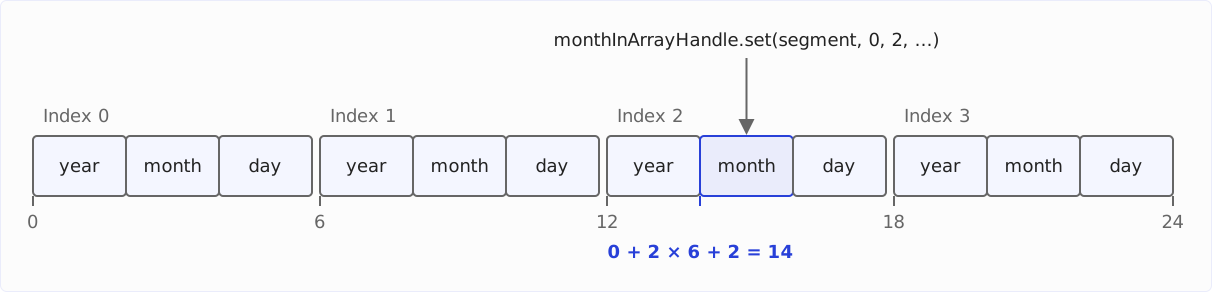
We write the structs via VarHandle.set(…) and specify the segment, the offset 0 (as the memory segment only contains one element, namely the array of structs), the array index, and the value to be written as arguments.
The following diagram shows the memory layout of this array: four structs of six bytes each, containing year, month, and day with two bytes each. Below each struct is its offset in bytes. Highlighted is the field that monthInArrayHandle.set(segment, 0, 2, …) writes to:
As in the previous example, we want to read the structs via MemorySegment.elements(…). This method provides a stream of memory segments, each of which contains a struct. Finally, we load the elements of the structs via three additional VarHandles for the struct (the previously created VarHandles were for structs within an array and won’t work here).
public class FFMTestArrayOfStructs {
  private static final int ARRAY_LENGTH = 4;

  public static void main(String[] args) {
    StructLayout dateLayout =
        MemoryLayout.structLayout(
            ValueLayout.JAVA_SHORT.withName("year"),
            ValueLayout.JAVA_SHORT.withName("month"),
            ValueLayout.JAVA_SHORT.withName("day"));

    SequenceLayout dateArrayLayout =
        MemoryLayout.sequenceLayout(ARRAY_LENGTH, dateLayout);

    MemorySegment segment = Arena.global().allocate(dateArrayLayout);
    writeToSegment(segment, dateArrayLayout);
    readFromSegment(segment, dateLayout);
  }

  private static void writeToSegment(
      MemorySegment segment, SequenceLayout dateArrayLayout) {
    VarHandle yearInArrayHandle =
        dateArrayLayout.varHandle(
            PathElement.sequenceElement(), PathElement.groupElement("year"));
    VarHandle monthInArrayHandle =
        dateArrayLayout.varHandle(
            PathElement.sequenceElement(), PathElement.groupElement("month"));
    VarHandle dayInArrayHandle =
        dateArrayLayout.varHandle(
            PathElement.sequenceElement(), PathElement.groupElement("day"));

    ThreadLocalRandom random = ThreadLocalRandom.current();
    for (int i = 0; i < ARRAY_LENGTH; i++) {
      yearInArrayHandle.set(segment, 0, i, (short) random.nextInt(1900, 2100));
      monthInArrayHandle.set(segment, 0, i, (short) random.nextInt(1, 13));
      dayInArrayHandle.set(segment, 0, i, (short) random.nextInt(1, 31));
    }
  }

  private static void readFromSegment(
      MemorySegment segment, StructLayout dateLayout) {
    VarHandle yearHandle = dateLayout.varHandle(PathElement.groupElement("year"));
    VarHandle monthHandle = dateLayout.varHandle(PathElement.groupElement("month"));
    VarHandle dayHandle = dateLayout.varHandle(PathElement.groupElement("day"));

    segment
        .elements(dateLayout)
        .forEach(
            dateSegment -> {
              int year = (int) yearHandle.get(dateSegment, 0);
              int month = (int) monthHandle.get(dateSegment, 0);
              int day = (int) dayHandle.get(dateSegment, 0);
              System.out.printf("%04d-%02d-%02d%n", year, month, day);
            });
  }
}In the GitHub repository, you will find another example, FFMTestArrayOfArrays, which I do not include here as it does not introduce any new concepts.
You have now acquired a solid basic knowledge of arenas, memory segments, memory layouts, and function descriptors. You should now be ready for your first forays into the world of native functions and native memory.
Calling Your Own Libraries
So far, we have only called functions of the C standard library, which Linker.defaultLookup() finds without further ado. For your own or a third-party library, you need a different SymbolLookup. There are two ways to get one.
The first way is SymbolLookup.libraryLookup(…). The method loads the library – on Linux, e.g., the file libmylib.so – and binds it to an arena. When you close the arena, the library is unloaded again:
try (Arena arena = Arena.ofConfined()) {
  SymbolLookup mylib = SymbolLookup.libraryLookup("libmylib.so", arena);
  MemorySegment myFunction = mylib.findOrThrow("my_function");
  // . . .
}
The second way uses the classic System.loadLibrary(…) from JNI. You then find the loaded library via SymbolLookup.loaderLookup(), which searches all libraries of the calling class loader:
System.loadLibrary("mylib");
SymbolLookup mylib = SymbolLookup.loaderLookup();
MemorySegment myFunction = mylib.findOrThrow("my_function");
Both ways are considered “restricted”: libraryLookup() as a method of the FFM API, System.loadLibrary() since Java 24 through JEP 472. Without --enable-native-access, they trigger the warning you know from the first example.
jextract: Generating Bindings From Header Files
For a library with dozens of functions and structs, writing every function descriptor and every memory layout by hand becomes tedious. The jextract tool takes this work off your hands: it reads the header files of a C library and generates Java code with the downcall handles and memory layouts you would otherwise write yourself.
jextract is not part of the JDK. It is developed in the openjdk/jextract project; ready-made builds are available as early-access builds.
jextract only understands C header files. This matches the FFM API: its native linker calls functions according to the platform’s C ABI (Application Binary Interface), i.e., its calling convention and data types. You reach a C++ or Rust library through a C interface – in C++ via extern "C", in Rust, e.g., with the cbindgen tool.
A typical invocation looks like this:
jextract \
  --include-dir /path/to/mylib/include \
  --output src \
  --target-package org.example.mylib \
  --library mylib \
  /path/to/mylib/include/mylib.h
jextract places the generated classes in the org.example.mylib package under src. You will find most functions in a class whose name is derived from the header file – for mylib.h, it is mylib_h.
The generated bindings depend on the platform jextract runs on: the C preprocessor evaluates the headers depending on the platform, and C types such as long do not have the same size everywhere. I therefore recommend generating the bindings on the platform where you use them.
A Brief History of the Foreign Function & Memory API
Finally, in this section, you will find a brief review of the development steps of the FFM API.
The FFM API grew out of two initially separate APIs: the “Foreign-Memory Access API,” which appeared as an incubator with Java 14 in March 2020, and the “Foreign Linker API,” which followed a year later with Java 16. In Java 17, the two were merged into the “Foreign Function & Memory API.” In Java 22, it was finalized in March 2024 – after two incubator and three preview rounds.
The following table shows all ten JEPs along the way:
| Java version | JEP | API | Stage |
|---|---|---|---|
| Java 14 | JEP 370 | Foreign-Memory Access API | incubator |
| Java 15 | JEP 383 | Foreign-Memory Access API | second incubator |
| Java 16 | JEP 389 | Foreign Linker API | incubator |
| Java 16 | JEP 393 | Foreign-Memory Access API | third incubator |
| Java 17 | JEP 412 | Foreign Function & Memory API | incubator |
| Java 18 | JEP 419 | Foreign Function & Memory API | second incubator |
| Java 19 | JEP 424 | Foreign Function & Memory API | preview |
| Java 20 | JEP 434 | Foreign Function & Memory API | second preview |
| Java 21 | JEP 442 | Foreign Function & Memory API | third preview |
| Java 22 | JEP 454 | Foreign Function & Memory API | final |
Conclusion
Most Java developers will rarely need to access native memory or execute native code. Nevertheless, it is helpful to know that this option exists, e.g., to invoke AI libraries written in other languages from Java.
In this article, you have learned the basics. For a real library, I recommend generating the bindings with jextract instead of writing every function descriptor by hand. And grant native access with --enable-native-access today – then your code will keep running when deny becomes the default.
JDK Enhancement Proposal 454 and the Project Panama website take you deeper into the subject.
Did you take something away from this article? With a review on my ProvenExpert profile, you help other developers assess whether these articles are worth reading – and you help me understand which content is most useful to you.