
This article is about the ArrayBlockingQueue and its properties. You will see how the ArrayBlockingQueue is used with an example. I will also give you a recommendation in which cases you should use this queue.
Here we are in the class hierarchy:
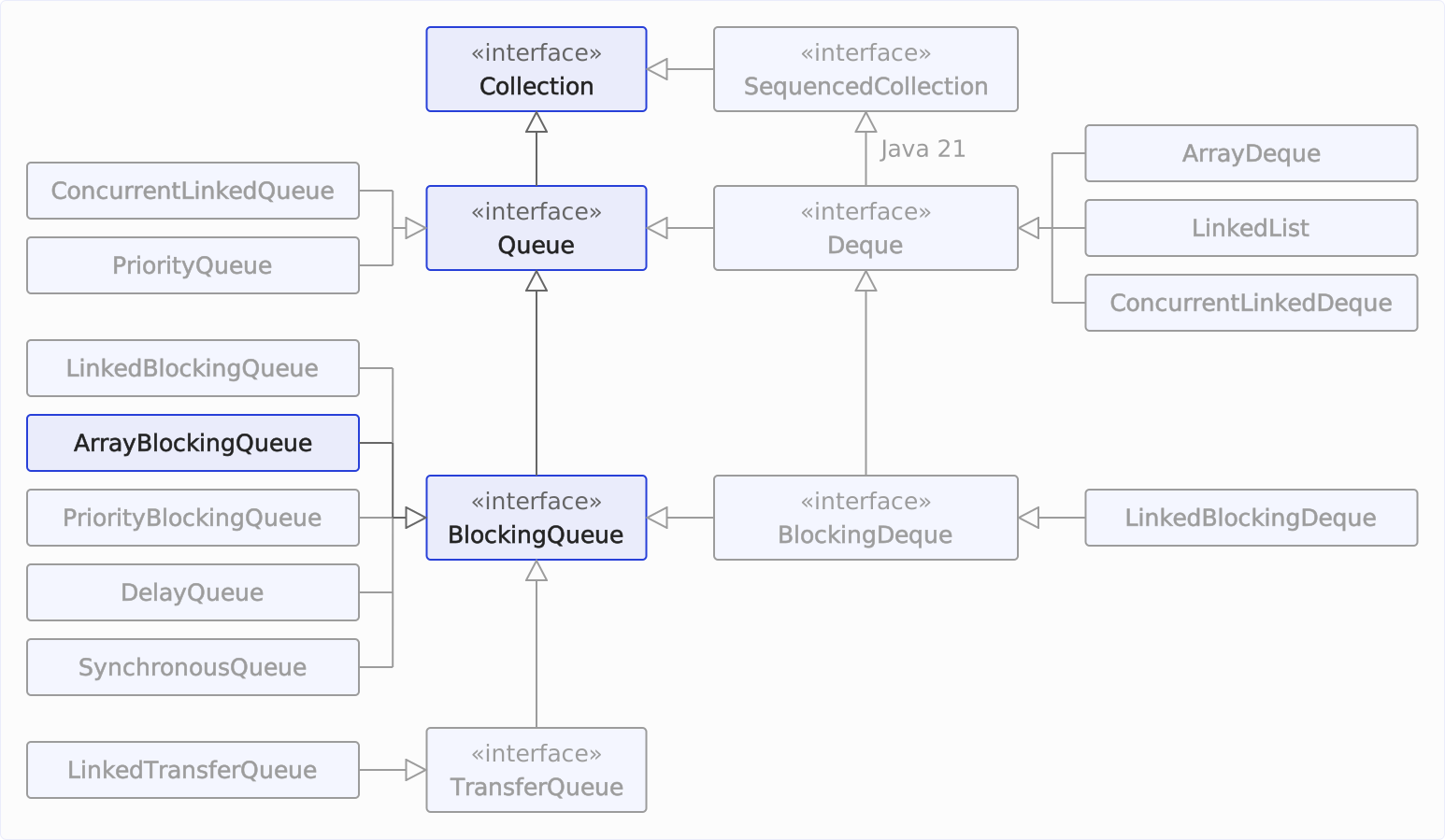
ArrayBlockingQueue Characteristics
The class java.util.concurrent.ArrayBlockingQueue is based on an array and – like most queue implementations – is thread-safe (see below). It is bounded (has a fixed capacity) and blocking – put() waits when the queue is full, take() when it is empty – and optionally provides a fairness policy (i.e., waiting producer and consumer threads are served in the order in which they called their blocking method).
You set the capacity when creating the queue, and it cannot be changed afterward: new ArrayBlockingQueue<>(capacity) creates a queue without a fairness policy, new ArrayBlockingQueue<>(capacity, true) one with it. According to the Javadoc, fairness generally decreases throughput but reduces variability and prevents a waiting thread from being passed over indefinitely.
A third constructor additionally takes the elements of a collection. All three constructors reject a capacity below 1 with an IllegalArgumentException.
null elements are not allowed (put(null) throws a NullPointerException) – which is why poll() can unambiguously signal “queue empty” with the return value null.
The characteristics at a glance:
| Underlying data structure | Thread-safe? | Blocking/ non-blocking | Fairness policy | Bounded/ unbounded | Iterator type |
|---|---|---|---|---|---|
| Array | Yes (pessimistic locking with a single lock) | Blocking | Optional | Bounded | Weakly consistent¹ |
¹ Weakly consistent: Elements that remain in the queue without interruption since the iterator was created are returned by the iterator exactly once. Changes after its creation – insertions as well as removals – may be reflected by the iterator, but need not be; it never throws a ConcurrentModificationException.
The iterator supports remove().
Recommended Use Case
I recommend ArrayBlockingQueue if you need a blocking queue with a fixed capacity and fairness or steady latencies matter more to you than maximum throughput – or if you want to avoid a separate node object being created on the heap for every inserted element, which the garbage collector has to clean up again after it is taken, as is the case with a linked queue.
The ArrayBlockingQueue creates its array once when the queue is created and then only writes the elements into it.
If throughput with many producers and consumers is what counts, the LinkedBlockingQueue is usually faster: it uses two separate ReentrantLocks for writing and reading, so producers and consumers rarely block each other. Why that is different with ArrayBlockingQueue is shown in the section “Is ArrayBlockingQueue Thread-Safe?”. According to the Javadoc, the performance of linked queues is less predictable in return. If nothing should block at all, use the ConcurrentLinkedQueue.
ArrayBlockingQueue Example
In the following example, we create an ArrayBlockingQueue with capacity 3 and the fairness policy switched on. Then we have a ScheduledExecutorService write and read elements to and from the queue at specified intervals (→ code on GitHub):
public class ArrayBlockingQueueExample {
  private static final long startTime = System.currentTimeMillis();

  static void main() throws InterruptedException {
    BlockingQueue<Integer> queue = new ArrayBlockingQueue<>(3, true);
    ScheduledExecutorService pool = Executors.newScheduledThreadPool(10);

    // Start reading from the queue immediately, every 3 seconds
    for (int i = 0; i < 10; i++) {
      int delaySeconds = i * 3;
      pool.schedule(() -> dequeue(queue), delaySeconds, TimeUnit.SECONDS);
    }

    // Start writing to the queue after 3.5 seconds (so there are already 2 threads
    // waiting), every second (so that the queue fills faster than it's emptied,
    // so that we see a full queue soon)
    for (int i = 0; i < 10; i++) {
      int element = i; // Assign to an effectively final variable
      int delayMillis = 3500 + i * 1000;
      pool.schedule(
          () -> enqueue(queue, element), delayMillis, TimeUnit.MILLISECONDS);
    }

    pool.shutdown();
    pool.awaitTermination(1, TimeUnit.MINUTES);
  }

  private static void enqueue(BlockingQueue<Integer> queue, int element) {
    log("Calling queue.put(%d) (queue = %s)...", element, queue);
    try {
      queue.put(element);
      log("queue.put(%d) returned (queue = %s)", element, queue);
    } catch (InterruptedException e) {
      Thread.currentThread().interrupt();
    }
  }

  private static void dequeue(BlockingQueue<Integer> queue) {
    log("    Calling queue.take() (queue = %s)...", queue);
    try {
      Integer element = queue.take();
      log("    queue.take() returned %d (queue = %s)", element, queue);
    } catch (InterruptedException e) {
      Thread.currentThread().interrupt();
    }
  }

  private static void log(String format, Object... args) {
    System.out.printf(
        Locale.US,
        "[%4.1fs] [%-16s] %s%n",
        (System.currentTimeMillis() - startTime) / 1000.0,
        Thread.currentThread().getName(),
        String.format(format, args));
  }
}
We try to read an element from the queue every three seconds, starting immediately. We write the elements every second but do not start until 3.5 s have passed. At this point, two reading threads should have already blocked and are waiting for elements to be written to the queue.
Since we write faster than we read, the queue should soon reach its capacity limit. The writing threads should block from that moment until the reading threads have caught up.
Here is a sample output:
[ 0.0s] [pool-1-thread-1 ]     Calling queue.take() (queue = [])...
[ 3.0s] [pool-1-thread-2 ]     Calling queue.take() (queue = [])...
[ 3.5s] [pool-1-thread-3 ] Calling queue.put(0) (queue = [])...
[ 3.5s] [pool-1-thread-3 ] queue.put(0) returned (queue = [])
[ 3.5s] [pool-1-thread-1 ]     queue.take() returned 0 (queue = [])
[ 4.5s] [pool-1-thread-9 ] Calling queue.put(1) (queue = [])...
[ 4.5s] [pool-1-thread-9 ] queue.put(1) returned (queue = [])
[ 4.5s] [pool-1-thread-2 ]     queue.take() returned 1 (queue = [])
[ 5.5s] [pool-1-thread-7 ] Calling queue.put(2) (queue = [])...
[ 5.5s] [pool-1-thread-7 ] queue.put(2) returned (queue = [2])
[ 6.0s] [pool-1-thread-8 ]     Calling queue.take() (queue = [2])...
[ 6.0s] [pool-1-thread-8 ]     queue.take() returned 2 (queue = [])
[ 6.5s] [pool-1-thread-5 ] Calling queue.put(3) (queue = [])...
[ 6.5s] [pool-1-thread-5 ] queue.put(3) returned (queue = [3])
[ 7.5s] [pool-1-thread-4 ] Calling queue.put(4) (queue = [3])...
[ 7.5s] [pool-1-thread-4 ] queue.put(4) returned (queue = [3, 4])
[ 8.5s] [pool-1-thread-10] Calling queue.put(5) (queue = [3, 4])...
[ 8.5s] [pool-1-thread-10] queue.put(5) returned (queue = [3, 4, 5])
[ 9.0s] [pool-1-thread-6 ]     Calling queue.take() (queue = [3, 4, 5])...
[ 9.0s] [pool-1-thread-6 ]     queue.take() returned 3 (queue = [4, 5])
[ 9.5s] [pool-1-thread-3 ] Calling queue.put(6) (queue = [4, 5])...
[ 9.5s] [pool-1-thread-3 ] queue.put(6) returned (queue = [4, 5, 6])
[10.5s] [pool-1-thread-1 ] Calling queue.put(7) (queue = [4, 5, 6])...
[11.5s] [pool-1-thread-9 ] Calling queue.put(8) (queue = [4, 5, 6])...
[12.0s] [pool-1-thread-2 ]     Calling queue.take() (queue = [4, 5, 6])...
[12.0s] [pool-1-thread-2 ]     queue.take() returned 4 (queue = [5, 6, 7])
[12.0s] [pool-1-thread-1 ] queue.put(7) returned (queue = [5, 6, 7])
[12.5s] [pool-1-thread-7 ] Calling queue.put(9) (queue = [5, 6, 7])...
[15.0s] [pool-1-thread-8 ]     Calling queue.take() (queue = [5, 6, 7])...
[15.0s] [pool-1-thread-8 ]     queue.take() returned 5 (queue = [6, 7, 8])
[15.0s] [pool-1-thread-9 ] queue.put(8) returned (queue = [6, 7, 8])
[18.0s] [pool-1-thread-5 ]     Calling queue.take() (queue = [6, 7, 8])...
[18.0s] [pool-1-thread-5 ]     queue.take() returned 6 (queue = [7, 8, 9])
[18.0s] [pool-1-thread-7 ] queue.put(9) returned (queue = [7, 8, 9])
[21.0s] [pool-1-thread-4 ]     Calling queue.take() (queue = [7, 8, 9])...
[21.0s] [pool-1-thread-4 ]     queue.take() returned 7 (queue = [8, 9])
[24.0s] [pool-1-thread-10]     Calling queue.take() (queue = [8, 9])...
[24.0s] [pool-1-thread-10]     queue.take() returned 8 (queue = [9])
[27.0s] [pool-1-thread-6 ]     Calling queue.take() (queue = [9])...
[27.0s] [pool-1-thread-6 ]     queue.take() returned 9 (queue = [])
As predicted, the first two read attempts block at 0.0 s and 3.0 s because no elements have yet been written to the queue.
After 3.5 s, the first element is written, which wakes up the first thread, and that thread takes the element right away. After 4.5 s, the second element is written, waking up the second thread to remove the element.
Since the program writes faster than it reads, after 10.5 s, thread 1 blocks, after 11.5 s, thread 9 blocks, and after 12.5 s, thread 7 blocks when trying to write additional elements into the queue, which is full at that time.
After 12.0 s, an element is removed, and thread 1 can continue writing. After 15.0 s, another element is taken, and thread 9 can continue. After 18.0 s, thread 7 can continue.
Since no more elements are written to the queue, it empties again towards the end.
Note the order: the three blocked put() calls are served in the order in which they blocked. With the fairness policy switched on, this order is guaranteed; without it, the Javadoc leaves it unspecified.
Is ArrayBlockingQueue Thread-Safe?
Yes, ArrayBlockingQueue is thread-safe.
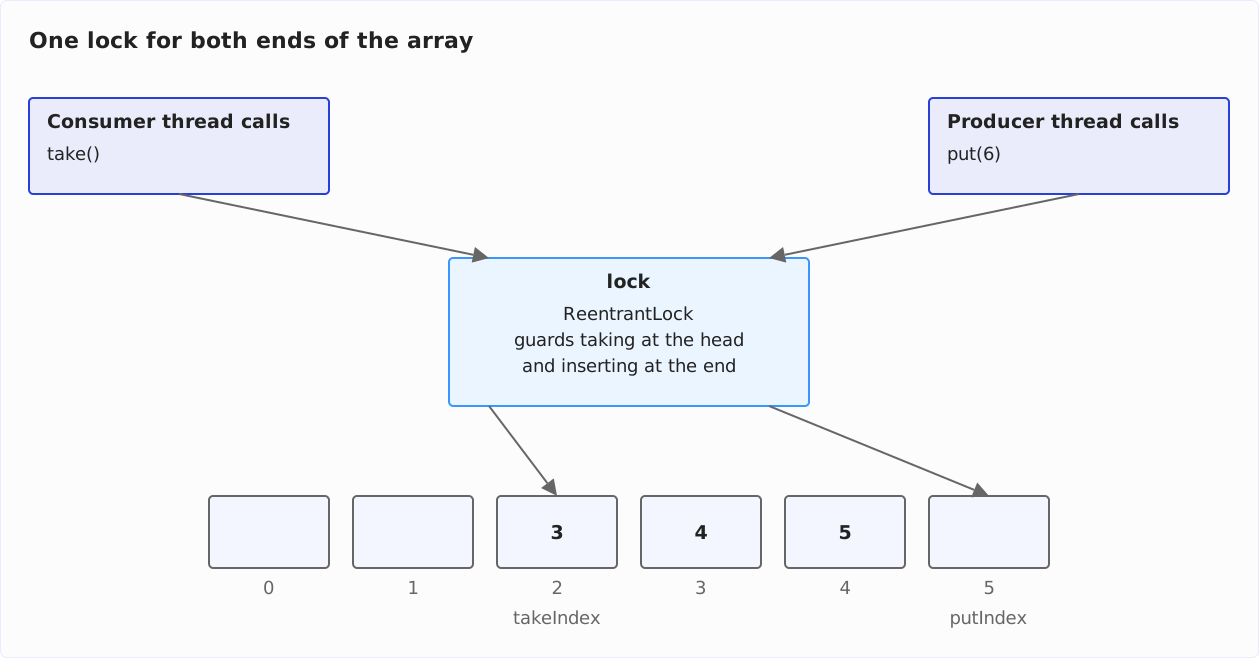
Internally, the class uses the array as a ring buffer: takeIndex points to the oldest element, putIndex to the next free slot; when either of them reaches the end of the array, it wraps around to 0. Inserting at the tail and taking from the head therefore never shift an element – only remove(Object), which deletes an element from the middle of the array, moves the following elements up. How a ring buffer works step by step, I show in the article “Ring Buffer (Circular Buffer).”
Thread safety is provided by a single ReentrantLock, simply called lock in the source code. It guards both the head and the tail of the queue, and two conditions hang off it: put() waits on notFull, take() on notEmpty. Because producer and consumer threads take the same lock, access conflicts (“thread contention”) between them can occur even when the queue is neither empty nor full.
The following diagram shows the one lock between the two ends of the array – in the example, a queue with capacity 6 holding the elements 3, 4, and 5, from which a consumer thread (on the left) takes the first element while a producer thread (on the right) puts the 6. It captures the moment before: putIndex is on slot 5, the last slot of the array, and wraps around to 0 after the write:
With low to moderate contention, optimistic locking – as in the ConcurrentLinkedQueue – is usually faster; under high contention, explicit locks have the edge. And only they let a thread wait until an element or a free slot is available – a lock-free queue cannot block.
Differences from other queues:
- With
LinkedBlockingQueue, thread safety is provided by not one but two locks. Thus, producer and consumer threads rarely block each other. - With
ConcurrentLinkedQueue, thread safety is provided by optimistic locking via compare-and-set, resulting in better performance with low to moderate contention.
ArrayBlockingQueue Time Complexity
Thanks to the ring buffer, put(), take(), offer(), and poll() work independently of the length of the queue; their time complexity is O(1).
size() is O(1) as well: the class maintains the counter count when inserting and removing. contains() and remove(Object), on the other hand, traverse the array and are O(n).
Summary and Outlook
This article has introduced you to the ArrayBlockingQueue. This queue is thread-safe, blocking, and bounded; a single ReentrantLock guards both ends of its ring buffer. With an example, you have seen how to use it with the fairness policy switched on. If throughput is what you need most, the LinkedBlockingQueue with its two locks is usually the better choice.
As the name suggests, this queue is based on an array. Its linked-list-based counterpart, the LinkedBlockingQueue, was covered in the previous part of the series.
The next part of the series is about PriorityBlockingQueue – a thread-safe and blocking variant of the PriorityQueue presented previously.
Was this article helpful to you? Then I’d be happy if you took a moment to leave a review on my ProvenExpert profile.