
Every Java object in memory contains not only the actual data but also a so-called “Object Header” that precedes the data. This header includes, for example, the identity hash code of an object, information about the object’s age, and a reference to the class that was instantiated by this object.
In this article, you will learn:
- How is the object header structured?
- What are the Mark Word and Class Word?
- What is the Compressed Class Space?
- How can Compressed Class Pointers be represented on a 64-bit system using only 32 bits?
Structure of the Java Object Header
The Java Object Header comprises a “Mark Word” and a “Class Word.” On a 64-bit system with uncompressed class pointers (which was possible up to Java 26), the header occupies 128 bits – i.e., 16 bytes – and has the following structure:

With compressed pointers (I’ll explain what that means in the Compressed Class Pointers section), the class word is only 32 bits long – and thus, the entire object header is no longer 128 bits, but only 96 bits – i.e., 12 bytes:

What data do Mark Word and Class Word contain, and how are they structured?
Mark Word
First, let’s look at the Mark Word (note that I changed the scale from the previous graphics to show the details better). Its layout has been different since Java 24; I’ll show you the layout that applied up to Java 23 first – it was in effect for the longest time.
Mark Word up to Java 23
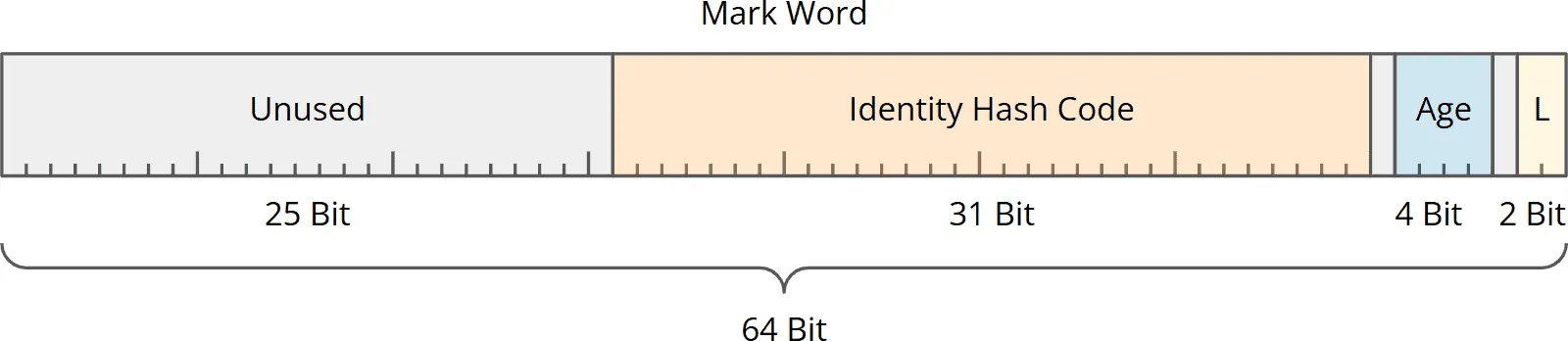
Up to Java 23, the Mark Word typically contained the following information:
- 25 unused bits.
- 31 bits for the object’s identity hash code – the value returned by
System.identityHashCode(Object). - 1 unused bit – this was used by the Concurrent Mark Sweep (CMS) garbage collector, which was removed in Java 14.
- 4 bits in which the garbage collector stores the age of the object, which it uses to decide when to move an object from the young to the old generation.
- 1 unused bit – this was used for biased locking, which was turned off in Java 15.
- 2 bits for the lock state of the object (“tag bits”).
Mark Word Since Java 24
Along with Compact Object Headers, Java 24 reshaped the classic layout as well: three of the unused bits were reserved for Project Valhalla together with the CMS bit, and the biased-locking bit became the self-forwarded tag. This layout applies to Java 24 to 26; since Java 27, you only see it with Compact Object Headers explicitly disabled.
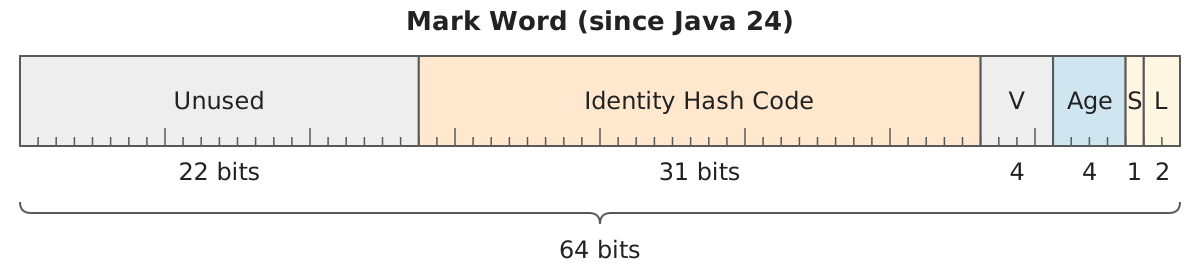
Since then, the Mark Word contains:
- 22 unused bits.
- 31 bits for the identity hash code – unchanged.
- 4 bits reserved for Project Valhalla – that is, for the planned value classes.
- 4 bits for the age of the object – unchanged.
- 1 bit for the self-forwarded tag, with which the garbage collector marks an object that it could not copy and that therefore stays where it is.
- 2 bits for the lock state of the object (“tag bits”) – unchanged.
In the obsolete “Legacy Stack Locking,” the Mark Word could change – I’ll explain how in the next section.
Legacy Stack Locking
In “Legacy Stack Locking” (the standard locking mechanism until Java 22), when the object is locked (i.e. when a thread is within a synchronized block defined on this object), the first 62 bits of the Mark Word are replaced by a pointer to an additional data structure on the stack:
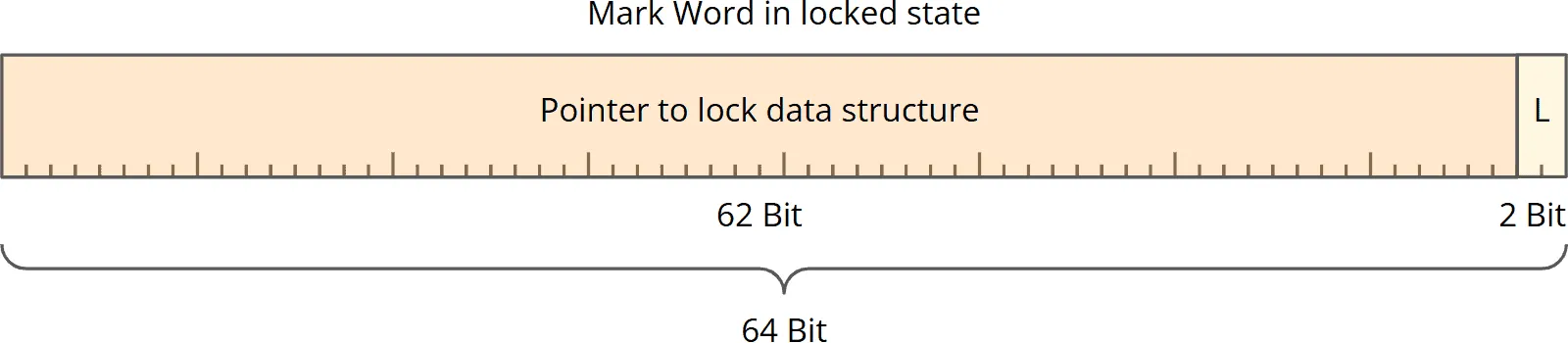
This data structure then contains the actual Mark Word as well as additional information about the lock, such as a list of threads that have been blocked and are waiting to be allowed to enter the synchronized block.
Since “Legacy Stack Locking” made it difficult to access the actual data of the Mark Word and was one reason for the aforementioned pinning, it was replaced by the more modern “Lightweight Locking.”
With -XX:LockingMode=1, the old mode could still be enabled up to Java 25; since Java 26, that is no longer possible, and in Java 27 the JVM no longer knows the flag.
Lightweight Locking
Java 21 introduces so-called “Lightweight Locking,” which – as long as no second thread is waiting for the lock – operates without swapping out the Mark Word. Lightweight Locking has been the default mode since Java 23.
With Lightweight Locking, if no other thread wants to enter the critical section, only the tag bits (the last two bits of the Mark Word) are changed from 0b01 (unlocked) to 0b00 (lightweight-locked). No additional data structure is created.
Only when another thread attempts to enter the critical section is the lock “inflated”:
- An additional data structure is created, which contains, among other things, a list of waiting threads.
- Since Java 27, the pointer to this data structure is stored by default in a separate hashtable (the “Object Monitor Table”) and no longer in the Mark Word. The inflation of the lock is merely indicated there by changing the tag bits to
0b10.
Lightweight Locking is, therefore, a more efficient way to synchronize threads by no longer swapping out the Mark Word and reducing the overhead of unnecessary monitor objects in scenarios without thread contention.
Class Word
The Class Word (sometimes also spelled “Klass Word”) is quickly explained:
It contains a pointer to the so-called Klass data structure in metaspace – a memory area outside the Java heap. This data structure contains all relevant information about the class of the object. All objects of the same class, e.g., all ArrayList objects, point to the same Klass data structure.
On a 64-bit system, this pointer (unless it is compressed – more on that later) is also 64 bits in size:

With these 64 bits, we can address 16 EB (16 Exabytes = 18,446,744,073,709,551,616 bytes). A Klass data structure is usually between half a kilobyte and one kilobyte in size. With 64 bits, we could, therefore, reference 264 / 768 = 24 quadrillion classes. This is a number that is likely to seem very large even in 30 years.
Therefore, the so-called “Compressed Class Space” and “Compressed Class Pointers” were introduced, which I will describe in the following two sections.
Compressed Class Space
The “Compressed Class Space” is a contiguous memory block within the metaspace (a memory area outside the heap) where all Klass data structures are stored. This area is allocated when a Java program starts, and its size cannot change during runtime.

By default, the Compressed Class Space is 1 GB in size. You can change its size with the following VM option:
-XX:CompressedClassSpaceSize=<size>
Allowed values are between 1 MB and 4 GB.
The name “Compressed Class Space” is misleading because it is not the Klass data structures themselves that are compressed but rather the pointers from the Class Word of the object header to these Klass data structures. More on that in the next section.
Compressed Class Pointers
As mentioned in the previous section, the Compressed Class Space can be a maximum of 4 GB in size. To address 4 GB, 32 bits (232 = 4,294,967,296) are sufficient.
A Compressed Class Pointer is, therefore, a 32-bit value that defines the address of the Klass data structure as an offset within the Compressed Class Space:

The actual address of the Klass data structure is obtained by adding the starting address of the Compressed Class Space and this offset.
Compressed Class Pointers Can No Longer Be Disabled
On a 64-bit system, Compressed Class Pointers are enabled by default. Up to Java 26, you could disable them with the following option:
-XX:-UseCompressedClassPointers
However, there was no reason to do this, because compressed pointers can be used to address around 4 to 6 million classes – and even large Java applications rarely use more than 100,000 classes. For this reason, this option was marked as deprecated in Java 25, and in Java 27, the uncompressed class-pointer mode was removed – the option has had no effect since then.
Further Reading: Compact Object Headers
Since Java 27, Compact Object Headers – developed as part of Project Lilliput – have been enabled by default: the header shrinks to 64 bits by compressing the class pointer to 22 bits and moving it into the Mark Word, and the Class Word is gone. How exactly this works is explained in the article on Compact Object Headers.
Did this article answer your questions? Then I’d be happy about a review on my ProvenExpert profile – it helps other developers find this content.