
After the previous release was relatively small, Java 14 was released with an impressive 16 implemented JDK Enhancement Proposals (JEPs) on March 17, 2020.
Java 14 introduces a significant change to the language: Switch Expressions.
Another valuable feature, “Helpful NullPointerExceptions”, has been saving us a lot of troubleshooting work ever since.
Two exciting previews, “Records” and “Pattern Matching for instanceof”, are also included.
As always, there are also some performance improvements; and quite a few features have been marked as “deprecated” or removed.
Switch Expressions (Standard)
With Switch Expressions – after var in Java 10 and var for lambda parameters in Java 11 – the third language enhancement from Project Amber reaches production status. Switch expressions allow a much more concise notation than before using arrow notation:
switch (day) {
  case MONDAY, FRIDAY, SUNDAY -> System.out.println(6);
  case TUESDAY                -> System.out.println(7);
  case THURSDAY, SATURDAY     -> System.out.println(8);
  case WEDNESDAY              -> System.out.println(9);
}
As an expression, switch can also return a value:
int numLetters = switch (day) {
  case MONDAY, FRIDAY, SUNDAY -> 6;
  case TUESDAY                -> 7;
  case THURSDAY, SATURDAY     -> 8;
  case WEDNESDAY              -> 9;
};
To find out what other possibilities switch expressions offer, e.g. how to return a value from code blocks with yield, when default cases are necessary and when they are not, and how the compiler can perform a completeness analysis on enums, see the main article on switch expressions.
(Switch Expressions were first introduced as a preview feature in Java 12. In the second preview in Java 13, the keyword break, used initially to return values, was replaced by yield. Due to positive feedback, Switch Expressions were released as a final feature in Java 14 by JDK Enhancement Proposal 361 without further changes.)
Helpful NullPointerExceptions
We all know the following problem: Our code throws a NullPointerException:
Exception in thread "main" java.lang.NullPointerException
    at eu.happycoders.BusinessLogic.calculate(BusinessLogic.java:80)
And in the code, we find something like this:
long value = context.getService().getContainer().getMap().getValue();What is null now?
context?context.getService()?Service.getContainer()?Container.getMap()?Map.getValue()? (in case this method returns aLongobject)
To fix the error, we have the following options:
- We could analyze the source code.
- We could debug the application (very costly if the error is difficult to reproduce or only occurs in production).
- We could split the code into multiple lines and rerun it (we would have to redeploy the application and wait for the error to occur again).
After upgrading to Java 14, you won’t have to ask yourself this question anymore because then the error message will look like this, for example:
Exception in thread "main" java.lang.NullPointerException:
Cannot invoke "Map.getValue()" because the return value of "Container.getMap()" is null
    at eu.happycoders.BusinessLogic.calculate(BusinessLogic.java:80)
We can now see exactly where the exception occurred: Container.getMap() returned null, so Map.getValue() could not be called.
Something similar can happen when accessing arrays, as in the following line of code:
this.world[x][y][z] = value;If a NullPointerException occurs in this line, it was previously not possible to tell whether world, world[x], or world[x][y] was null. With Java 14, this is clear from the error message:
Exception in thread "main" java.lang.NullPointerException:
Cannot store to int array because "this.world[x][y]" is null
    at eu.happycoders.BusinessLogic.calculate(BusinessLogic.java:107)
In Java 14, “Helpful NullPointerExceptions” are disabled by default and must be enabled with -XX:+ShowCodeDetailsInExceptionMessages. Since Java 15, this feature has been enabled by default.
(Helpful NullPointerExceptions are specified in JDK Enhancement Proposal 358.)
Experimental, Preview, and Incubator Features
The following features are not yet production-ready in Java 14. They are shipped at a more or less advanced stage of development to be able to improve them based on feedback from the Java community.
The first three features (Records, Pattern Matching for instanceof, and Text Blocks) are being developed (like Switch Expressions) in Project Amber, whose goal is to make Java syntax more modern and concise.
I will not present the features in all details but only briefly outline each and refer to the Java version in which that feature reached production readiness. The corresponding article of this series covers it in detail.
Records (Preview)
The first new preview feature in Java 14 is Records, defined in JDK Enhancement Proposal 359.
A record offers a compact syntax for a class with only final fields. These are set in the constructor and can be read via access methods.
Here is a simple example:
record Point(int x, int y) {}This one-liner creates a class Point with
- final instance fields
xandy, - a constructor setting both fields,
- and access methods
x()andy()to read the fields.
Point can be used as follows:
Point p = new Point(3, 5);
int x = p.x();
int y = p.y();
The equals(), hashCode() and toString() methods are generated automatically for records.
Records can have static fields and methods but no instance fields. They can implement interfaces but cannot inherit from other classes. They are implicitly final, so you can’t inherit from them either.
After a second preview in Java 15, records reached production readiness in Java 16. For a detailed presentation, see the main article on Java records.
Pattern Matching for instanceof (Preview)
The second preview in Java 14 is “Pattern Matching for instanceof”. This feature, defined in JDK Enhancement Proposal 305, eliminates the annoying need to cast to the target type after an instanceof check.
The easiest way to illustrate this is with an example.
The following code receives an Object named obj. If it is a String and longer than five characters, it should be converted to uppercase and printed. If it is an Integer, it should be squared and printed.
To do this, we need to perform a cast in lines 4 and 9:
Object obj = getObject();

if (obj instanceof String) {
  String s = (String) obj;
  if (s.length() > 5) {
    System.out.println(s.toUpperCase());
  }
} else if (obj instanceof Integer) {
  Integer i = (Integer) obj;
  System.out.println(i * i);
}
Many of us have become so accustomed to this style that we no longer even question it. But there is a better way!
Starting with Java 14, we can omit the casts and write the code as follows instead:
if (obj instanceof String s) {
  if (s.length() > 5) {
    System.out.println(s.toUpperCase());
  }
} else if (obj instanceof Integer i) {
  System.out.println(i * i);
}
After an instanceof statement, we can now specify a variable name. If obj is of the specified type, it is bound to the new variable name; this new variable is then of the specified target type and visible in the “then block”.
We can even go one step further and combine the if statements of lines 1 and 2:
if (obj instanceof String s && s.length() > 5) {
  System.out.println(s.toUpperCase());
} else if (obj instanceof Integer i) {
  System.out.println(i * i);
}
Thus, we have reduced nine lines of code to five while significantly increasing readability.
Just like records, “Pattern Matching for instanceof” – after a second preview in Java 15 – has been production-ready since Java 16.
Text Blocks (Second Preview)
Text Blocks were introduced in Java 13 as a preview. They allow the notation of multiline strings as in the following example:
String sql = """
    SELECT id, firstName, lastName FROM Employee
    WHERE departmentId = "IT"
    ORDER BY lastName, firstName""";
JDK Enhancement Proposal 368 introduces two new escape sequences in Java 14:
- Backslash at the end of the line to suppress a line break.
\sfor spaces to prevent them from being removed from the end of the line.
You can find examples of these escape sequences in the main article on text blocks.
Text blocks reached production status in the next release, Java 15. The article linked above describes them in full detail.
ZGC on macOS + Windows (Experimental)
ZGC, a garbage collector developed by Oracle with the goal – at the time – of pause times of 10 ms or less, was first introduced in Java 11 as an experimental feature for Linux.
The JDK Enhancement Proposals JEP 364 and JEP 365 now make the Z Garbage Collector available on macOS and Windows (still as an experimental feature).
You can enable ZGC with the JVM flags -XX:+UnlockExperimentalVMOptions -XX:+UseZGC.
ZGC reached production status in Java 15; I present it in detail in the corresponding article.
Packaging Tool (Incubator)
The jpackage tool is being developed based on JDK Enhancement Proposal 343. You can use this tool to create a platform-specific installer for a Java application, which in turn installs the application and the JRE required for it.
Platform-specific means that the installer feels familiar to users of a particular platform. On Windows, for example, this is an .msi or .exe file that is launched by double-clicking it. For macOS, a .pkg or .dmg file. And for Linux, a .deb or .rpm file.
The functionality is based on the javapackager tool, which was included since JDK 8, but removed in Java 11 along with JavaFX.
jpackage reached production readiness in Java 16; in the corresponding article of this series, I show how to use the tool.
Foreign-Memory Access API (Incubator)
JDK Enhancement Proposal 370 introduces an API that allows Java programs to efficiently and securely access memory outside the Java heap.
The Foreign-Memory Access API is part of Project Panama, which aims to create a faster and easier-to-use replacement for the Java Native Interface (JNI).
This interface remained – after a second incubator in Java 15 – in the incubator stage until Java 18 and first appeared as a preview version in Java 19 as “Foreign Function & Memory API”. The Foreign Function & Memory API became production-ready in Java 22.
Performance Improvements
Java 14 has some performance improvements in memory access and garbage collectors.
Non-Volatile Mapped Byte Buffers
With a MappedByteBuffer, you can “map” a file into a memory region to read and write it via regular memory access operations. In the “Memory-mapped files” section of the article “Java Files” series, you can read more about this.
Changed data must be transferred to the storage medium regularly. For non-volatile memory (NVM), there are more efficient procedures with less overhead than with conventional storage media.
Starting with Java 14, you can use these efficient mechanisms. For this purpose, you have to specify that the file is located on an NVM medium when creating the MappedByteBuffer. To do this, select one of the new modes ExtendedMapMode.READ_ONLY_SYNC or ExtendedMapMode.READ_WRITE_SYNC when calling FileChannel.map(), as in the following example. ExtendedMapMode lives in its own module, jdk.nio.mapmode (package jdk.nio.mapmode), which you have to include in modular applications via requires jdk.nio.mapmode;.
try (FileChannel channel =
    FileChannel.open(
        Path.of("test-file.bin"),
        StandardOpenOption.CREATE,
        StandardOpenOption.WRITE,
        StandardOpenOption.READ)) {
  MappedByteBuffer buffer = channel.map(ExtendedMapMode.READ_WRITE_SYNC, 0, 256);
  // read from / write to the buffer
}
Non-Volatile Mapped Byte Buffers are only available on Linux (x64 and AArch64) since only Linux has the required special operating system calls.
(Non-Volatile Mapped Byte Buffers are specified in JDK Enhancement Proposal 352.)
NUMA-Aware Memory Allocation for G1
The physical distance between CPU core and memory module plays an increasingly important role on modern machines with multiple CPUs and multiple cores per CPU. The further away a memory module is from the CPU core, the higher the latency for memory access.
As of Java 14, through JDK Enhancement Proposal 345, the G1 Garbage Collector can take advantage of such architectures to increase overall performance.
Threads are assigned to nearby NUMA nodes. Objects created by a thread are always created on the same NUMA node. And as long as they are in Young Generation, they remain on that node by being evacuated only to Survivor Regions on the same NUMA node.
NUMA-Aware Memory Allocation is only available for Linux, and you must explicitly enable it via the VM option -XX:+UseNUMA.
Parallel GC Improvements
In the parallel garbage collector, management for parallel processing of tasks has been optimized, potentially leading to significant performance improvements. In the course of this change, the flags -XX:BindGCTaskThreadsToCPUs, -XX:UseGCTaskAffinity, and -XX:GCTaskTimeStampEntries became obsolete.
There is no JEP for this change; it is tracked in the bug tracker under JDK-8224666.
Deprecations and Deletions
The following features have been marked as “deprecated” or “for removal” or permanently removed from the JDK in Java 14.
Thread Suspend/Resume Are Deprecated for Removal
Besides Thread.stop(), the following methods have also been marked as “deprecated” since Java 1.2:
Thread.suspend()Thread.resume()ThreadGroup.suspend()ThreadGroup.resume()ThreadGroup.allowThreadSuspension()
The reason for this is that thread suspension is highly prone to deadlocks:
If Thread.suspend() is called within a synchronized block, the corresponding monitor remains locked at least until Thread.resume() is called. However, if this happens in another thread, within a synchronized block on the same monitor, this second thread will block when trying to enter the synchronized block.
In Java 14, the above methods were marked as “for removal”.
The method Thread.stop(), which is also marked as “deprecated” – and in my eyes much more dangerous – was left untouched in Java 14.
There is no JEP for this change; it is tracked in the bug tracker under JDK-8231602.
Deprecate the Solaris and SPARC Ports
The Solaris operating system and the SPARC processor architecture are no longer state-of-the-art. To use development resources elsewhere, Oracle has proposed in JDK Enhancement Proposal 362 to mark the Solaris/SPARC, Solaris/x64, and Linux/SPARC ports as “deprecated” in Java 14 and to remove them entirely in one of the subsequent releases. The removal followed as early as Java 15 with JEP 381.
Remove the Concurrent Mark Sweep (CMS) Garbage Collector
The Concurrent Mark Sweep (CMS) garbage collector was marked as “deprecated” in Java 9 with JEP 291. Development resources should be reallocated in favor of more modern garbage collectors such as G1GC and ZGC.
As a replacement for CMS, the all-rounder G1, available experimentally since Java 6 Update 14 and promoted to the default garbage collector in Java 9, is recommended.
JEP 363 finally removes CMS from the JDK in Java 14.
Deprecate the ParallelScavenge + SerialOld GC Combination
There is an unusual and rarely used combination of GC algorithms: the pairing of parallel GC algorithm for the young generation (“ParallelScavenge”) and serial algorithm for the old generation (“SerialOld”).
You can activate this combination by enabling the ParallelGC and disabling the ParallelOldGC at the same time, which in turn automatically enables the SerialOldGC:
-XX:+UseParallelGC -XX:-UseParallelOldGC
This setting can reduce the total memory consumption by up to 3% of the Java heap.
However, the upside does not outweigh the high maintenance effort. Therefore, it was decided to use the development resources elsewhere and mark this GC combination as “deprecated” in Java 14 (JEP 366).
As a substitute, parallel GC is recommended for both young and old generations, which is activated as follows:
-XX:+UseParallelGC
As early as Java 15, the UseParallelOldGC flag became obsolete, and the ParallelScavenge + SerialOld combination was thus removed (JDK-8235860).
Remove the Pack200 Tools and API
The compression method for .class and .jar files, Pack200, introduced in Java 5, has been marked as “deprecated” in Java 11.
In times of 100-Mbps DSL lines and 18-TB hard disks, the effort required to maintain such unique compression methods – just to squeeze out a few extra bytes compared to standard methods – is out of all proportion to the benefits.
With JDK Enhancement Proposal 367, Pack200 and the associated tools were finally removed from the JDK.
Other Changes in Java 14
In this category, I have usually listed changes that Java developers did not necessarily need to know about. In Java 14, however, the “other changes” are pretty interesting.
JFR Event Streaming
In the article on Java 11, I introduced Java Flight Recorder (JFR) and JDK Mission Control (JMC). Flight Recorder collects valuable data about the JVM during the execution of an application and stores it in a file. You can then visualize the stored data with Mission Control:
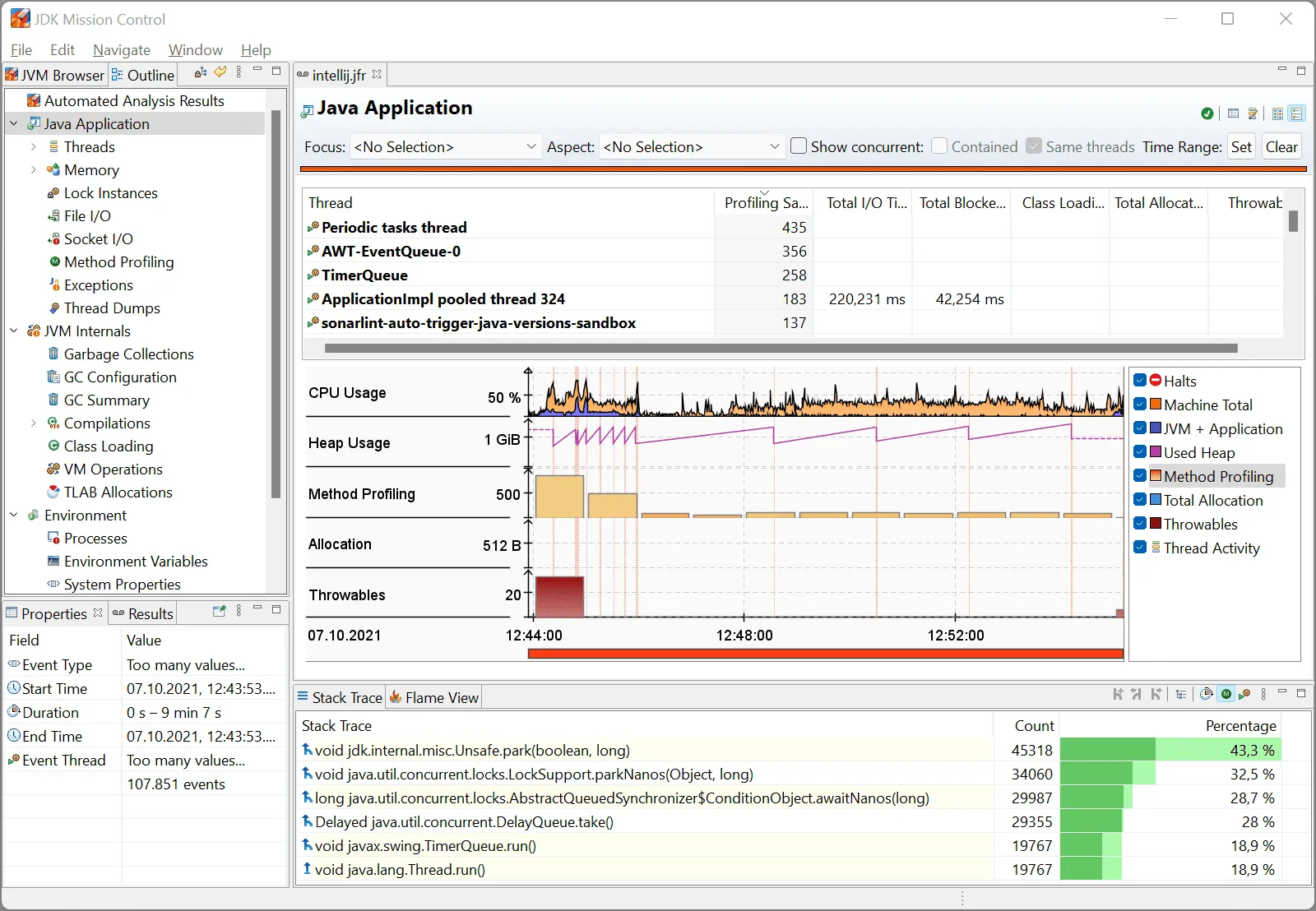
As of Java 14, JDK Enhancement Proposal 349 enables continuous monitoring of a Java application by allowing the data collected by Flight Recorder to be read from within the running application (instead of storing it in a file and analyzing it after the fact).
The following sample source code shows how this works:
int[] array = createRandomArray(1_000_000_000);

try (var rs = new RecordingStream()) {
  rs.enable("jdk.CPULoad").withPeriod(Duration.ofSeconds(1));

  rs.onEvent(
      "jdk.CPULoad",
      event -> {
        float jvmUser = event.getFloat("jvmUser");
        float jvmSystem = event.getFloat("jvmSystem");
        float machineTotal = event.getFloat("machineTotal");

        System.out.printf(
            Locale.US,
            "JVM User: %5.1f %%, JVM System: %5.1f %%, Machine Total: %5.1f %%%n",
            jvmUser * 100,
            jvmSystem * 100,
            machineTotal * 100);
      });

  rs.startAsync();

  Arrays.parallelSort(array);
}
First, you create a stream of JFR events with new RecordingStream().
You activate a concrete event with RecordingStream.enable() (in the example, “jdk.CPULoad”).
Using RecordingStream.onEvent(), we define how to react to the event. The event itself consists of several data fields, which we can read with getFloat() – or other getters, depending on the data type.
With RecordingStream.startAsync(), we start the recording in a separate thread. In the main thread, we sort an array with a billion elements, which takes about 15 seconds on my laptop.
Meanwhile, you can see well from the flight recorder data that Arrays.parallelSort() almost completely utilizes the CPU:
JVM User:  45.1 %, JVM System:  15.0 %, Machine Total:  60.1 %
JVM User:  86.5 %, JVM System:   0.5 %, Machine Total:  95.2 %
JVM User:  91.8 %, JVM System:   0.3 %, Machine Total: 100.0 %
JVM User:  93.0 %, JVM System:   0.2 %, Machine Total:  96.9 %
...
Accounting Currency Format Support
In some countries, such as the USA, negative numbers in accounting are not represented by a minus sign but by parentheses.
In Java 14, the so-called language tag extension “u-cf-account” is added, which allows specifying in a Locale object the additional information whether we use it in the context of accounting.
You can use this extension as in the following example:
// Example *without* language tag extension
Locale locale = Locale.forLanguageTag("en-US");
NumberFormat cf = NumberFormat.getCurrencyInstance(locale);
System.out.println("Normal:     " + cf.format(-14.95));

// Example *with* language tag extension
Locale localeAccounting = Locale.forLanguageTag("en-US-u-cf-account");
NumberFormat cfAccounting = NumberFormat.getCurrencyInstance(localeAccounting);
System.out.println("Accounting: " + cfAccounting.format(-14.95));
As of Java 14, the program prints the following:
Normal:     -$14.95
Accounting: ($14.95)
If you run the program under Java 13 or older, the tag extension is ignored, and the program formats both lines the same:
Normal:     -$14.95
Accounting: -$14.95
You can find more Unicode language tag extensions in the article about Java 10.
There is no JEP for this change; it is tracked in the bug tracker under JDK-8215181.
Minor Changes Without a JEP
CompactNumberFormatnow handles plural forms: inLONGstyle, one million is formatted as “1 Million” in German, two million as “2 Millionen” (JDK-8222756).- The
java.security.aclpackage, deprecated since Java 9, has been removed (JDK-8191138). Thread.countStackFrames()now always throws anUnsupportedOperationException(JDK-8205132).- Ahead-of-time compilation (
-XX:+UseAOT), introduced in Java 9 with JEP 295, is disabled by default, and the related flags are now experimental (JDK-8227439). In Java 17, the AOT compiler was removed.
Complete List of All Changes in Java 14
This article presented all features of Java 14 defined in JDK Enhancement Proposals and some performance improvements, deletions, and minor changes not associated with any JEP.
For a complete list of changes, see the official Java 14 release notes.
Summary
Java 14 is an impressive release. Switch Expressions are ready for production. And thanks to Helpful NullPointerExceptions, we have been saving a lot of debugging work ever since.
Two additional features from Project Amber have been added to the JDK as previews: Records and “Pattern Matching for instanceof”. And Text Blocks have been extended by the escape sequences “Backslash at the end of the line” and “\s”.
The (still experimental) low-latency garbage collector ZGC is now also available on Windows and macOS. And those who miss javapackager can now experiment with its successor jpackage.
JFR event streaming and several performance improvements round out the release.
If this article has helped you, I would greatly appreciate a positive review on my ProvenExpert profile. Your feedback helps me improve my content and motivates me to write new informative articles.