This and the following parts of this tutorial series are about queues for particular purposes. We will start with DelayQueue, a queue that releases each element only after its delay has expired.
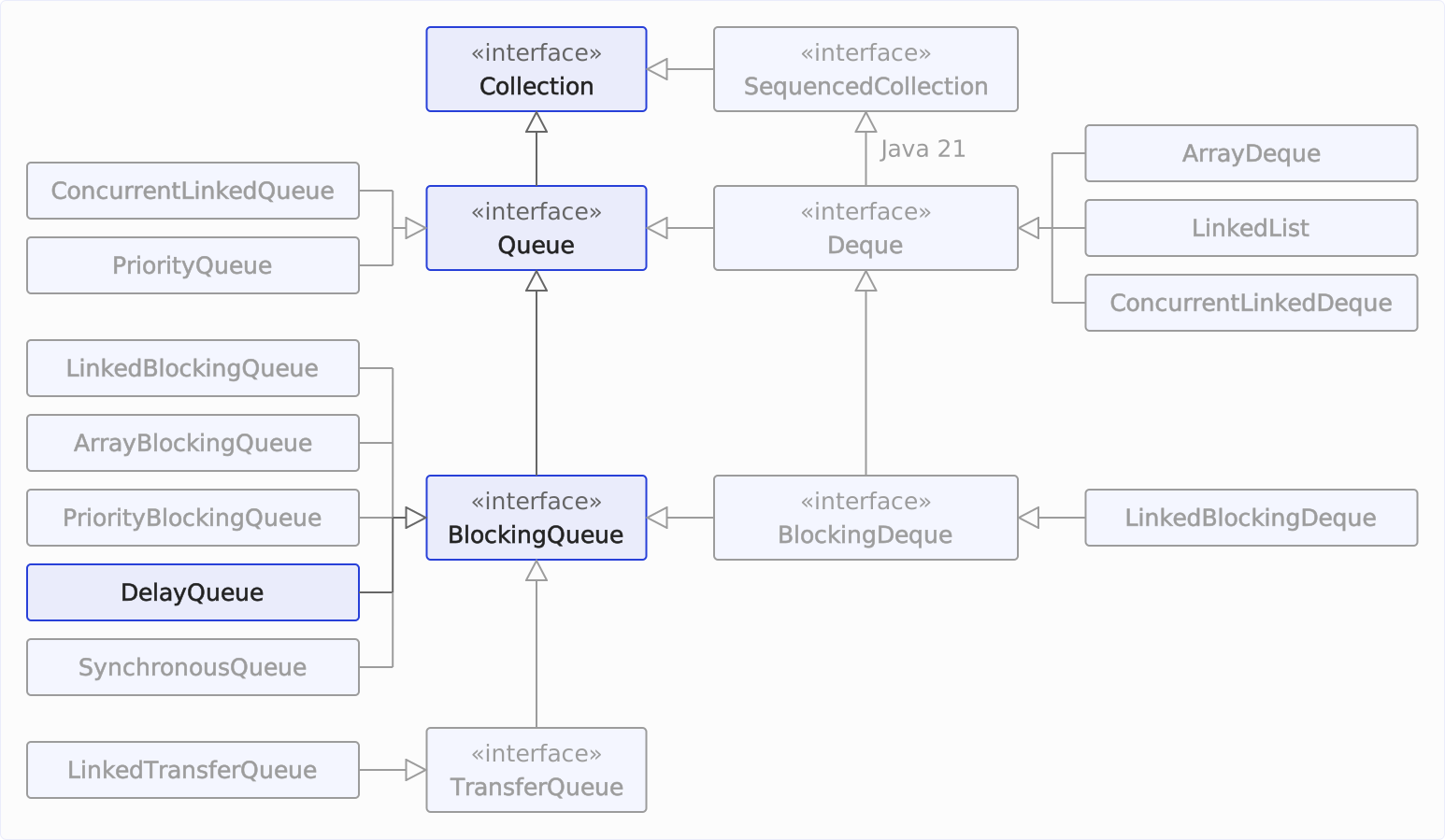
We are here in the class hierarchy:
DelayQueue Characteristics
The java.util.concurrent.DelayQueue class – just like the PriorityQueue it uses internally – is not a FIFO queue. It does not take out the element that has been in the queue the longest. Instead, an element can only be taken when a wait time (“delay”) assigned to that element has expired.
Therefore, the elements must implement the interface java.util.concurrent.Delayed. Its getDelay() method returns, on every call, the remaining time that must elapse before the element can be removed from the queue. Once that time is zero or negative, the element has expired.
Delayed also extends Comparable<Delayed>, and the Javadoc of Delayed requires compareTo() to order the elements consistently with getDelay(). That is because the PriorityQueue sorts by compareTo(), and DelayQueue only checks the element at the head for expiration. If compareTo() orders differently, the head holds an element whose delay is still running while an expired one waits behind it.
DelayQueue is blocking but unbounded: it can hold any number of elements and blocks only on removal (until the delay of the element at the head expires), not on insertion. null elements are not allowed.
Thread safety is achieved by pessimistic locking via a single ReentrantLock.
If several threads wait in take(), only one of them – the so-called leader – waits with a time limit, namely until the element at the head expires. The leader is the first thread that finds an unexpired head while there is no leader yet. All other threads wait without a time limit.
Only one of them is ever woken up, in two cases:
- The leader has taken the expired element. Before it leaves
take(), it wakes up one waiting thread, provided the queue still contains elements. That thread checks the new element at the head: if it has already expired, the thread takes it and in turn wakes up the next thread. Otherwise, it becomes the new leader. offer()inserts an element that expires earlier than the previous head, or the queue was empty. Thenoffer()resets the leader and wakes up one waiting thread – not necessarily the previous leader. That thread becomes the new leader with the shorter delay. The previous leader waits until its old deadline. If it then finds no expired element at the head, it waits without a time limit like the other threads.
So when an element expires, only one thread wakes up, not all waiting ones.
The characteristics in detail:
| Underlying data structure | Thread-safe? | Blocking/ non-blocking | Fairness policy | Bounded/ unbounded | Iterator type |
|---|---|---|---|---|---|
| Priority queue | Yes (pessimistic locking with a lock) | Blocking (only dequeue) | Not available | Unbounded | Weakly consistent¹ |
¹ Weakly consistent: All elements that exist when the iterator is created are traversed by the iterator exactly once. Changes that occur after this can, but do not need to, be reflected by the iterator.
Expired and Unexpired Elements
DelayQueue implements the BlockingQueue interface but intentionally violates its general contract: according to Queue and BlockingQueue, the removal methods return the element at the head. They may return null, throw an exception, or wait only if the queue is empty. In DelayQueue, they also do so when the queue contains elements but none of them has expired.
So the following methods only consider expired elements and only ever remove the expired element at the head:
poll()returnsnullas long as no element has expired – according to the interface, only if the queue is empty.remove()without an argument throws aNoSuchElementExceptionas long as no element has expired – according to the interface, only if the queue is empty.take()waits until the first element has expired – according to the interface, only until an element becomes available.poll(long, TimeUnit)waits the same way and returnsnullif no element expires within the timeout.drainTo()transfers only the expired elements. This matches the interface, which promises “all available” elements.
All other methods operate on all elements, expired or not:
size()counts all elements.peek()returns the element at the head even if its delay is still running – that is, the element that expires next.- The iterator traverses all elements in no particular order. It works on a copy made when the iterator is created, so it does not reflect later changes.
remove(Object)andclear()also remove elements whose delay is still running.
A loop that checks isEmpty() and then calls poll() therefore gets null even though the queue is not empty. That is why the example in the section “DelayQueue Example” calls take().
Recommended Use Case
For tasks that should run after a delay or at fixed intervals, I recommend a ScheduledExecutorService, e.g., from Executors.newScheduledThreadPool(). It works on the same principle: the ScheduledThreadPoolExecutor keeps its tasks in its own DelayedWorkQueue, a heap sorted by execution time. In addition, it manages the threads that execute the tasks, repeats periodic tasks, and gives you a ScheduledFuture for each task.
Use DelayQueue itself when your elements are not tasks but data that your own threads pick up once their delay has expired – for example, cache entries that should be removed after a deadline, or jobs that should be retried only after a wait time following a failure.
In the JDK itself, the Swing timer uses a DelayQueue: every started javax.swing.Timer, wrapped in a DelayedTimer, is inserted into the DelayQueue of the javax.swing.TimerQueue class, and a single thread takes the timers from there with take().
However, all operations go through the same ReentrantLock – under high contention, producers and consumers wait for each other. And elements that do not implement Delayed themselves need a wrapper class like DelayedElement in the following example.
DelayQueue Example
In the following example (→ code on GitHub), we fill a DelayQueue with seven instances of the DelayedElement class. Each of them contains a random number and a random initial delay between 100 and 999 ms. Then we call take() until the queue is empty again.
public class DelayQueueExample {
  static void main() {
    BlockingQueue<DelayedElement<Integer>> queue = new DelayQueue<>();
    ThreadLocalRandom random = ThreadLocalRandom.current();
    long startTime = System.currentTimeMillis();

    // Enqueue random numbers with random initial delays
    for (int i = 0; i < 7; i++) {
      int randomNumber = random.nextInt(10, 100);
      int initialDelayMillis = random.nextInt(100, 1000);
      DelayedElement<Integer> element =
          new DelayedElement<>(randomNumber, initialDelayMillis);
      queue.offer(element);
      System.out.printf(
          "[%3dms] queue.offer(%s)   --> queue = %s%n",
          System.currentTimeMillis() - startTime, element, queue);
    }

    // Dequeue all elements
    while (!queue.isEmpty()) {
      try {
        DelayedElement<Integer> element = queue.take();
        System.out.printf(
            "[%3dms] queue.take() = %s --> queue = %s%n",
            System.currentTimeMillis() - startTime, element, queue);
      } catch (InterruptedException e) {
        Thread.currentThread().interrupt();
      }
    }
  }
}
The corresponding DelayedElement class (→ code on GitHub) calculates the expiration time expirationNanos in its constructor. getDelay() returns the difference between this time and the current time, converted to the requested unit. compareTo() compares the expiration times and thus orders the elements consistently with getDelay().
The class works with System.nanoTime(), not with System.currentTimeMillis(). currentTimeMillis() returns the system’s wall-clock time, which jumps when it is corrected, e.g., via NTP – an element would then expire too early or too late. nanoTime(), on the other hand, only measures elapsed time; the JDK’s Delayed implementations in ScheduledThreadPoolExecutor and TimerQueue use it too.
compareTo() compares two nanoTime() values by their difference, not directly. That is what the Javadoc of nanoTime() demands, because the values can overflow.
Here is the DelayedElement class:
import static java.util.concurrent.TimeUnit.MILLISECONDS;
import static java.util.concurrent.TimeUnit.NANOSECONDS;

import java.util.concurrent.Delayed;
import java.util.concurrent.TimeUnit;

public class DelayedElement<E> implements Delayed {
  private final E e;
  private final long initialDelayMillis;
  private final long expirationNanos;

  public DelayedElement(E e, long initialDelayMillis) {
    this.e = e;
    this.initialDelayMillis = initialDelayMillis;
    this.expirationNanos =
        System.nanoTime() + MILLISECONDS.toNanos(initialDelayMillis);
  }

  @Override
  public long getDelay(TimeUnit unit) {
    long remainingNanos = expirationNanos - System.nanoTime();
    return unit.convert(remainingNanos, NANOSECONDS);
  }

  @Override
  public int compareTo(Delayed o) {
    DelayedElement<?> other = (DelayedElement<?>) o;
    // Compare the difference, not the values: System.nanoTime() may overflow
    return Long.signum(expirationNanos - other.expirationNanos);
  }

  @Override
  public String toString() {
    return "{%s, %dms}".formatted(e, initialDelayMillis);
  }
}The following output of a run on Java 27 shows that elements are taken in the order of their expiration, not in the order of insertion:
[  1ms] queue.offer({91, 560ms})   --> queue = [{91, 560ms}]
[ 22ms] queue.offer({46, 169ms})   --> queue = [{46, 169ms}, {91, 560ms}]
[ 23ms] queue.offer({94, 476ms})   --> queue = [{46, 169ms}, {91, 560ms}, {94, 476ms}]
[ 23ms] queue.offer({69, 951ms})   --> queue = [{46, 169ms}, {91, 560ms}, {94, 476ms}, {69, 951ms}]
[ 23ms] queue.offer({23, 613ms})   --> queue = [{46, 169ms}, {91, 560ms}, {94, 476ms}, {69, 951ms}, {23, 613ms}]
[ 23ms] queue.offer({67, 141ms})   --> queue = [{67, 141ms}, {91, 560ms}, {46, 169ms}, {69, 951ms}, {23, 613ms}, {94, 476ms}]
[ 23ms] queue.offer({95, 170ms})   --> queue = [{67, 141ms}, {91, 560ms}, {46, 169ms}, {69, 951ms}, {23, 613ms}, {94, 476ms}, {95, 170ms}]
[166ms] queue.take() = {67, 141ms} --> queue = [{46, 169ms}, {91, 560ms}, {95, 170ms}, {69, 951ms}, {23, 613ms}, {94, 476ms}]
[196ms] queue.take() = {46, 169ms} --> queue = [{95, 170ms}, {91, 560ms}, {94, 476ms}, {69, 951ms}, {23, 613ms}]
[197ms] queue.take() = {95, 170ms} --> queue = [{94, 476ms}, {91, 560ms}, {23, 613ms}, {69, 951ms}]
[500ms] queue.take() = {94, 476ms} --> queue = [{91, 560ms}, {69, 951ms}, {23, 613ms}]
[562ms] queue.take() = {91, 560ms} --> queue = [{23, 613ms}, {69, 951ms}]
[639ms] queue.take() = {23, 613ms} --> queue = [{69, 951ms}]
[979ms] queue.take() = {69, 951ms} --> queue = []
The queue in the output is not sorted², but the element with the shortest remaining delay is always at the head (left). And take() returns a few milliseconds after the element’s delay has expired: the element {67, 141ms} was inserted at 23 ms, so it expired at 164 ms and was taken at 166 ms.
² In fact, you can see the order of the elements in the array representation of the min-heap.
The following diagram shows the same run over time. Each row stands for one element, in the order of insertion; the bar runs from offer() to take(), and its end shows in which order the element was taken:
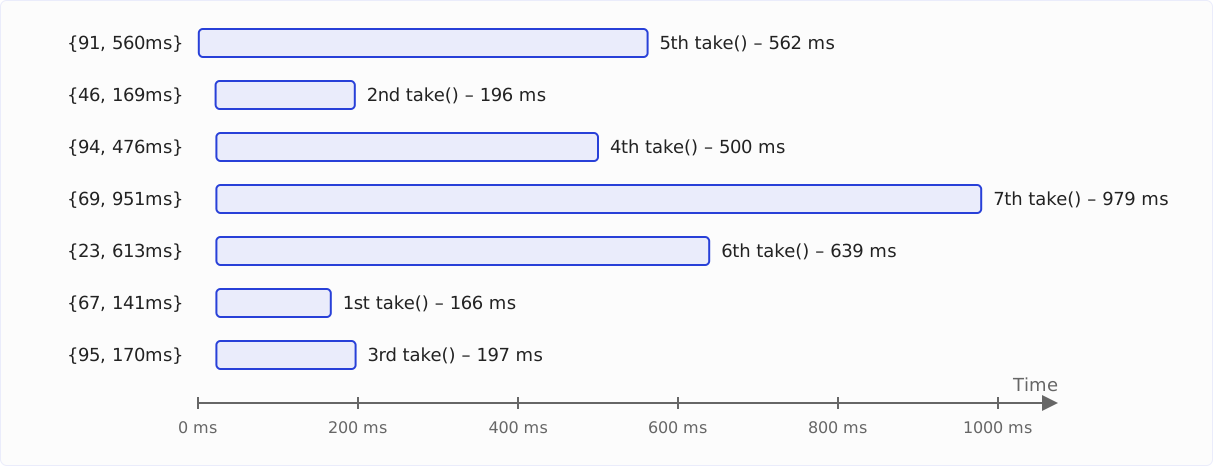
The element {91, 560ms} was inserted first and taken fifth; the element {67, 141ms} was inserted sixth and taken first.
Summary and Outlook
In this article, you have learned about DelayQueue. It releases each element only after its delay has expired, its elements implement Delayed with a compareTo() that is consistent with getDelay(), and poll() and take() only consider expired elements. For tasks that should run after a delay, a ScheduledExecutorService is the simpler choice.
You can find a comparison of all queue implementations in the JDK and an overview of when to use which implementation in the article about the Queue interface.
In the next part of this series, I will introduce you to another special queue – one that never contains any elements: SynchronousQueue.
Was this article helpful to you? Then I’d be happy if you took a moment to leave a review on my ProvenExpert profile.