A BufferedReader reads text from a source – a file, a network stream, the console – in large blocks into a buffer instead of fetching every character from the source individually. From this buffer, it hands out the text character by character or line by line. This way, you can read even large text files line by line without having to load them into memory completely.
For a file, the code for this looks like this in most cases:
try (BufferedReader reader = Files.newBufferedReader(Path.of("files/server.log"))) {
  String line;
  while ((line = reader.readLine()) != null) {
    System.out.println(line);
  }
}
2026-10-17 08:15:02 INFO Server started on port 8080
2026-10-17 08:15:07 INFO GET /java/java-bufferedreader/ 200
2026-10-17 08:15:09 WARN GET /java/bufferedreader/ 404
2026-10-17 08:15:11 INFO GET /java/java-streams/ 200
2026-10-17 08:15:12 ERROR Connection reset by peerFiles.newBufferedReader() opens the file and returns a BufferedReader that decodes the file as UTF-8. Each call to readLine() returns the next line, without the line terminator, and null at the end of the file. The try-with-resources statement closes the reader – and with it the file – even if an exception occurs while reading.
BufferedReader has existed since Java 1.1. A lot has been added since then: Files.newBufferedReader() in Java 7, the lines() method in Java 8, readAllLines() and readAllAsString() in Java 25, and, also in Java 25, the IO class, which itself uses a BufferedReader internally.
In this article, you will find out
- how a
BufferedReaderbuffers and why it is faster than aFileReaderalone, - which ways there are to create a
BufferedReader, and which one I recommend, - what happens when the character encoding of the file does not match,
- which line terminators
readLine()recognizes and when it returnsnull, - how to process lines as a stream with
lines(), - how to read ahead with
mark()andreset(), and whyready()does not tell you whether more lines are coming, - how to read from the console with a
BufferedReaderand withIO.readln(), - how fast the individual read methods are,
- how
BufferedReaderandScannerdiffer.
The Examples in This Article
Most examples read the small log file files/server.log from the introduction. It has five lines, each with a date, a time, a log level, and a message. The log level is always at positions 20 to 24 (counting from 0) and is padded with spaces to five characters.
You can find the complete code as well as the file server.log in the GitHub repository java-bufferedreader, in the package eu.happycoders.bufferedreader. Each section has its own class there with a main() method that produces the outputs shown. Start the classes in the root directory of the repository; files created by the examples end up in the target/ directory.
The examples use methods from Java 25 and therefore run only on Java 25 or later. Where a method is newer than Java 8, the text says since when it has existed.
What Is a BufferedReader?
BufferedReader is a Reader that wraps another Reader. It does not read from it character by character but in blocks of up to 8,192 characters, stores them in an internal buffer, and serves all subsequent read() and readLine() calls from this buffer. Only when the buffer is empty does it fetch the next block.
The BufferedReader stores the wrapped reader in a field of type Reader, and to read, it calls only one method on it: read(char[], int, int). It therefore works with any subclass of Reader. Usually, the wrapped reader is an InputStreamReader, which converts the bytes of an InputStream into characters. The following diagram shows how the classes for reading files are related. The solid lines stand for binary data, i.e., bytes, the dashed lines for text data, i.e., characters and strings:
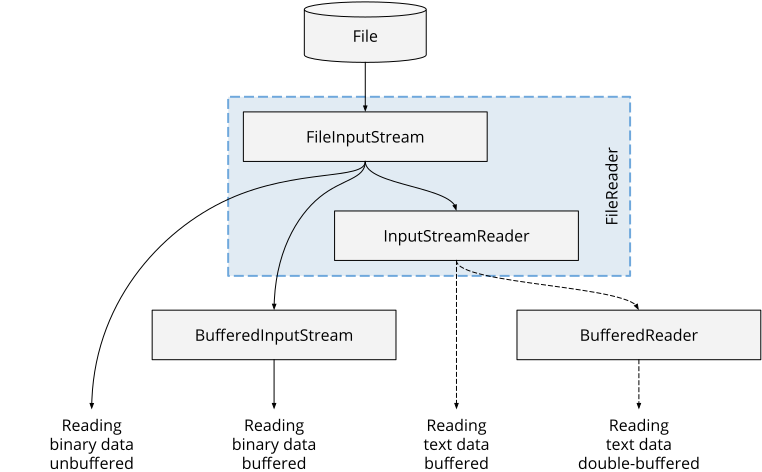
FileReader is a combination of FileInputStream and InputStreamReader. And the InputStreamReader already has a buffer of its own: it reads the bytes in blocks of 8,192 bytes and decodes them into characters.
So why a BufferedReader on top? Because the buffer of the InputStreamReader only bundles the accesses to the file, not the decoding of the characters. Every read() call on an InputStreamReader allocates a new char array of length 2, synchronizes, checks the array bounds, and lets the decoder decode at most two chars.
Why two? In Java, a char is a UTF-16 code unit. Characters outside the so-called Basic Multilingual Plane, e.g., many emojis, take up two of them, a so-called surrogate pair. The decoder can only decode such a character as a whole and needs room for two chars to do so. read() then returns the first char and keeps the second one for the next call.
The BufferedReader, on the other hand, lets the decoder decode up to 8,192 characters at once. Until the next refill, a read() on the BufferedReader is then just an access to its char array.
The second advantage is the readLine() method: only BufferedReader has it – Reader, InputStreamReader, and FileReader do not.
Creating a BufferedReader
There are three common ways to create a BufferedReader: via Files.newBufferedReader(), via a FileReader, and via an InputStreamReader. The first two variants read files; the third reads from any InputStream.
Files.newBufferedReader()
The Files.newBufferedReader() method from the NIO.2 API has existed since Java 7. It takes a Path and returns a ready-to-use BufferedReader:
Path log = Path.of("files/server.log");
try (BufferedReader reader = Files.newBufferedReader(log)) {
  System.out.println(reader.readLine());
}
2026-10-17 08:15:02 INFO Server started on port 8080Without a character encoding, the reader created this way decodes the file as UTF-8. You pass a different encoding as the second argument, e.g., Files.newBufferedReader(log, StandardCharsets.ISO_8859_1).
new BufferedReader(new FileReader(…))
The classic way nests two constructor calls: a FileReader opens the file, and a BufferedReader wraps it.
try (BufferedReader reader =
    new BufferedReader(new FileReader("files/server.log", UTF_8))) {
  System.out.println(reader.readLine());
}
2026-10-17 08:15:02 INFO Server started on port 8080The FileReader constructor with a Charset parameter has existed since Java 11. Without this parameter, the FileReader uses the default encoding of the JVM, which has also been UTF-8 since Java 18. Up to and including Java 17, it depended on the operating system and the locale; you can find the details in the article about reading files, in the section What character encoding does Java use by default to read text files?
The try-with-resources statement only needs to declare the BufferedReader. When it is closed, it also closes the FileReader – the section Closing a BufferedReader shows how exactly that works.
InputStreamReader: A BufferedReader Around Any InputStream
Not all text comes from a file. If it comes from a network socket, from the output of a process, from a resource on the classpath, or from a compressed file, the respective API gives you an InputStream. An InputStreamReader converts it into characters, and you put the BufferedReader around the InputStreamReader.
The following example compresses the log file with GZIPOutputStream and reads the first line from the compressed file:
Path log = Path.of("files/server.log");
Path gzipped = Path.of("target/server.log.gz");
try (OutputStream out = new GZIPOutputStream(Files.newOutputStream(gzipped))) {
  Files.copy(log, out);
}

try (BufferedReader reader =
    new BufferedReader(
        new InputStreamReader(
            new GZIPInputStream(Files.newInputStream(gzipped)), UTF_8))) {
  System.out.println(reader.readLine());
}
2026-10-17 08:15:02 INFO Server started on port 8080The chain reads from the inside out: Files.newInputStream() delivers the compressed bytes, GZIPInputStream decompresses them, InputStreamReader decodes the decompressed bytes as UTF-8, and BufferedReader buffers the characters and splits them into lines.
Always specify the encoding for the InputStreamReader. Which encoding the bytes have depends on their source – you cannot tell it from the bytes themselves.
Setting the Buffer Size
A second constructor takes the size of the buffer in characters:
try (BufferedReader reader =
    new BufferedReader(new FileReader(log.toFile(), UTF_8), 65_536)) {
  System.out.println(reader.readLine());
}
2026-10-17 08:15:02 INFO Server started on port 8080Without this parameter, the buffer holds 8,192 characters. Whether a larger buffer speeds up reading is shown in the section How Fast Is BufferedReader?
When the Character Encoding Does Not Match
Files.newBufferedReader() differs from the other two ways in one respect, which only becomes apparent when a file is not in the expected encoding.
The following program writes “Grüße aus Köln” (German for “Greetings from Cologne”) to a file as ISO-8859-1. In ISO-8859-1, each umlaut takes up one byte; in UTF-8, it takes two. The program then reads the file three times: with Files.newBufferedReader(), with a FileReader for UTF-8, and with Files.newBufferedReader() for ISO-8859-1:
Path latin1 = Path.of("target/greeting-latin1.txt");
Files.writeString(latin1, "Grüße aus Köln", ISO_8859_1);

try (BufferedReader reader = Files.newBufferedReader(latin1)) {
  System.out.println(reader.readLine());
} catch (MalformedInputException e) {
  System.out.println("Files.newBufferedReader(): " + e);
}

try (BufferedReader reader =
    new BufferedReader(new FileReader(latin1.toFile(), UTF_8))) {
  System.out.println("FileReader:                " + reader.readLine());
}

try (BufferedReader reader = Files.newBufferedReader(latin1, ISO_8859_1)) {
  System.out.println("With ISO_8859_1:           " + reader.readLine());
}
Files.newBufferedReader(): java.nio.charset.MalformedInputException: Input length = 1
FileReader: Gr��e aus K�ln
With ISO_8859_1: Grüße aus KölnThe readers in the first two attempts both decode UTF-8, and both hit the byte of the “ü”, which is not a valid character in UTF-8. But they react differently:
- The reader from
Files.newBufferedReader()throws aMalformedInputException, a subclass ofIOException. - The
FileReaderreplaces every invalid byte with the Unicode replacement character U+FFFD, which most fonts draw as a diamond with a question mark – and keeps reading without an error message.
Only with the matching encoding in the third attempt does the text arrive correctly.
I recommend Files.newBufferedReader() for all files. A file in the wrong encoding is then noticed at the first invalid byte instead of being processed further as text with replacement characters. The price: a file that contains even a single invalid byte cannot be read this way. If you have to process such files anyway, deliberately use an InputStreamReader or FileReader and check the lines you read for U+FFFD.
How character encodings work and how the same bytes become different characters depending on the encoding is explained in the section Character encoding of the article about reading files.
Reading Line by Line with readLine()
readLine() reads characters until it encounters a line terminator and returns everything before it as a String. The line terminator itself is not part of the result.
Line Terminators
Which characters end a line depends on the operating system that wrote the file: Linux and macOS use a line feed (\n), Windows the combination of carriage return and line feed (\r\n), and classic Mac OS up to version 9 a single carriage return (\r). readLine() recognizes all three, even mixed in one file – and the end of the input as a fourth line terminator.
The following example uses a small helper method to read a text that contains all four line terminators. The helper method puts each line in square brackets, so that spaces and empty lines become visible too, and at the end, it prints null, the return value with which readLine() signals the end:
printLines("Unix\nWindows\r\nClassic Mac OS\rLast line without terminator");private static void printLines(String text) throws IOException {
try (BufferedReader reader = new BufferedReader(Reader.of(text))) {
String line;
while ((line = reader.readLine()) != null) {
System.out.println("[" + line + "]");
}
System.out.println("null");
}
}[Unix]
[Windows]
[Classic Mac OS]
[Last line without terminator]
nullReader.of() has existed since Java 24. The method returns a Reader that reads the characters of a string (more precisely: of a CharSequence). Up to Java 23, you needed a StringReader for this.
None of the four lines contains a \r or \n. The last line ends without a line terminator, and readLine() still returns it in full.
Empty Lines and the End of the Input
To readLine(), an empty line and the end of the input are two different things: for an empty line, it returns an empty string; at the end of the input, null.
printLines("first\n\nthird\n");[first]
[]
[third]
nullAfter the last \n, there is no further empty line: a line terminator at the end of the input ends the last line; it does not start a new one. Only two line terminators in a row produce an empty line at the end:
printLines("first\n\n");[first]
[]
nullFor empty input, the very first readLine() call returns null:
printLines("");nullThat is why a read loop checks the result of readLine() for null and not for the empty string. A loop that stops on line.isEmpty() instead ends at the first empty line – and if the input has none, isEmpty() throws a NullPointerException at the end of the input, because line is null then.
Only One readLine() per Loop Iteration
The loop from the introduction assigns the result of readLine() to the variable line in its condition and checks it for null there. It may seem natural to only check readLine() in the condition and call it a second time in the loop body:
// wrong: reads two lines per iteration and prints only the second
while (reader.readLine() != null) {
  System.out.println(reader.readLine());
}
2026-10-17 08:15:07 INFO GET /java/java-bufferedreader/ 200
2026-10-17 08:15:11 INFO GET /java/java-streams/ 200
nullThe first, third, and fifth lines, however, are read only when the loop condition is evaluated and are then thrown away. Only the second and fourth lines are printed. And because the file has an odd number of lines, the second call in the last iteration returns null.
Lines Without a Length Limit
readLine() reads until a line terminator arrives – if necessary, the entire input. If someone sends you a gigabyte without a line break, readLine() builds a single string from it or aborts with an OutOfMemoryError if the heap is not large enough.
For input from untrusted sources, such as the network, you should therefore limit the length – e.g., by reading in blocks with read(char[], int, int) and searching for the line terminator yourself.
lines(): Lines as a Stream
Since Java 8, lines() has returned the lines of a BufferedReader as a Stream<String>. This gives you all the operations of the Stream API. The following example prints only the lines with an HTTP request:
try (BufferedReader reader = Files.newBufferedReader(log)) {
  reader.lines()
      .filter(line -> line.contains(" GET "))
      .forEach(System.out::println);
}
2026-10-17 08:15:07 INFO GET /java/java-bufferedreader/ 200
2026-10-17 08:15:09 WARN GET /java/bufferedreader/ 404
2026-10-17 08:15:11 INFO GET /java/java-streams/ 200The stream does not read the file when lines() is called, but only during the terminal operation, here forEach(). So the file must be open until then – that is why the entire pipeline is inside the try-with-resources block.
The second example counts the lines per log level. substring(20, 25) cuts the log level out of each line, and strip() removes the spaces it is padded with. Collectors.groupingBy() groups the lines by this value and counts them; the TreeMap sorts the log levels alphabetically:
try (BufferedReader reader = Files.newBufferedReader(log)) {
  Map<String, Long> linesPerLevel =
      reader.lines()
          .collect(groupingBy(
              line -> line.substring(20, 25).strip(),
              TreeMap::new,
              counting()));
  System.out.println(linesPerLevel);
}
{ERROR=1, INFO=3, WARN=1}The methods of Stream do not declare checked exceptions. If an IOException occurs while reading, the stream therefore wraps it in an UncheckedIOException. The following example shows this with the ISO-8859-1 file from the section When the Character Encoding Does Not Match:
try (BufferedReader reader = Files.newBufferedReader(latin1)) {
  long count = reader.lines().count();
  System.out.println(count + " lines");
} catch (UncheckedIOException e) {
  System.out.println(e + "\n  caused by " + e.getCause());
}
java.io.UncheckedIOException: java.nio.charset.MalformedInputException: Input length = 1
caused by java.nio.charset.MalformedInputException: Input length = 1The Javadoc of lines() names one restriction: after the terminal operation, the reader is not at any defined position. So you cannot process the first lines via a stream and then continue reading with readLine().
If all you need from a file is the stream of its lines, you can do without a BufferedReader of your own: Files.lines(path) opens the file and returns the stream directly. The try-with-resources statement then holds the stream instead of the reader, because the stream keeps the file open until it is closed. The first example of this section then looks like this:
try (Stream<String> lines = Files.lines(log)) {
  lines.filter(line -> line.contains(" GET "))
      .forEach(System.out::println);
}
2026-10-17 08:15:07 INFO GET /java/java-bufferedreader/ 200
2026-10-17 08:15:09 WARN GET /java/bufferedreader/ 404
2026-10-17 08:15:11 INFO GET /java/java-streams/ 200If you process the lines with a parallel stream, Files.lines() has a second advantage, by the way: it splits a UTF-8 file on the default file system that is at most Integer.MAX_VALUE bytes in size into halves for the threads itself, whereas BufferedReader.lines() can only be split in growing blocks. How this affects the running time is shown in the article about parallel streams.
Reading Everything at Once: readAllLines() and readAllAsString()
Since Java 25, every Reader has two methods that read the rest of the input at once: readAllLines() returns the lines as an unmodifiable List<String>, readAllAsString() returns the text as one single String, including all line terminators.
try (BufferedReader reader = Files.newBufferedReader(log)) {
  List<String> lines = reader.readAllLines();
  System.out.println(lines.size() + " lines");
}

try (BufferedReader reader = Files.newBufferedReader(log)) {
  String content = reader.readAllAsString();
  System.out.println(content.length() + " characters");
}
5 lines
276 charactersFor a file, Files.readAllLines(path) (since Java 8) and Files.readString(path) (since Java 11) are shorter; the article about reading files shows both.
The new methods, readAllLines() and readAllAsString(), have two advantages, though: they work with any Reader, including an InputStreamReader around a network stream. And they read only the rest – so you can first read individual lines with readLine() and then the rest at once:
try (BufferedReader reader = Files.newBufferedReader(log)) {
  String first = reader.readLine();
  List<String> rest = reader.readAllLines();
  System.out.println("First line: " + first);
  System.out.println("Remaining:  " + rest.size() + " lines");
}
First line: 2026-10-17 08:15:02 INFO Server started on port 8080
Remaining: 4 linesBoth methods keep the entire rest of the input in memory. The Javadoc therefore advises against using them for input of unknown origin: a huge input occupies a correspondingly large amount of memory.
Reading Character by Character: read() and read(char[], int, int)
Like every Reader, BufferedReader has methods for reading individual characters. read() returns the next character as an int and -1 at the end of the input. The return type is int and not char so that -1 differs from every character.
The following example counts the digits in the log file:
try (BufferedReader reader = Files.newBufferedReader(log)) {
  int digits = 0;
  int c;
  while ((c = reader.read()) != -1) {
    if (Character.isDigit(c)) {
      digits++;
    }
  }
  System.out.println(digits + " digits");
}
83 digitsread(char[] cbuf, int off, int len) reads up to len characters into the array cbuf, starting at position off, and returns the number of characters read – again -1 at the end of the input. The following example reads the file in blocks of 100 characters:
try (BufferedReader reader = Files.newBufferedReader(log)) {
  char[] buffer = new char[100];
  int calls = 0;
  int total = 0;
  int n;
  while ((n = reader.read(buffer, 0, buffer.length)) != -1) {
    calls++;
    total += n;
  }
  System.out.println(total + " characters in " + calls + " calls");
}
276 characters in 3 callsThe 276 characters arrive in three blocks: 100, 100, and 76 characters. How many characters a call returns is not guaranteed, though – it may return fewer than fit into the array without the input having ended. So always rely on the return value, never on the length of the array.
Reading Ahead and Skipping: mark(), reset(), skip(), and ready()
You will need the following four methods less often than readLine(). ready() is worth a look anyway, because its name promises more than the method delivers.
mark() and reset()
With mark(), you remember a position in the reader; with reset(), you jump back to it. This lets you read ahead and then read the characters you have read a second time.
As an example, consider a file that may start with a header line beginning with #. The printData() method reads the first line. If it is a header line, the method prints it as such; otherwise, it jumps back with reset(), and the line is read again as the first data line:
private static void printData(Reader source) throws IOException {
  try (BufferedReader reader = new BufferedReader(source)) {
    reader.mark(1_000);
    String first = reader.readLine();
    if (first != null && first.startsWith("#")) {
      System.out.println("Header: " + first);
    } else {
      reader.reset();
    }

    String line;
    while ((line = reader.readLine()) != null) {
      System.out.println("Data:   " + line);
    }
  }
}
We call the method with and without a header line:
printData(Reader.of("# exported 2026-10-17\nAda Lovelace\nAlan Turing\n"));
printData(Reader.of("Ada Lovelace\nAlan Turing\n"));
Header: # exported 2026-10-17
Data: Ada Lovelace
Data: Alan Turing
Data: Ada Lovelace
Data: Alan TuringThe argument of mark() is the read-ahead limit: the number of characters you may read after mark() without losing the mark. If you read more, reset() may fail with an IOException and the message “Mark invalid” – it is certain to fail once the BufferedReader has had to refill its buffer after you exceeded the limit.
If the read-ahead limit is larger than the buffer, the BufferedReader allocates a new buffer the size of the limit on its next refill – a limit of one million characters therefore occupies 2 MB, because a char is two bytes in size.
So choose the limit as large as the longest line you want to take back, and no larger. The 1,000 characters in the example cover any realistic header line.
skip()
skip(n) skips up to n characters and returns how many it actually skipped. In the following example, it skips the date and time of a log line, which, together with the spaces, are 20 characters long:
try (BufferedReader reader =
    new BufferedReader(Reader.of("2026-10-17 08:15:02 INFO  Started"))) {
  long skipped = reader.skip(20);
  System.out.println("Skipped " + skipped + " characters: " + reader.readLine());
}
Skipped 20 characters: INFO Startedready()
ready() returns true if the next read is guaranteed not to wait for input – i.e., if the buffer still contains characters or the underlying Reader can deliver characters immediately. The name tempts you to read ready() as “more data is coming”. That is not what it means: false only means that no characters are available at this moment.
The following example shows this. A virtual thread writes a line into a pipe after half a second, and the BufferedReader reads at the other end:
PipedWriter writer = new PipedWriter();
try (BufferedReader reader = new BufferedReader(new PipedReader(writer))) {
  Thread producer = Thread.startVirtualThread(() -> {
    try (writer) {
      Thread.sleep(500);
      writer.write("Hello\n");
    } catch (IOException e) {
      throw new UncheckedIOException(e);
    } catch (InterruptedException _) {
      Thread.currentThread().interrupt();
    }
  });

  System.out.println("ready():    " + reader.ready());
  System.out.println("readLine(): " + reader.readLine());
  System.out.println("readLine(): " + reader.readLine());
  producer.join();
}
ready(): false
readLine(): Hello
readLine(): nullready() returns false because the line has not been written yet. The first readLine() call waits for it anyway and returns “Hello”. Only the second one returns null, because the thread has closed the pipe by then.
For files, ready() returns true as long as the file still contains unread bytes. For network streams, pipes, and the console, however, it returns false as soon as the data arrives more slowly than you read it. A while (reader.ready()) loop then stops in the middle of the input. You can recognize the end of the input only by the return value null of readLine() or -1 of read().
Reading from the Console
The console delivers its input via the InputStream System.in. There are two ways to read lines from it: a BufferedReader and, since Java 25, the IO.readln() method.
BufferedReader Around System.in
As with any InputStream, you put an InputStreamReader between System.in and the BufferedReader. Since Java 25, the system property stdin.encoding holds the encoding the console uses; the Javadoc of System.in recommends passing it to the InputStreamReader.
The following program reads lines until you enter an empty line or end the input with Ctrl+D (on Windows, Ctrl+Z and Enter):
// no try-with-resources: it would close System.in
BufferedReader in = new BufferedReader(
    new InputStreamReader(System.in, System.getProperty("stdin.encoding")));

System.out.println("Enter lines, finish with an empty line:");
String line;
while ((line = in.readLine()) != null && !line.isEmpty()) {
  System.out.println("You entered: " + line);
}
In a terminal, a session with two inputs and a final empty line looks like this:
Enter lines, finish with an empty line:
Hello
You entered: Hello
BufferedReader
You entered: BufferedReader
Note the condition of the loop: it checks for null first and for the empty line second. If you end the input with Ctrl+D, readLine() returns null, and line.isEmpty() would throw a NullPointerException.
Create the BufferedReader once and use it for all input. It reads more from System.in than it returns with one line – up to 8,192 characters if a file is redirected to System.in. A second BufferedReader around System.in would not read these characters anymore. That is why the Javadoc of System.in says: once you have wrapped System.in in a reader, read only through that reader.
For interactive programs, by the way, the same Javadoc points to the Console class, which can, e.g., read passwords without the typed characters appearing on the screen.
IO.readln()
Since Java 25, the java.lang package has contained the IO class (JEP 512, more about it in the article on Java 25 features). Its readln() method prints a prompt and reads a line:
String name = IO.readln("Your name: ");
IO.println("Hello, " + name + "!");
Your name: Ada
Hello, Ada!IO.readln() itself is implemented with a BufferedReader: on the first call, the class creates a BufferedReader around an InputStreamReader around System.in, with the encoding from stdin.encoding, and uses it for all further calls. So the same rule applies as above – after the first IO.readln(), you may read only via IO.readln(), no longer via a reader of your own around System.in.
For small programs and exercises, I recommend IO.readln(). A BufferedReader pays off where you process the input as a whole, e.g., with lines() or up to the end of the input – because although IO.readln() also returns null at the end of the input, it has no method that returns all lines at once.
How Fast Is BufferedReader?
I measured how much the buffer brings and which read method is the fastest with the Java Microbenchmark Harness (JMH), the microbenchmark tool of the OpenJDK project. Each method reads a text file of 100,000,000 bytes completely: UTF-8, 1,222,747 lines of 0 to 160 characters, 80 on average, and on average, every hundredth character is an umlaut.
The following chart shows how long each method takes for the whole file, in milliseconds. The methods of BufferedReader are blue; the two readers without a BufferedReader and, for comparison, Scanner.nextLine() are gray.
All BufferedReader methods run on a new BufferedReader(new FileReader(…)), except in the row “Files.newBufferedReader() + readLine()”:
![Read times for a text file of 100,000,000 bytes: InputStreamReader.read() 789 ms, FileReader.read() 783 ms, BufferedReader.read() 560 ms, BufferedReader.read(char[], int, int) 104 ms, BufferedReader.readLine() 124 ms, Files.newBufferedReader() with readLine() 123 ms, BufferedReader.lines() 124 ms, BufferedReader.readAllLines() 134 ms, Scanner.nextLine() 287 ms](/_astro/java-bufferedreader-read-times-en.R9XzhfQ3_1De7iC.svg)
Without a BufferedReader, reading character by character with FileReader.read() takes 783 ms. InputStreamReader.read() is on par at 789 ms, because FileReader is a subclass of InputStreamReader.
With BufferedReader.read(), it is 560 ms – so FileReader.read() is 40% slower. Here, the BufferedReader saves the decoding of at most two characters per call described in the section What Is a BufferedReader? What remains is one read() call per character, and each of these calls enters a synchronized block.
For the test file, that makes 99,024,162 calls. The file has 975,838 fewer characters than bytes, because it contains 975,838 umlauts, and each of them takes up two bytes in UTF-8.
The number of calls is the lever: BufferedReader.read(char[], int, int) with an array of 8,192 characters fetches the same 99,024,162 characters in 12,088 calls and takes 104 ms. BufferedReader.read() takes more than five times as long.
With read(char[], int, int), by the way, the BufferedReader copies nothing into its own buffer: if the array passed is at least as large as the buffer, it passes the call straight through to the InputStreamReader.
readLine() takes 124 ms, which makes it 19% slower than read(char[], int, int), because it searches each line for the line terminator and creates a String for each of the 1,222,747 lines. In return, you get the lines already split.
The other line-by-line variants are close together:
- The reader from
Files.newBufferedReader()reads withreadLine()in 123 ms – its strict decoder, which throws an exception on invalid bytes, costs nothing measurable. lines()takes 124 ms, as long as thereadLine()loop.readAllLines()takes 134 ms, which makes it 8% slower than thereadLine()loop; it additionally stores all 1,222,747 strings in a list and keeps them in memory at the same time.
Scanner.nextLine() takes more than twice as long as readLine(), at 287 ms. The Scanner searches for the line terminator with a regular expression instead of a character comparison; the section BufferedReader vs. Scanner shows what else sets it apart from BufferedReader.
The Buffer Size
Does a buffer larger than the default 8,192 characters bring more speed? The following table shows how long the readLine() loop takes with different buffer sizes:
| Buffer size (characters) | readLine() |
|---|---|
| 256 | 101 ms |
| 1,024 | 87 ms |
| 8,192 (default) | 122 ms |
| 65,536 | 121 ms |
| 1,048,576 | 121 ms |
From 8,192 characters on, a larger buffer changes nothing, because the number of file accesses does not depend on it: the InputStreamReader underneath reads the file with the same 12,208 reads of up to 8,192 bytes each for every buffer size. A counting InputStream between the file and the InputStreamReader shows this.
What stands out is the other direction: with 1,024 characters, readLine() takes only 87 ms. The cause, however, is not the smaller buffer but the JIT compiler. It compiles the loop that converts UTF-8 bytes into characters based on the profile the JVM collects about this loop during warm-up. A cross-check shows this: a program warms up the JVM with blocks of one size and then measures, with blocks of another size, how long the InputStreamReader alone takes to decode the file – each combination in a JVM of its own:
utf8, warm-up blocks 1,024, measured blocks 1,024: 46.8 ms (checksum 10)
utf8, warm-up blocks 8,192, measured blocks 8,192: 83.5 ms (checksum 40)
utf8, warm-up blocks 1,024, measured blocks 8,192: 55.6 ms (checksum 525)
utf8, warm-up blocks 8,192, measured blocks 1,024: 92.1 ms (checksum 525)
ascii, warm-up blocks 1,024, measured blocks 1,024: 13.8 ms (checksum 590)
ascii, warm-up blocks 8,192, measured blocks 8,192: 13.1 ms (checksum 440)
Decoding is fast whenever the JVM was warmed up with 1,024-character blocks – even if it then decodes 8,192-character blocks. It is slow after warming up with 8,192-character blocks, even with 1,024-character blocks. So the block size during measurement does not matter.
The last two lines read a copy of the file in which every umlaut is replaced by an x. With pure ASCII text, the difference disappears. This fits the design of the UTF-8 decoder: at the start of each call, it converts ASCII characters with a specially optimized method and falls back to a loop that works byte by byte from the first non-ASCII character on. How fast the machine code of this loop is depends on the profile collected during warm-up.
This also explains the table above: JMH measures each buffer size in JVMs of its own and warms each of them up with the same buffer size it then measures. A BufferedReader with a 1,024-character buffer makes the decoder work in blocks of 1,024 characters, so its JVM collects the profile from which the fast code is generated during warm-up. With an 8,192-character buffer, the slow code is generated. Hence the 87 versus 122 ms in the table.
In a real application that uses readers of various sizes and origins, the JVM collects a mixed profile – with which buffer size your program would then be faster cannot be predicted. I therefore recommend keeping the default size of 8,192 characters.
BufferedReader vs. Scanner
The Scanner class also reads lines, with hasNextLine() and nextLine(). But it is built for something else: it splits text into tokens and converts them into numbers and other types.
As an example, consider the first line of the log file. So that both classes split the same text, it appears as the string line in the code of the following two listings. Scanner splits it at the spaces with next() and returns the rest of the line with nextLine():
String line = "2026-10-17 08:15:02 INFO  Server started on port 8080";

try (Scanner scanner = new Scanner(line)) {
  String date = scanner.next();
  String time = scanner.next();
  String level = scanner.next();
  String message = scanner.nextLine().strip();
  System.out.println(date + " | " + time + " | " + level + " | " + message);
}
2026-10-17 | 08:15:02 | INFO | Server started on port 8080A BufferedReader does not split lines; readLine() returns the whole line as a string – just like line in the example. You split this string with String.split(). The second argument limits the result to four parts, so that the message stays in one piece:
String[] parts = line.split("\\s+", 4);
System.out.println(String.join(" | ", parts));
2026-10-17 | 08:15:02 | INFO | Server started on port 8080A read error shows another difference. The following example uses a Reader that throws an IOException on the first read – the way a network drive does when it disappears in the middle of reading. The BufferedReader passes the exception on to the caller:
try (BufferedReader reader = new BufferedReader(new FailingReader())) {
  System.out.println(reader.readLine());
} catch (IOException e) {
  System.out.println("Caught: " + e);
}
Caught: java.io.IOException: Simulated read errorThe Scanner, on the other hand, catches the same exception and reports that no more lines are coming. Only the ioException() method reveals that something went wrong:
try (Scanner scanner = new Scanner(new FailingReader())) {
  System.out.println("hasNextLine(): " + scanner.hasNextLine());
  System.out.println("ioException(): " + scanner.ioException());
}
hasNextLine(): false
ioException(): java.io.IOException: Simulated read errorA program that does not query ioException() thus processes an aborted file as if it were complete.
The following table compares the two classes:
BufferedReader | Scanner | |
|---|---|---|
| Purpose | reading characters and lines | splitting text into tokens and converting them |
| Buffer | 8,192 characters | initially 1,024 characters (doubles when a token or line does not fit) |
| Finding the line end | comparison with \n and \r | regular expression |
| Reading numbers | not directly (e.g., Integer.parseInt() on part of the line) | nextInt(), nextDouble(), etc. |
IOException | is thrown | is caught, available via ioException() |
| Thread-safe | yes (methods synchronized) | no |
| Reading the test file line by line | 124 ms (readLine()) | 287 ms (nextLine()) |
My recommendation: read files and other input that you process line by line with a BufferedReader. Use Scanner where you split mixed input of words and numbers – e.g., in exercises that read numbers from the console.
Closing a BufferedReader
Through the Reader underneath, a BufferedReader keeps a file or a network connection open. It must therefore be closed, preferably with try-with-resources.
It is enough to close the outermost reader. close() closes the Reader that the BufferedReader wraps, and that one in turn closes its InputStream. The following example shows this with a Reader that prints a message when it is closed:
try (BufferedReader reader =
    new BufferedReader(new ClosingReporter(Reader.of("Hello\n")))) {
  System.out.println(reader.readLine());
}
System.out.println("After the try block");
Hello
Inner reader closed
After the try blockClosingReporter is a FilterReader from the demo repository that prints the message in close() and then closes the wrapped Reader.
The exception is System.in. If you close a BufferedReader around System.in, System.in is closed, and no part of the program can read from the console afterward. That is why the reader in the section BufferedReader Around System.in is not in a try-with-resources block.
Common Mistakes
The sections above show each of the following mistakes in detail:
readLine()appears twice in the loop. Every second line gets lost, and at the end, anullarrives – the section Only OnereadLine()per Loop Iteration shows the correct form.- The loop stops at the first empty line.
readLine()reports the end of the input withnull, not with an empty string. ready()controls the loop. With network streams, pipes, and the console, the loop stops in the middle of the input, becauseready()only tells you whether characters are available right now.- The
InputStreamReadergets no encoding. It then decodes as UTF-8, even if the bytes from the network or an archive are encoded differently. - A line from an untrusted source has any length.
readLine()reads up to the next line terminator, if necessary until memory runs out. - A try-with-resources statement closes
System.in. After that, no part of the program can read from the console anymore.
Summary
A BufferedReader wraps another Reader, reads blocks of up to 8,192 characters from it, and serves read() and readLine() from this buffer. It is the standard way to read text line by line without having to load it into memory completely.
readLine() recognizes \n, \r\n, and \r as line terminators and returns null at the end of the input, but an empty string for an empty line. lines() returns the lines as a stream and wraps an IOException in an UncheckedIOException.
In the measurement, the readLine() loop reads a 100 MB text file in 124 ms; character by character without a BufferedReader, it takes 783 ms. A buffer beyond the default 8,192 characters brings nothing.
Since Java 25, readAllLines() and readAllAsString() read the rest of the input at once, and IO.readln() reads lines from the console – via a BufferedReader that the IO class creates internally.
ready() only tells you whether the next read delivers characters immediately. If it returns false, characters may still be coming – e.g., via a network stream on which the next data is still on its way. You can recognize the end of the input only by null from readLine() or -1 from read().
Scanner also reads lines, but it catches IOExceptions and is built for splitting text into tokens.
My recommendations:
- Create the
BufferedReaderfor files withFiles.newBufferedReader(). It reports a wrong encoding with aMalformedInputExceptioninstead of returning replacement characters. - Read with the loop
while ((line = reader.readLine()) != null)or withlines()– and never withready()as the loop condition. - Always specify the encoding for the
InputStreamReader; forSystem.in, the one fromstdin.encoding. - Close the
BufferedReaderwith try-with-resources, unless it wrapsSystem.in. - Keep the default buffer size of 8,192 characters.
- Use
Scanneronly where you split words and numbers from the same input.
How to read files into a string, a list, or a byte array in one go is shown in the article about reading files from the same series.
Did this article answer your questions? Then I’d be happy about a review on my ProvenExpert profile – it helps other developers find this content.