In this article, you will learn about a very special queue: LinkedTransferQueue. This article describes its characteristics and shows you how to use this queue with an example.
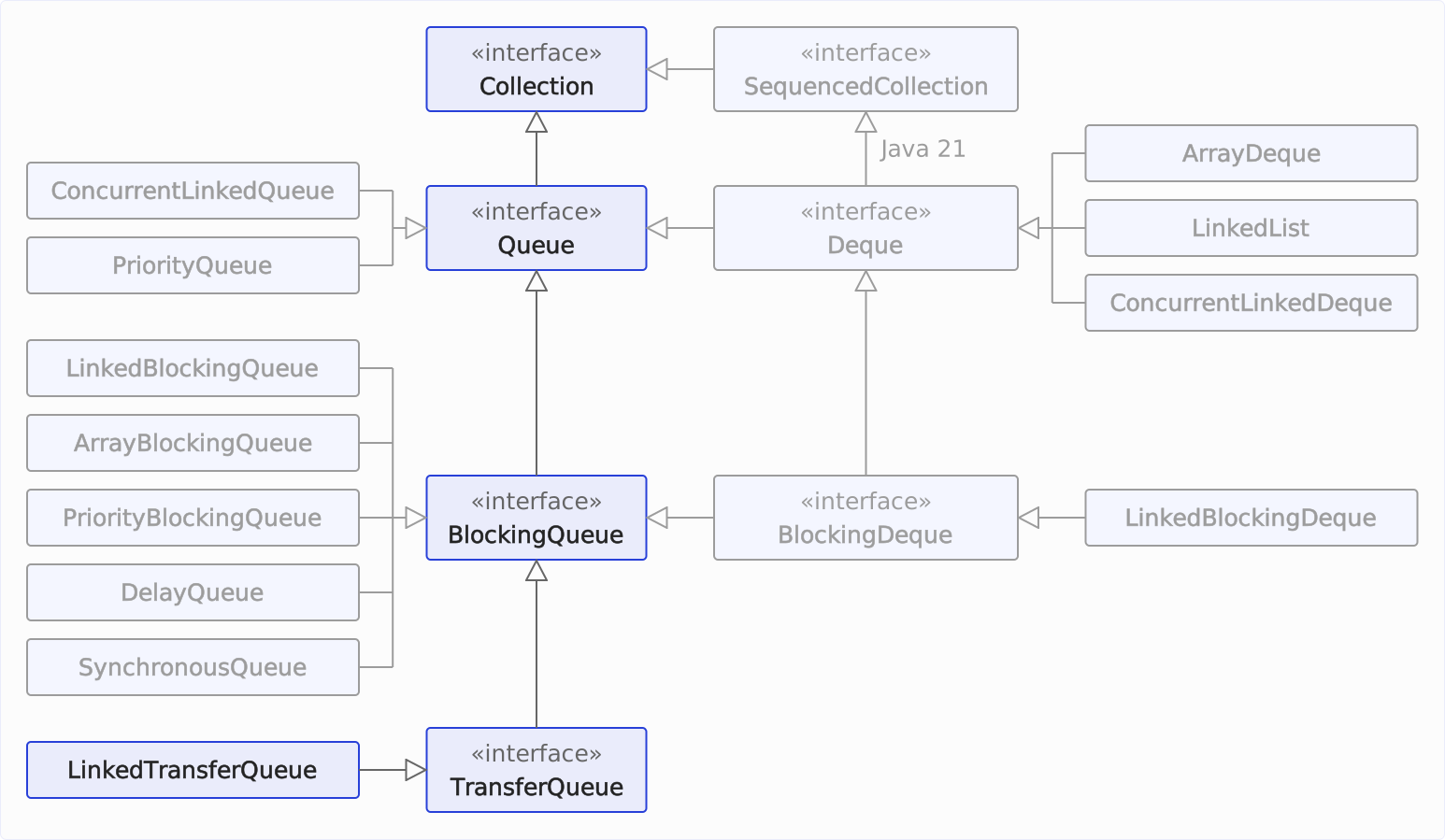
We are now at the lowest point of the queue class hierarchy:
TransferQueue Interface
As you can see in the class diagram, java.util.concurrent.LinkedTransferQueue is the only class that implements the TransferQueue interface.
TransferQueue defines additional enqueue methods that can only be executed successfully if another thread takes over the transferred item using take() or poll():
transfer(E e)– passes the element to a thread that is waiting for an element intake()or a timedpoll(). If such a thread does not exist, the method blocks until another thread callstake()orpoll(). The element is already in the queue in the meantime –size(),peek(), and the iterator see it – only the calling thread waits until it has been taken.tryTransfer(E e)– passes the element to a thread that is waiting for an element intake()or a timedpoll(). If such a thread does not exist, the method immediately returnsfalse.tryTransfer(E e, long timeout, TimeUnit unit)– passes the element to a thread that is waiting for an element intake()or a timedpoll(). If such a thread does not exist and does not appear within the waiting time, the method returnsfalse.
In addition, hasWaitingConsumer() and getWaitingConsumerCount() tell you whether, and how many, threads are currently waiting for an element in take() or a timed poll().
LinkedTransferQueue Characteristics
LinkedTransferQueue is an unbounded blocking queue, i.e., the regular enqueue operations put() and offer() cannot block (since the queue can grow to any size). The following, however, can block:
- the dequeue operations (when the queue is empty),
- and the
transfer()method as well as the timedtryTransfer()variant of theTransferQueueinterface, until the respective elements have been taken.
LinkedTransferQueue is based on a singly linked list. As a result, the time complexity of the size() method is O(n) (and not O(1) as in the array-based queues)¹, since the entire list must be traversed to determine its length.
Thread safety is achieved through non-blocking compare-and-set (CAS) operations, ensuring high performance with low to moderate contention (access conflicts through multiple threads).
The characteristics in detail:
| Underlying data structure | Thread-safe? | Blocking/ non-blocking | Fairness policy | Bounded/ unbounded | Iterator type |
|---|---|---|---|---|---|
| Linked list | Yes (optimistic locking through compare-and-set) | Blocking | Not available | Unbounded | Weakly consistent² |
¹ You can learn about time complexity in the article “Big O Notation and Time Complexity – Easily Explained”.
² Weakly consistent: All elements that exist when the iterator is created are traversed by the iterator exactly once. Changes that occur after this can, but do not need to, be reflected by the iterator.
Recommended Use Case
For a long time, LinkedTransferQueue was a marginal figure in the JDK: The class was created in 2009 together with the fork/join framework and served as the submission queue of ForkJoinPool during its development. Before Java 7 was released, however, the framework replaced it with its own work queues. Since Java 22, that has changed: SynchronousQueue is now internally a LinkedTransferQueue, which means that every thread pool created with Executors.newCachedThreadPool() runs on this very queue.
So the class is proven and actively maintained – most recently, Java 26 fixed a bug where poll() returned null under high contention even though the queue was not empty (JDK-8371740).
You should use LinkedTransferQueue when a producer needs to know that its element has been taken – for example, when exchanging messages between threads with receipt confirmation – and you still need the option to enqueue other elements with put() without waiting. If you need only one or the other, SynchronousQueue or LinkedBlockingQueue is the simpler choice.
LinkedTransferQueue Example
In the following example (→ code on GitHub), we start two threads that call LinkedTransferQueue.transfer(). After that, one element is written directly to the queue. Then, we create two more threads that call transfer(). Finally, we remove elements from the queue until it is empty again.
public class LinkedTransferQueueExample {
  static void main() throws InterruptedException {
    TransferQueue<Integer> queue = new LinkedTransferQueue<>();

    // Start 2 threads calling queue.transfer(),
    startTransferThread(queue, 1);
    startTransferThread(queue, 2);

    // ... then put one element directly,
    enqueueViaPut(queue, 3);

    // ... then start 2 more threads calling queue.transfer().
    startTransferThread(queue, 4);
    startTransferThread(queue, 5);

    // Now take all elements until the queue is empty
    while (!queue.isEmpty()) {
      dequeueViaTake(queue);
    }
  }

  private static void startTransferThread(TransferQueue<Integer> queue, int element)
      throws InterruptedException {
    new Thread(() -> enqueueViaTransfer(queue, element)).start();

    // Wait a bit to let the thread enqueue the element
    Thread.sleep(100);
    log("                            --> queue = " + queue);
  }

  private static void enqueueViaTransfer(TransferQueue<Integer> queue, int element) {
    log("Calling queue.transfer(%d)...", element);
    try {
      queue.transfer(element);
      log("queue.transfer(%d) returned  --> queue = %s", element, queue);
    } catch (InterruptedException e) {
      Thread.currentThread().interrupt();
    }
  }

  private static void enqueueViaPut(TransferQueue<Integer> queue, int element)
      throws InterruptedException {
    log("Calling queue.put(%d)...", element);
    queue.put(element);
    log("queue.put(%d) returned       --> queue = %s", element, queue);
  }

  private static void dequeueViaTake(TransferQueue<Integer> queue)
      throws InterruptedException {
    log("    Calling queue.take() (queue = %s)...", queue);
    Integer e = queue.take();
    log("    queue.take() returned %d --> queue = %s", e, queue);

    // Wait a bit to get the log output in a readable order
    Thread.sleep(10);
  }

  private static void log(String format, Object... args) {
    System.out.printf(
        Locale.US, "[%-8s] %s%n",
        Thread.currentThread().getName(),
        String.format(format, args));
  }
}
Below you can see the output of the program (the lines of main and the transfer threads may swap places from run to run):
[Thread-0] Calling queue.transfer(1)...
[main    ]                             --> queue = [1]
[Thread-1] Calling queue.transfer(2)...
[main    ]                             --> queue = [1, 2]
[main    ] Calling queue.put(3)...
[main    ] queue.put(3) returned       --> queue = [1, 2, 3]
[Thread-2] Calling queue.transfer(4)...
[main    ]                             --> queue = [1, 2, 3, 4]
[Thread-3] Calling queue.transfer(5)...
[main    ]                             --> queue = [1, 2, 3, 4, 5]
[main    ]     Calling queue.take() (queue = [1, 2, 3, 4, 5])...
[main    ]     queue.take() returned 1 --> queue = [2, 3, 4, 5]
[Thread-0] queue.transfer(1) returned  --> queue = [2, 3, 4, 5]
[main    ]     Calling queue.take() (queue = [2, 3, 4, 5])...
[main    ]     queue.take() returned 2 --> queue = [3, 4, 5]
[Thread-1] queue.transfer(2) returned  --> queue = [3, 4, 5]
[main    ]     Calling queue.take() (queue = [3, 4, 5])...
[main    ]     queue.take() returned 3 --> queue = [4, 5]
[main    ]     Calling queue.take() (queue = [4, 5])...
[main    ]     queue.take() returned 4 --> queue = [5]
[Thread-2] queue.transfer(4) returned  --> queue = [5]
[main    ]     Calling queue.take() (queue = [5])...
[main    ]     queue.take() returned 5 --> queue = []
[Thread-3] queue.transfer(5) returned  --> queue = []
The following diagram shows the sequence over time – one row per element, time runs from left to right:
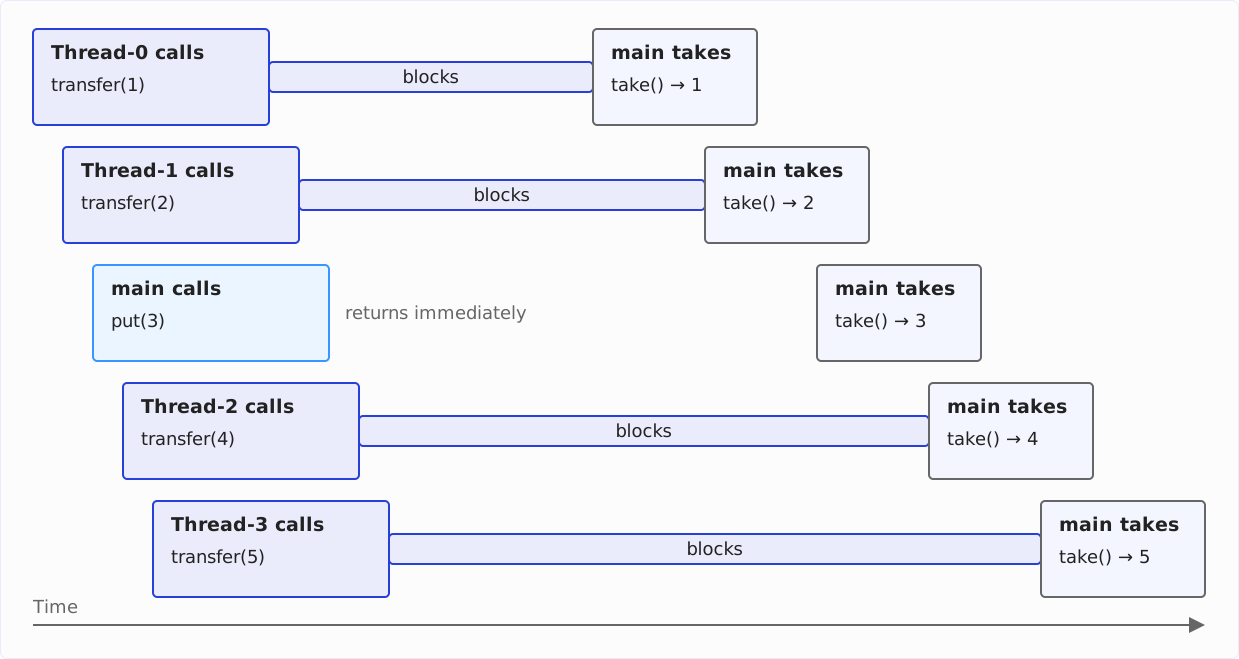
In the beginning, transfer() is called twice – neither call returns, although the elements are already in the queue (queue = [1], then queue = [1, 2]). Then put() is called once, and this call returns immediately. Two more transfer() calls follow, which block as well.
As soon as main takes the first element, transfer(1) returns; with the removal of the 2, transfer(2) returns. The removal of the 3 does not trigger any further action, since it was written to the queue with put(). After removing the 4 and the 5, transfer(4) and transfer(5) finally return.
Summary and Outlook
In this article, you learned about the TransferQueue interface and the LinkedTransferQueue implementation and saw how to use them with an example.
In the article about the Queue interface, you will find a comparison of all queue implementations of the JDK and an overview of in which cases you should use which implementation.
In the next part of this tutorial series, I’ll show you how to implement a queue yourself, starting with implementing a queue using a stack.
If you enjoyed this article, I’d appreciate a review on my ProvenExpert profile.